空港標識
背景書式タグを使用して、空港標識ラベルを書式設定できます。 このタグは、空港標識のテキスト背景の外観を変更するための固有の柔軟性を提供します。
下の図は、アウトラインを含む背景および含まない背景という 2 つの異なる背景で構成された空港標識を示しています。
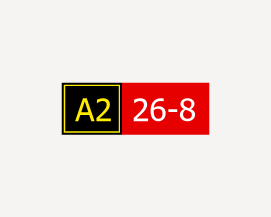
空港標識ラベルを作成するには、次の手順に従います。
レイヤーに対してラベルが有効化されていることを確認します。
デフォルトのフォント (Tahoma Regular) を使用します。 ラベルのサイズを 24 ポイントに変更します。
書式タグを使用して、ラベルの背景を作成します。
- テキストを囲む書式タグを配置する、ラベル条件式のシンプルな例。 ラベルは、「A2 26-8」です。
"<CLR red='255' green='236' blue='0' alpha='100'><BGD red='0' green='0' blue='0' alpha='100' outline_red='255' outline_green='236' outline_blue='0' outline_alpha='100' width='1' padding='-2'>" + "A2 " + "</BGD></CLR><CLR red='255' green='255' blue='255' alpha='100'><BGD red='230' green='0' blue='0' alpha='100'>" + " 26-8" + "</BGD></CLR>"ラベルをデータ内のフィールドから取得し、その情報から背景およびアウトライン色を決定するための論理を含んでいる、ラベル条件式のさらに複雑な例。
この条件式は、以下の例に従って書式設定されているデータに依存します。 括弧 ([ ]) 内の数字は、テキストに使用される書式を示します。 [3] の値は、黒い背景上の黄色のテキストを示します。
[4]9-27[3]B10
[7]5
[12]
[4]9-27[3]B4[0]56
[0]←B4
Arcade ラベル式
var yellow = [255,236,0,100] var red = [230,0,0,100] var blue = [0,180,230,100] var black = [0,0,0,100] var white = [255,255,255,100] var none = [0,0,0,0] var textFontName = "Frutiger"; var textFontStyle = "65 Bold"; var signFontName = "Esri Airport Sign" var signFontStyle = "" function FormatBO(background, outline, width, padding, txt){ var attr = "" if(background != none && count(background) == 4){ attr += " red='" + background[0] + "'" attr += " green='" + background[1] + "'" attr += " blue='" + background[2] + "'" attr += " alpha='" + background[3] + "'" } if(outline != none && count(outline) == 4){ attr += " outline_red='" + outline[0] + "'" attr += " outline_green='" + outline[1] + "'" attr += " outline_blue='" + outline[2] + "'" attr += " outline_alpha='" + outline[3] + "'" attr += " width='" + width + "'" attr += " padding='" + padding + "'" } return "<BGD" + attr + ">" + txt + "</BGD>" } function SetTextColor(rgba, txt) { var r = rgba[0] var g = rgba[1] var b = rgba[2] var a = rgba[3] return "<CLR red='" + r + "' green='" + g + "' blue='" + b + "' alpha='" + a + "'>" + txt + "</CLR>"; } function FormatFont(label, name, style, size) { var tagName = iif(name=="", "", " NAME='"+name+"'") var tagStyle = iif(style=="", "", " STYLE='"+style+"'") var tagSize = iif(size==0, "", " SIZE='"+size+"'") return "<FNT" + tagName + tagStyle + tagSize + ">" + label + "</FNT>" } var testExpr = $feature.AIRPORTSIGNMSGFRONT // e.g. "[0]←D[3]F" var splitExpr = Split(testExpr,"[") // e.g. ["", "0]←D ", "3]F"] var typeTextPairArray = [["",""]] for (var index in splitExpr){ var pair = Split(splitExpr[index],"]") typeTextPairArray[index] = pair } // e.g. [[""], ["0","←D"], ["3","F"]] var expression = ""; var indices = [0] for (var index in typeTextPairArray){ indices[index] = index; var pairCount = count(typeTextPairArray[index]) if(pairCount != 2){ expression += iif(pairCount >= 1, typeTextPairArray[index][0], "") continue; } var type = number(typeTextPairArray[index][0]) var newText = typeTextPairArray[index][1] if(type == 0) // "DIRECTION") expression += SetTextColor(black, FormatBO(yellow, none, 0, 0, newText)); else if(type == 1) // "INFO_ACFT") expression += SetTextColor(black, FormatBO(yellow, none, 0, 0, FormatFont(newText, textFontName, textFontStyle, 0))); else if(type == 2) //"INFO_VEH") expression += SetTextColor(black, FormatBO(yellow, none, 0, 0, FormatFont(newText, textFontName, textFontStyle, 5))); else if(type == 3) // "LOCATION") expression += SetTextColor(yellow, FormatBO(black, yellow, 1, -2, FormatFont(" " + newText + " ", textFontName, textFontStyle, 0))); else if(type == 4) // "MANDATORY") expression += SetTextColor(white, FormatBO(red, none, 0, 0, FormatFont(newText, textFontName, textFontStyle, 0))); else if(type == 5) // "NO_ENTRY") expression += SetTextColor(red, FormatBO(white, none, 0, 0, FormatFont("O", signFontName, "", 16))); else if(type == 6) // "RWY_CRITICAL") expression += SetTextColor(black, FormatBO(yellow, none, 0, 0, FormatFont("IIIII", signFontName, "", 0))); else if(type == 7) // "RWY_DIST_REMAIN") expression += SetTextColor(white, FormatBO(black, none, 0, 0, FormatFont(newText, textFontName, textFontStyle, 0))); else if(type == 8) //"RWY_SAFETY") expression += SetTextColor(black, FormatBO(yellow, none, 0, 0, FormatFont("RRRRR", signFontName, "", 0))); else if(type == 9) //"TAXIWAY_END") expression += SetTextColor(black, FormatBO(yellow, none, 0, 0, FormatFont("TTT", signFontName, "", 0))); else if(type == 10) //"TERMINAL") expression += SetTextColor(white, FormatBO(blue, none, 0, 0, FormatFont(newText, textFontName, textFontStyle, 0))); else if(type == 11) //"VEH_STOP") expression += SetTextColor(red, FormatBO(white, none, 0, 0, FormatFont("S", signFontName, "", 16))); else if(type == 12) //"VEH_YIELD") expression += SetTextColor(red, FormatBO(white, none, 0, 0, FormatFont("Y", signFontName, "", 16))); else expression += newText } return expression「背景吹出し」の余白を設定します。
ラベリング タブの ラベルの配置 グループで ラベル配置プロパティ ランチャー
 をクリックします。
ラベリング ウィンドウで、シンボル をクリックして 一般 タブ
 をクリックします。
吹出し を展開します。
吹出し ドロップダウン メニューをクリックして、背景 を選択します。
次のように余白を設定します。
左の余白 - 10 ポイント
右の余白 - 10 ポイント
上の余白 - 5 ポイント
下の余白 - 5 ポイント