HfForward
汇总
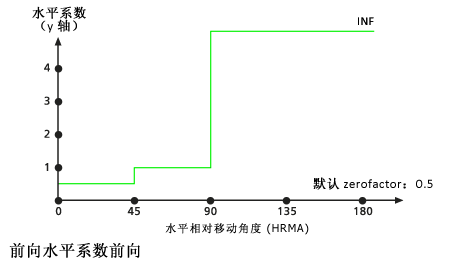
通过向前函数定义水平成本系数和水平相对移动角度之间的关系。 该函数规定只允许向前移动。
讨论
此对象用于 距离累积 和 距离分配 Spatial Analyst 工具,以及 路径距离 、 路径距离分配 和 路径距离回溯链接 旧的距离工具。
如果某段行程的水平相对移动角度 (HRMA) 小于 45 度,则水平系数 (HF) 将设置为与 zeroFactor 相关的值。 当 HRMA 大于或等于 45 度且小于 90 度时,HF 设置为 sideValue 。 如果 HRMA 大于或等于 90 度,则将 HF 设置为无穷大。
语法
HfForward({zeroFactor}, {sideValue})
| 名称 | 说明 | 数据类型 |
|---|---|---|
|
zeroFactor (可选) |
(默认值为 0.5) |
Double |
|
sideValue (可选) |
确定为大于或等于 45 度且小于 90 度的 HRMA 指定的 HF 值。在上图中, (默认值为 1.0) |
Double |
属性
| 名称 | 说明 | 数据类型 |
|---|---|---|
|
zeroFactor (读取和写入) |
当 HRMA 小于交角时, |
Double |
|
sideValue (读取和写入) |
确定为大于或等于 45 度且小于 90 度的 HRMA 指定的 HF 值。在上图中, |
Double |
代码示例
演示了如何创建 HfForward 类以及如何在 Python 窗口的 DistanceAccumulation 工具中使用该类。
import arcpy
from arcpy import env
from arcpy.sa import *
env.workspace = "C:/sapyexamples/data"
myHorizFactor = HfForward(0.5, 1.0)
outDistAccum = DistanceAccumulation("source.shp", "barrier.tif",
                                    "elev.tif", "", "", "",
                                    "horizontalRas.tif", myHorizFactor)
outDistAccum.save("C:/sapyexamples/output/distaccumhff")
使用 HfForward 类执行 DistanceAccumulation 分析。
# Name: HfForward_Ex_02.py
# Description: Uses the HfForward object to run the
#              DistanceAccumulation tool.
# Requirements: Spatial Analyst extension

# Import system modules
import arcpy
from arcpy import env
from arcpy.sa import *

# Set environment settings
env.workspace = "C:/sapyexamples/data"

# Set local variables
inSourceData = "sourcepts.shp"
inSurfaceRaster = "elevation.tif"
inHorizontalRaster = "horizontalRas.tif"

# Create the HfForward Object
zeroFactor = 0.5
sideValue = 1.0
myHorizFactor = HfForward(zeroFactor, sideValue)

# Run PathDistance
outDistAccum = DistanceAccumulation(inSourceData,"", inSurfaceRaster,"","",
                                    "", inHorizontalRaster, myHorizFactor)

# Save the output
outDistAccum.save("C:/sapyexamples/output/distaccumhfF2")