RemapValue
汇总
一个列表,用于标识输出栅格中应重分类到的单个输入值。
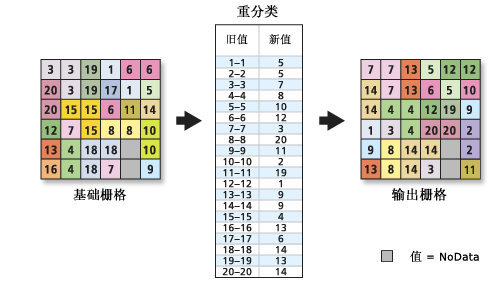
RemapValue 重映射表。讨论
RemapValue 对象可在 重分类 工具和 WOTable 类中使用。
通过输入 NoData (字符串)作为 newValue 值,可以将 oldValue 值分配给 NoData。
各输入值已具有分类(如土地利用)或者仅需更改少量值时,通常使用按单个值进行重分类。
语法
RemapValue(remapTable)
| 名称 | 说明 | 数据类型 |
|---|---|---|
|
remapTable |
用于将旧值重映射为新值的重映射表。 其定义一个用于重映射输入值的列表。这是一个列表的列表,且内部列表是由两个部分组成。 这两个部分为:
|
List |
属性
| 名称 | 说明 | 数据类型 |
|---|---|---|
|
remapTable (读取和写入) |
用于将原始值重映射到新值的重映射表。 |
List |
代码示例
RemapValue 示例 1(Python 窗口)
演示如何创建 RemapValue 类以及如何在 Python 窗口的 Reclassify 函数中使用该类。
import arcpy
from arcpy import env
from arcpy.sa import *
env.workspace = "C:/sapyexamples/data"
myRemapValue = RemapValue([["Water", 0], ["Wetlands", 0], ["Barrenland", 1], ["Brushtransitional", 2], ["Builtup",3]])
outReclassRV = Reclassify("landuse", "LANDUSE2", myRemapValue)
outReclassRV.save("C:/sapyexamples/output/reclassrv")
RemapValue 示例 2(独立脚本)
使用 RemapValue 类进行重分类。
# Name: RemapValue_Ex_02.py
# Description: Uses the RemapValue object to run Reclassify tool.
# Requirements: Spatial Analyst extension

# Import system modules
import arcpy
from arcpy import env
from arcpy.sa import *

# Set environment settings
env.workspace = "C:/sapyexamples/data"

# Set local variables
inRaster = "negs"

# Define the RemapValue Object
myRemapVal = RemapValue([[-3,9],[0,1],[3,-4],[4,5],[5,6],[6,4],[7,-7]])

# Run Reclassify
outReclassRV = Reclassify(inRaster, "VALUE", myRemapVal, "")

# Save the output
outReclassRV.save("C:/sapyexamples/output/reclassrevar2")