Geodatabases on Amazon Web Services
Geodatabases store spatial and nonspatial data. File geodatabases on Amazon Elastic Compute Cloud (EC2) instances or enterprise geodatabases stored in Amazon database service instances are intended to store data you serve from ArcGIS Server sites on Amazon Web Services (AWS).
Note:
Geodatabases in AWS are not intended to be accessed directly from on-premises ArcGIS clients, as performance will be far slower than when the geodatabases are accessed from ArcGIS clients on AWS.
When you create a site using ArcGIS Enterprise tools for Amazon Web Services, you can create enterprise geodatabases in Amazon database service instances registered with the site. For other deployment methods or when you use file geodatabases, you must create the geodatabases and register it with your ArcGIS Server site.
See Data sources for ArcGIS Server for information about registering geodatabases with an ArcGIS Server site.
Enterprise geodatabases
ArcGIS Enterprise tools for AWS provide options to include an enterprise geodatabase in an Amazon database service with your stand-alone ArcGIS GIS Server site.
ArcGIS Enterprise Cloud Builder Command Line Interface for Amazon Web Services, the ArcGIS Enterprise Cloud Builder for Amazon Web Services app, and Esri AWS CloudFormation templates register the geodatabase with the ArcGIS Server site.
Note:
When the client, data source, and ArcGIS Enterprise are not deployed in the same location, you will likely experience degraded performance when data is sent between an on-premises component and the cloud.
Amazon performs some database maintenance tasks so you don't have to. For example, Amazon applies database patches to your database. They are also designed to be highly available, as they can be run in multiple availability zones (referred to as multi-AZ deployments).
Note:
Multi-AZ deployments are the default deployment type for Amazon database service instances; therefore, Amazon database service instances you launch using ArcGIS Enterprise tools for AWS deployment use this deployment type.
Because they provide enhanced availability, Amazon recommends you use multi-AZ deployments for production systems. Be aware, though, that these deployments cost more to use per hour and for storage than other deployments. Consult the Amazon RDS pricing guide for more information.
The following diagram shows a GIS Server site on AWS with ArcGIS Server and an Amazon RDS instance, with two additional GIS Server installations on AWS instances available when CPU usage exceeds a specified threshold:
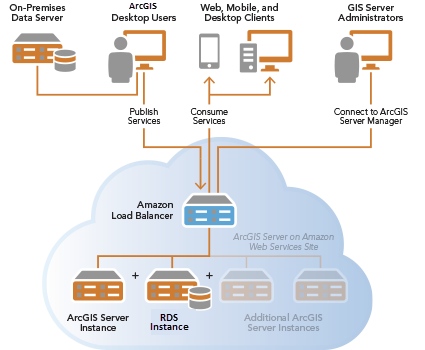
See Geodatabases in PostgreSQL used with ArcGIS on AWS and Geodatabases in SQL Server used with ArcGIS on AWS for more information.
Supported AWS database offerings
ArcGIS Enterprise tools for AWS deployment can create enterprise geodatabases in the following AWS databases:
Amazon Aurora (PostgreSQL-compatible edition)
Amazon Relational Database Service (RDS) for PostgreSQL
Amazon Relational Database Service (RDS) for SQL Server
At this time, ArcGIS supports only database-authenticated connections to these database services.
All geodatabases in Amazon RDS for SQL Server must be sde-schema geodatabases.
Tip:
To create a geodatabase in a different supported cloud database on AWS, you must create the database and geodatabase outside of the ArcGIS Enterprise tools for AWS.