Container engines and ArcGIS Notebook Server
Docker container allocation software is used by ArcGIS Notebook Server.
Docker software
ArcGIS Notebook Server uses Docker container allocation software to provide security and isolate resources for notebook authors. Containers are virtualized operating systems, as opposed to virtual machines; each container on a machine includes all OS components in an isolated environment. ArcGIS Notebook Server provides a separate container for each user in the site. Each user owns one container per runtime, and users can only run notebooks in their own container.
Docker is a separate, third-party software component that must be installed on each ArcGIS Notebook Server machine before using ArcGIS Notebook Server.
Docker container images
When you receive the software downloads and authorization files from My Esri before installation, you also receive two Docker container images specific to ArcGIS Notebooks. These container images provide the necessary runtime—a specific collection of Python modules—for notebook users.
Esri provides two Docker container images: Standard and Advanced. These two container images include system tools and libraries, as well as various settings to configure the container appropriately. They also include a notebook runtime: the Standard container image includes the Standard notebook runtime, and the Advanced container image includes the Advanced runtime.
The Standard runtime enables ArcGIS Notebooks to use code from ArcGIS API for Python and third-party modules. The Advanced runtime contains all the modules of the Standard image and also includes ArcPy and related libraries.
If you have an Advanced license, you should download and install both container images from My Esri. The Python modules contained in the Standard and Advanced images are listed in View available Python libraries.
To author notebooks using the Advanced runtime, a user must be assigned a role in the portal that includes the Advanced Notebooks privilege. The first time they open a notebook, a container will be launched for them, with the Advanced container image applied to it.
Notebook authors with the Advanced Notebooks privilege can also specify a notebook to use the Standard runtime. This allows them to share notebooks they've created with users who only have access to the Standard runtime. The first time they do so, a second container will be launched for them, loaded with the Standard container image.
Learn more about notebook user privileges
By default, a container is allocated a certain amount of RAM and a certain number of CPU core shares. These default resource limits are determined by the runtime being run by the container, as follows:
The Standard runtime allots 1 CPU core and 4 GB of RAM per container.
The Advanced runtime allots 2 CPU cores and 6 GB of RAM per container.
As an ArcGIS Notebook Server administrator, monitor the number of notebook authors working in your site and which runtime each is using. Depending on these factors, you may need or want to change the resource limits set for ArcGIS Notebook Server.
Docker editions
Docker is available in two editions. Docker and Mirantis Container Runtime (formerly Docker Engine-Enterprise). Both editions are considered feature-complete.
Note:
See the Docker FAQ for more information on the Docker version and pricing.
Ensure that you install Docker or Mirantis Container Runtime on each ArcGIS Notebook Server machine. For more information on installing and configuring Docker, see Install Docker for ArcGIS Notebook Server.
Note:
ArcGIS Notebook Server will only work with one of the editions of Docker installed on a machine. You cannot mix editions on a multimachine site.
Notebook runtimes and container images
When a container is first launched, it's mostly empty. The system libraries, tools, and configurations the container needs to function are provided through a container image file. The container image is applied to the container as part of the launch process.
Tip:
If you've deployed cloud software, you're probably familiar with machine images, which provide blank virtual machines with the code, tools, and settings they need to function. Container images function the same way for the blank virtual OS of the container.
Esri provides two container images for ArcGIS Notebook Server. Included in each container image is a notebook runtime, which makes Python resources available in ArcGIS Notebooks. Each runtime packages a list of these libraries and dependencies, including a specific version of each Python library.
The two ArcGIS Notebook Server runtimes—Standard (which includes ArcGIS API for Python and other Python modules) and Advanced (which also includes ArcPy)—are available in notebooks as part of their corresponding container image.
View the libraries available in each runtime
Depending on your license, you will receive either the Standard container image or both the Standard and Advanced container images.
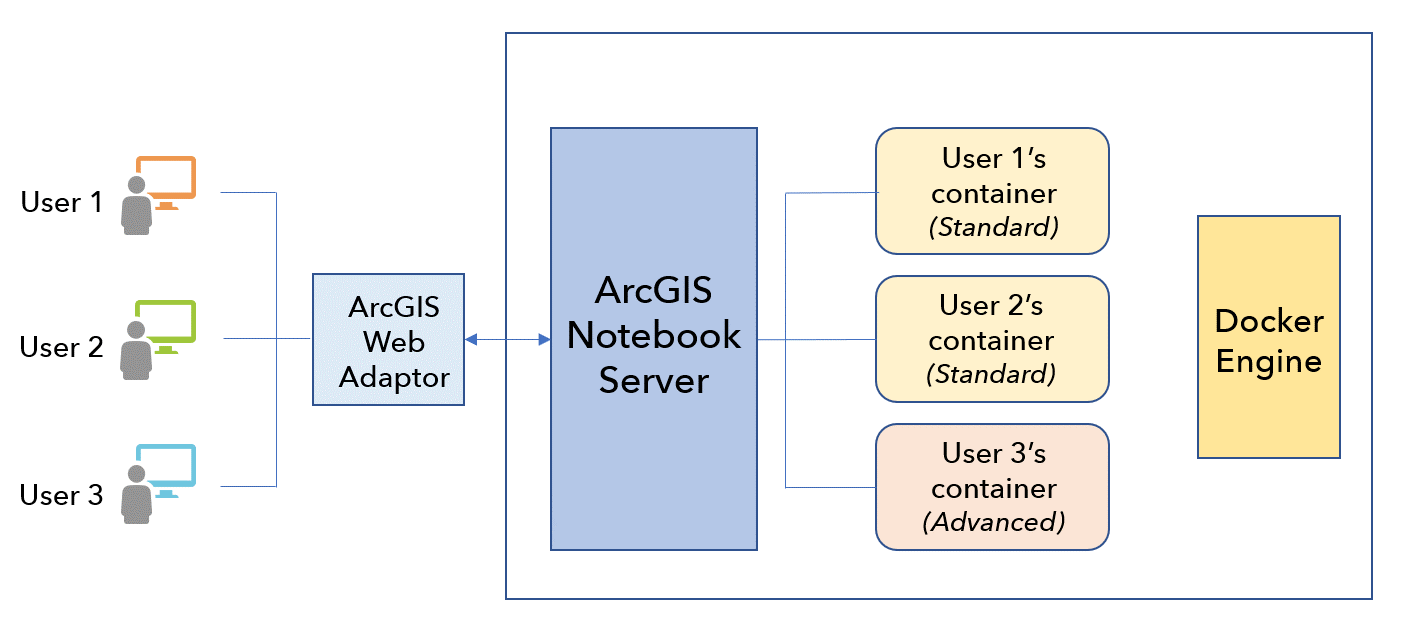
When a container is launched, one of the two container images you received from Esri is applied to the container. The runtime and image applied depend on the notebook author's privileges in the portal:
Authors who have only been granted the Create and Edit Notebooks privilege will have their container loaded with the Standard container image. All notebooks they open will use the Standard runtime.
Authors who have also been granted the Advanced Notebooks privilege will have their container loaded with the Advanced container image. The default notebook runtime for their notebooks is the Advanced runtime. However, they have the option to specify an individual notebook's runtime and can use either the Standard or the Advanced runtime in their notebooks.
ArcGIS Notebook Server is compatible with Windows containers using either Mirantis Container Runtime or Docker Engine from binaries as container engine options on Windows.
Container engines for Windows
Similar to other ArcGIS Notebook Server deployments, ArcGIS Notebook Server with Windows containers is installed on a server operating system and is configured and federated with an ArcGIS Enterprise portal. Additionally, a web adaptor can be deployed in front of the ArcGIS Notebook Server software.
ArcGIS Notebook Server uses virtualized operating systems known as containers to isolate notebook authors' environments. As a result, the containers allow each author to use a subset of server resources without their work or resource usage interfering with others.
These containers are allocated and maintained by a third-party container engine, either Mirantis Container Runtime or Docker Engine from binaries. Before installing ArcGIS Notebook Server, you must install a container engine. Once ArcGIS Notebook Server is installed, it must be configured to work with that container engine.
ArcGIS Notebook Server allocates one container per runtime to each notebook author on the site, and only they can work in the container. The computing resources the authors use when running notebooks will not affect other authors' containers.
When a portal member with corresponding privileges opens their first notebook, a container is launched on the ArcGIS Notebook Server site. This session between the notebook and the container will be ongoing through the duration of the notebook.
ArcGIS Notebook Server can join multiple machines together in a site. Machines in a multiple-machine configuration must be configured to be identical, and each machine can run ArcGIS Notebooks.
Notebook runtimes and Windows container images
A single Windows container image is provided for ArcGIS Notebook Server. This container image includes the Standard and Advanced notebook runtimes, which make Python resources available in ArcGIS Notebooks. See Available Python libraries for more information on the libraries available in each runtime.
The two ArcGIS Notebook Server runtimes, Standard and Advanced, are available in notebooks as part of the container image. Depending on your license and user privilege, either the Standard or both the Standard and Advanced runtimes will be available for use.
The Windows containers in an ArcGIS Notebook Server site support two modes of runtime isolation, process and Hyper-V. See the Microsoft Isolation Modes documentation for more information on the modes. If you configure your site to use Hyper-V isolation, the Hyper-V role must be installed on the machine. See the Microsoft documentation for more information on how to install Hyper-V for Windows Server.
Note:
There are limitations with respect to the number of containers that can be run when using Windows containers with Hyper-V. See Microsoft Frequently asked questions about containers for more information.
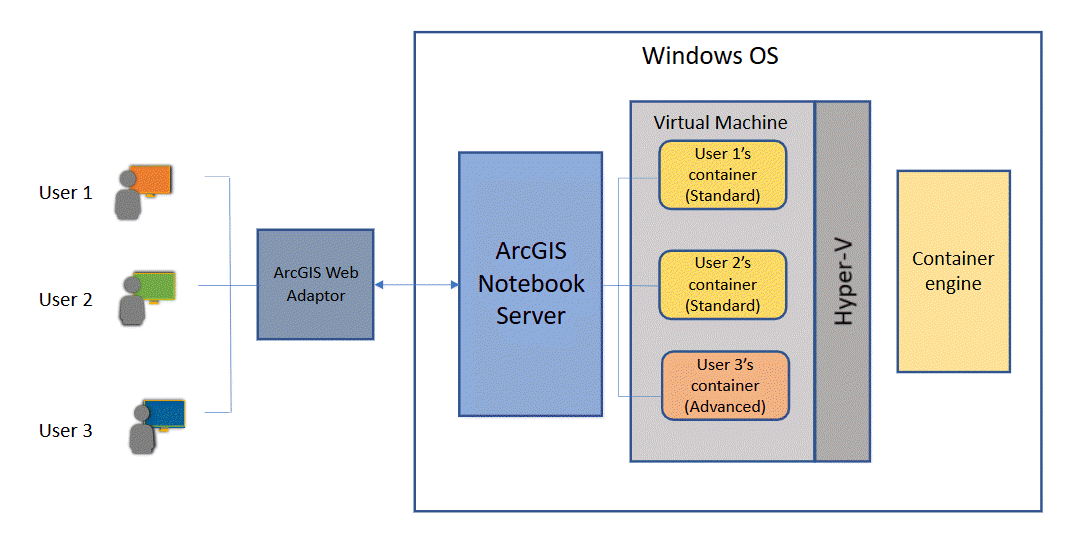
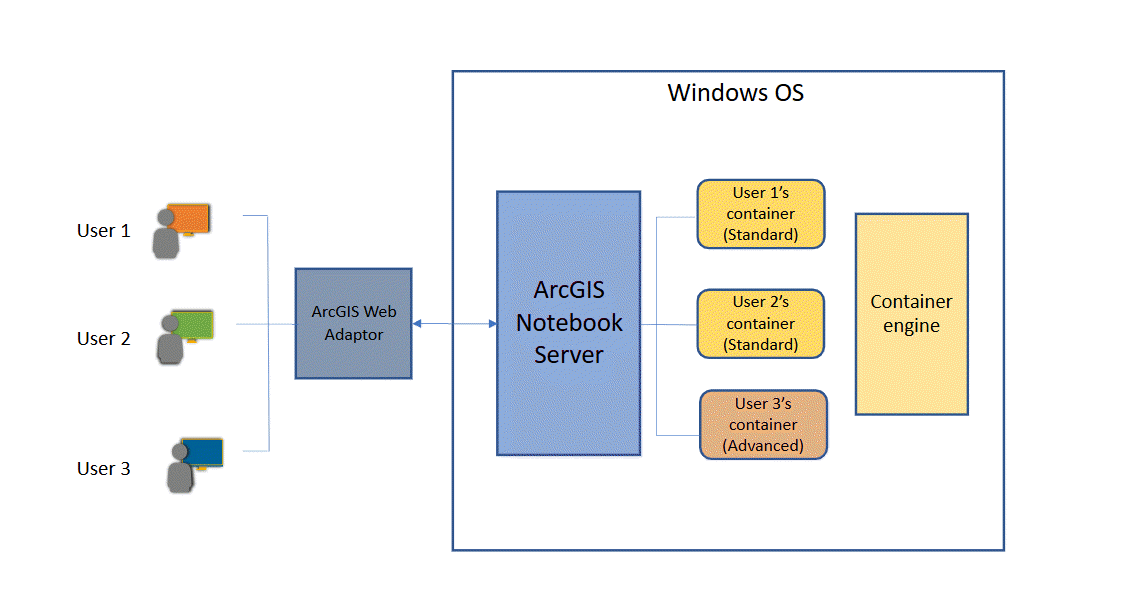
When a container is launched, the Windows container image provided by Esri is applied to the container. The runtime will depend on the license configured for ArcGIS Notebook Server and the notebook author's privilege.
Note:
There is a known limitation that may result in WinError 1455 when importing the torch library or Python libraries that have torch as a dependency. See Common problems and solutions for more information.
Prerequisites and constraints for Windows systems
If you deploy ArcGIS Notebook Server on Windows machines with Windows containers, there are prerequisites and constraints to consider.
Mirantis Container Runtime prerequisites
Keep the following in mind when working with Mirantis Container Runtime:
Mirantis Container Runtime currently only supports Windows Server 2022.
When ArcGIS Notebook Server and Mirantis Container Runtime are deployed on multiple machines, you no longer need to configure replication (DFS) for your workspace directory. The workspace directory can be shared as a path mounted on a drive with Mirantis Container Runtime.