RasterCollection
Summary
Defines the group of input rasters and attributes to include in a collection that will be used for processing.
Discussion
The RasterCollection object allows a group of rasters to be sorted and filtered, and prepares a collection for additional processing and analysis.
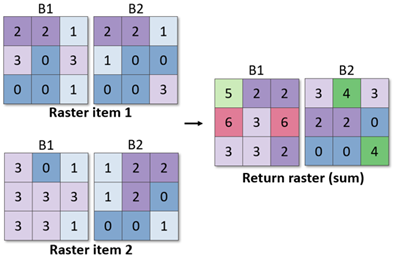
The RasterCollection object includes the max, min, median, mean, majority, and sum methods for calculating statistics for each pixel across matching bands within the collection's rasters.
For example, the sum method adds the pixel values from Band 1 in raster item 1 to the pixel values in Band 1 of raster item 2, and returns a Raster object in which Band 1 contains those summed values.
Syntax
RasterCollection(rasters, {attribute_dict})
| Name | Explanation | Data type |
|---|---|---|
|
rasters |
The input raster datasets. Supported inputs include a list of rasters, a mosaic dataset, a multidimensional raster in Cloud Raster Format, a NetCDF file, or an image service. If you're using a list of raster datasets, all rasters must have the same cell size and spatial reference. |
List |
|
attribute_dict (Optional) |
A Python dictionary that contains attribute information to be added to each raster, when the input is a list of rasters. For each key-value pair, the key is the attribute name and the value is a list of values that represent the attribute value for each raster. For example, to add a name field to a list of three rasters, use The default value is None. |
Dictionary |
Properties
| Name | Explanation | Data type |
|---|---|---|
|
fields (Read only) |
The list of field names included in the raster collection. |
String |
|
count (Read only) |
The total number of items in the raster collection. |
Integer |
Methods
addField(field_name, field_values[field_values,...])
Adds a new field to the raster collection and populates it with values.
| Name | Explanation | Data type |
|---|---|---|
|
field_name |
The name of the field to be added. |
String |
|
field_values[field_values,...] |
The list of values associated with the field name. The length of the list should match the number of items in the raster collection. |
List |
Return value
| Data type | Explanation |
|---|---|
|
RasterCollection |
The collection of rasters that contain the new field. |
filter({where_clause}, {query_geometry_or_extent})
Filters the collection of raster items by attributes or geometry and returns a raster collection containing only the items that satisfy the filter. If no arguments are provided, all raster items from the raster collection will be returned in a new raster collection.
| Name | Explanation | Data type |
|---|---|---|
|
where_clause (Optional) |
An expression that limits the records returned. For more information on WHERE clauses and SQL statements, see SQL reference for query expressions used in ArcGIS. The default value is None. |
String |
|
query_geometry_or_extent (Optional) |
An object that filters the items such that only those that intersect with the object will be returned. This can be specified with a The default value is None. |
Geometry |
Return value
| Data type | Explanation |
|---|---|
|
RasterCollection |
The collection of rasters that satisfy the attribute or geometry queries. |
filterByAttribute(field_name, operator, field_values[field_values,...])
Filters the collection of raster items by an attribute query and returns a raster collection containing only the items that satisfy the query.
To query the raster collection based on a time field, use the filterByTime method.
| Name | Explanation | Data type |
|---|---|---|
|
field_name |
The field name to use in the filter. |
String |
|
operator |
The keyword to filter the attributes. Keywords include the following:
|
String |
|
field_values[field_values,...] |
The attribute value or values against which to compare. This can be specified as a string, a list, or a number. |
String |
Return value
| Data type | Explanation |
|---|---|
|
RasterCollection |
The collection of rasters that satisfy the attribute query. |
filterByCalendarRange(calendar_field, start, {end}, time_field_name, date_time_format)
Filters the collection of raster items based on the range of a calendar field and returns a raster collection containing only the items that satisfy the filter. If no arguments are provided, all raster items from the raster collection will be returned in a new raster collection.
| Name | Explanation | Data type |
|---|---|---|
|
calendar_field |
The name of the calendar field. Specify one of the following: |
String |
|
start |
The start value of the |
Integer |
|
end (Optional) |
The end value of the |
Integer |
|
time_field_name |
The name of the field that contains the time attribute for each item in the collection. The default is |
String |
|
date_time_format |
The time format of the values in the time field. For example, if the input date and time value is |
String |
Return value
| Data type | Explanation |
|---|---|
|
RasterCollection |
The collection of rasters that satisfy the time range query. |
filterByGeometry(query_geometry_or_extent)
Filters the collection of raster items so that only those that intersect with the geometry will be returned.
| Name | Explanation | Data type |
|---|---|---|
|
query_geometry_or_extent |
An object that filters the items such that only those that intersect with the object will be returned. This can be specified with a |
Geometry |
Return value
| Data type | Explanation |
|---|---|
|
RasterCollection |
The collection of rasters that satisfy the geometry filter. |
filterByRasterProperty(property_name, operator, property_values[property_values,...])
Filters the collection of raster items by a raster property query and returns a raster collection containing only the items that satisfy the query.
| Name | Explanation | Data type |
|---|---|---|
|
property_name |
The name of the property to use in the filter. |
String |
|
operator |
The operator to filter the property.
|
String |
|
property_values[property_values,...] |
The property value or values against which to compare. This can be specified as a string, a list, or a number. |
String |
Return value
| Data type | Explanation |
|---|---|
|
RasterCollection |
The collection of rasters that satisfy the property query. |
filterByTime({start_time}, {end_time}, {time_field_name}, {date_time_format})
Filters the collection of raster items by a time range and returns a raster collection containing only the items that satisfy the filter.
| Name | Explanation | Data type |
|---|---|---|
|
start_time (Optional) |
A string that specifies the start time. The string should be formatted to match the date format of the input raster collections, for example, "1990-01-01T13:30:00". If not specified, the end time must be specified, and only the items that have a time value that is earlier than or equal to the end time will be returned. The default value is None. |
String |
|
end_time (Optional) |
A string that specifies the end time. The string should be formatted to match the date format of the input raster collections, for example, "1991-01-01T13:30:00". If not specified, the start time must be specified, and only the items that have a time value that is later than or equal to the start time will be returned. The default value is None. |
String |
|
time_field_name (Optional) |
The name of the field that contains the time attribute for each item in the collection. The default value is StdTime. |
String |
|
date_time_format (Optional) |
The format of the |
String |
Return value
| Data type | Explanation |
|---|---|
|
RasterCollection |
The collection of rasters that satisfy the time range filter. |
fromSTACAPI(stac_api, {query}, {attribute_dict}, {request_method}, {request_params}, {context})
Creates a RasterCollection object from a SpatioTemporal Asset Catalog (STAC) API search query.
Use the GetSTACInfo function to gather necessary STAC information, which can then be used to create Raster objects with this method.
| Name | Explanation | Data type |
|---|---|---|
|
stac_api |
The URL of the STAC API root endpoint. This is the STAC API where the search will be performed, for example, The following STAC APIs are supported:
|
String |
|
query (Optional) |
The For the |
Dictionary |
|
attribute_dict (Optional) |
The attribute information that will be added to each STAC item raster returned from the query. For each key-value pair, the key is the attribute name, and the value is a list of values that represent the attribute value for each raster. Attribute values can also be collected from the STAC items automatically using the STAC item metadata information. To do this, specify the STAC item property name for the attribute of interest as key-value pairs (attribute display name: STAC item property name). Note:If no |
Dictionary |
|
request_method (Optional) |
Specifies the HTTP request method that will be used with the STAC API for the search.
Example: "POST" The default value is POST. |
String |
|
request_params (Optional) |
The parameters of the STAC API search request. Specify the |
Dictionary |
|
context (Optional) |
Additional properties that will be used to control the creation of the object. The dictionary supports the The When working with individual assets, the asset key can be specified directly, for example, If the value of the
Examples: The Example: |
Dictionary |
Return value
| Data type | Explanation |
|---|---|
|
RasterCollection |
A new instance of this class is returned |
fromSTACCatalog(stac_catalog, {attribute_dict}, {request_params}, {context})
Creates a RasterCollection object from a static SpatioTemporal Asset Catalog (STAC).
Use the GetSTACInfo function to gather necessary STAC information, which can then be used to create Raster objects with this method.
| Name | Explanation | Data type |
|---|---|---|
|
stac_catalog |
The URL of the STAC item, a The following static catalogs (and their underlying child catalogs) are supported:
|
String |
|
attribute_dict (Optional) |
The attribute information that will be added to each STAC item raster returned from the query. For each key-value pair, the key is the attribute name, and the value is a list of values that represent the attribute value for each raster. Attribute values can also be collected from the STAC items automatically using the STAC item metadata information. To do this, specify the STAC item property name for the attribute of interest as key-value pairs (attribute display name: STAC item property name). Note:If no |
Dictionary |
|
request_params (Optional) |
The parameters of the STAC catalog or item request. Specify the |
Dictionary |
|
context (Optional) |
Additional properties that will be used to control the creation of the object. The dictionary supports the The When working with individual assets, the asset key can be specified directly, for example, If the value of the
Examples: The Example: |
Dictionary |
Return value
| Data type | Explanation |
|---|---|
|
RasterCollection |
A new instance of this class is returned |
getFieldValues(field_name, {max_count})
Returns the values of a specified field from the raster collection.
| Name | Explanation | Data type |
|---|---|---|
|
field_name |
The name of the field from which to extract values. |
String |
|
max_count (Optional) |
An integer that specifies the maximum number of field values to be returned. The values will be returned in the order that the raster items are ordered in the collection. If no value is specified, all the field values for the given field will be returned. The default value is None. |
Integer |
Return value
| Data type | Explanation |
|---|---|
|
String |
The list of field values for the specified field name. |
groupBy(field_name)
Groups a raster collection based on a field. Each grouped raster collection can be accessed by the field value.
| Name | Explanation | Data type |
|---|---|---|
|
field_name |
The name of the field. Items with the same field values will be grouped together. |
String |
Return value
| Data type | Explanation |
|---|---|
|
Dictionary |
A dictionary that contains the grouped raster collections. The dictionary key is a field value associated with the field name that was used to define the grouping. The dictionary value is a raster collection in which the field name contains the same field value. |
majority({ignore_nodata[ignore_nodata,...]}, {extent_type}, {cellsize_type})
Returns a raster object in which each band contains the pixel value that occurs most frequently for that band across all rasters in the raster collection.
For example, if there are 10 raster items in the raster collection, each with four bands, the majority method will determine the pixel value that occurs most frequently across all raster items for band 1, for band 2, for band 3, and for band 4; a four-band raster is returned. Band numbers are matched between raster items using the band index, so the items in the raster collection must follow the same band order.
| Name | Explanation | Data type |
|---|---|---|
|
ignore_nodata[ignore_nodata,...] (Optional) |
Specifies whether NoData values are ignored. The default value is True. |
Boolean |
|
extent_type (Optional) |
Computes the extent of the output raster object when the input rasters have different extents.
The default value is FirstOf. |
String |
|
cellsize_type (Optional) |
Computes the cell size of the output raster object when the input rasters have different cell sizes.
The default value is FirstOf. |
String |
Return value
| Data type | Explanation |
|---|---|
|
Raster |
The raster in which each band contains the most frequently occurring pixel values for that band across all items in the raster collection. |
map(func)
Maps a Python function over a raster collection.
| Name | Explanation | Data type |
|---|---|---|
|
func |
The Python function to map over the raster collection. The return value of the function must be a dictionary in which one of the keys is |
Function |
Return value
| Data type | Explanation |
|---|---|
|
RasterCollection |
The raster collection in which each item contains the raster with the function applied and the attributes attached. |
max({ignore_nodata[ignore_nodata,...]}, extent_type, cellsize_type)
Returns a raster object in which each band contains the maximum pixel values for that band across all rasters in the raster collection.
For example, if there are 10 raster items in the raster collection, each with four bands, the max method will calculate the maximum pixel value that occurs across all raster items for band 1, band 2, band 3, and band 4; a four-band raster is returned. Band numbers are matched between raster items using the band index, so the items in the raster collection must follow the same band order.
| Name | Explanation | Data type |
|---|---|---|
|
ignore_nodata[ignore_nodata,...] (Optional) |
Specifies whether NoData values are ignored. The default value is True. |
Boolean |
|
extent_type |
Computes the extent of the output raster object when the input rasters have different extents.
The default value is FirstOf. |
String |
|
cellsize_type |
Computes the cell size of the output raster object when the input rasters have different cell sizes.
The default value is FirstOf. |
String |
Return value
| Data type | Explanation |
|---|---|
|
Raster |
The raster in which each band contains the maximum pixel values for that band across all rasters in the raster collection. |
mean({ignore_nodata[ignore_nodata,...]}, {extent_type}, {cellsize_type})
Returns a raster object in which each band contains the average pixel values for that band across all rasters in the raster collection.
For example, if there are 10 raster items in the raster collection, each with four bands, the mean method will calculate the mean pixel value that occurs across all raster items for band 1, band 2, band 3, and band 4; a four-band raster is returned. Band numbers are matched between raster items using the band index, so the items in the raster collection must follow the same band order.
| Name | Explanation | Data type |
|---|---|---|
|
ignore_nodata[ignore_nodata,...] (Optional) |
Specifies whether NoData values are ignored. The default value is True. |
Boolean |
|
extent_type (Optional) |
Computes the extent of the output raster object when the input rasters have different extents.
The default value is FirstOf. |
String |
|
cellsize_type (Optional) |
Computes the cell size of the output raster object when the input rasters have different cell sizes.
The default value is FirstOf. |
String |
Return value
| Data type | Explanation |
|---|---|
|
Raster |
The raster in which each band contains the average pixel values for that band across all rasters in the raster collection. |
median({ignore_nodata[ignore_nodata,...]}, {extent_type}, {cellsize_type})
Returns a raster object in which each band contains the median pixel values for that band across all rasters in the raster collection.
For example, if there are 10 raster items in the raster collection, each with four bands, the median method will calculate the median pixel value that occurs across all raster items for band 1, band 2, band 3, and band 4; a four-band raster is returned. Band numbers are matched between raster items using the band index, so the items in the raster collection must follow the same band order.
| Name | Explanation | Data type |
|---|---|---|
|
ignore_nodata[ignore_nodata,...] (Optional) |
Specifies whether NoData values are ignored. The default value is True. |
Boolean |
|
extent_type (Optional) |
Computes the extent of the output raster object when the input rasters have different extents.
The default value is FirstOf. |
String |
|
cellsize_type (Optional) |
Computes the extent of the output raster object when the input rasters have different extents.
The default value is FirstOf. |
String |
Return value
| Data type | Explanation |
|---|---|
|
Raster |
The raster in which each band contains the median pixel values for that band across all rasters in the raster collection. |
merge(collection2)
Returns a merged raster collection that includes all rasters from two raster collections.
| Name | Explanation | Data type |
|---|---|---|
|
collection2 |
The raster collection to be merged. |
RasterCollection |
Return value
| Data type | Explanation |
|---|---|
|
RasterCollection |
The merged raster collection. |
min({ignore_nodata[ignore_nodata,...]}, {extent_type}, {cellsize_type})
Returns a raster object in which each band contains the lowest pixel values for that band across all rasters in the raster collection.
For example, if there are 10 raster items in the raster collection, each with four bands, the min method will calculate the minimum pixel value that occurs across all raster items for band 1, band 2, band 3, and band 4; a four-band raster is returned. Band numbers are matched between raster items using the band index, so the items in the raster collection must follow the same band order.
| Name | Explanation | Data type |
|---|---|---|
|
ignore_nodata[ignore_nodata,...] (Optional) |
Specifies whether NoData values are ignored. The default value is True. |
Boolean |
|
extent_type (Optional) |
Computes the extent of the output raster object when the input rasters have different extents.
The default value is FirstOf. |
String |
|
cellsize_type (Optional) |
Computes the cell size of the output raster object when the input rasters have different cell sizes.
The default value is FirstOf. |
String |
Return value
| Data type | Explanation |
|---|---|
|
Raster |
The raster in which each band contains the lowest pixel values for that band across all rasters in the raster collection. |
mosaic({mosaic_method})
Returns a raster dataset in which all items in a raster collection have been mosaicked into a single raster.
| Name | Explanation | Data type |
|---|---|---|
|
mosaic_method (Optional) |
The method that will be used for overlapping areas between adjacent raster items. Mosaic method options include the following:
For more information about mosaic methods, see Displaying overlapping imagery. The default value is First. |
String |
Return value
| Data type | Explanation |
|---|---|
|
Raster |
The raster dataset with the mosaicked raster items from the raster collection. |
qualityMosaic(quality_rc_or_list, {statistic_type})
Returns a raster dataset in which all items in a raster collection have been mosaicked into a single raster based on a quality requirement.
| Name | Explanation | Data type |
|---|---|---|
|
quality_rc_or_list |
The raster collection or list of rasters to be used as quality indicators. For example, Landsat 8's Band 1 is the Coastal/Aerosol band, which can be used to estimate the concentration of fine aerosol particles such as smoke and haze in the atmosphere. For a collection of Landsat 8 images, use the |
RasterCollection |
|
statistic_type (Optional) |
The statistic used to compare the input collection or list of quality rasters.
For example, to mosaic the input raster collection such that those with the lowest aerosol content are on top, use the |
String |
Return value
| Data type | Explanation |
|---|---|
|
Raster |
The raster dataset with the mosaicked raster items from the raster collection. |
reduce(func[func,...], {func_args})
Returns a raster object where all images in the collection are combined into a single image based on a reducer function.
For example, if there are ten raster items in the raster collection, each with four bands, the Min method can be specified as the reducer function. This will return a four-band raster, with each band containing the minimum values across all ten rasters.
| Name | Explanation | Data type |
|---|---|---|
|
func[func,...] |
The function used to reduce the raster collection. This argument also accepts a custom reducer function. The default value is None. |
String |
|
func_args (Optional) |
A dictionary that contains additional parameters for the reducer function. The default value is None. |
Dictionary |
Return value
| Data type | Explanation |
|---|---|
|
RasterCollection |
The collection of rasters that satisfy the reducer method. |
selectBands(band_ids_or_names[band_ids_or_names,...])
Selects a list of bands from every raster item in a raster collection and returns a raster collection that contains raster items with only the selected bands.
| Name | Explanation | Data type |
|---|---|---|
|
band_ids_or_names[band_ids_or_names,...] |
The names or index numbers of bands to be included in the returned raster items. This can be specified with a single string, integer, or a list of strings or integers. |
Object |
Return value
| Data type | Explanation |
|---|---|
|
RasterCollection |
The collection of rasters containing only the selected bands. |
sort(field_name, {ascending})
Sorts the collection of rasters by a field name and returns a raster collection that is in the order specified.
| Name | Explanation | Data type |
|---|---|---|
|
field_name |
The name of the field to use for sorting. |
String |
|
ascending (Optional) |
Specifies whether to sort in ascending or descending order. The default value is True. |
Boolean |
Return value
| Data type | Explanation |
|---|---|
|
RasterCollection |
The sorted collection of raster items. |
std({ignore_nodata[ignore_nodata,...]}, {extent_type}, {cellsize_type})
Returns a raster object in which each band contains the standard deviation pixel values for that band across all rasters in the raster collection.
For example, if there are 10 raster items in the raster collection, each with four bands, the std method will calculate the standard deviation pixel value that occurs across all raster items for bands 1, 2, 3, and 4; a four-band raster is returned. Band numbers are matched between raster items using the band index, so the items in the raster collection must follow the same band order.
| Name | Explanation | Data type |
|---|---|---|
|
ignore_nodata[ignore_nodata,...] (Optional) |
Specifies whether NoData values are ignored. The default value is True. |
Boolean |
|
extent_type (Optional) |
Computes the extent of the output raster object when the input rasters have different extents.
The default value is FirstOf. |
String |
|
cellsize_type (Optional) |
Computes the cell size of the output raster object when the input rasters have different cell sizes.
The default value is FirstOf. |
String |
Return value
| Data type | Explanation |
|---|---|
|
Raster |
The raster in which each band contains the standard deviation pixel values for that band across all rasters in the raster collection. |
sum({ignore_nodata[ignore_nodata,...]}, {extent_type}, {cellsize_type})
Returns a raster object in which each band contains the sum of pixel values for that band across all rasters in the raster collection.
For example, if there are 10 raster items in the raster collection, each with four bands, the sum method will calculate the sum of pixel values for each pixel that occurs across all raster items for band 1, band 2, band 3, and band 4; a four-band raster is returned. Band numbers are matched between raster items using the band index, so the items in the raster collection must follow the same band order.
| Name | Explanation | Data type |
|---|---|---|
|
ignore_nodata[ignore_nodata,...] (Optional) |
Specifies whether NoData values are ignored. The default value is True. |
Boolean |
|
extent_type (Optional) |
Computes the extent of the output raster object when the input rasters have different extents.
|
String |
|
cellsize_type (Optional) |
Computes the cell size of the output raster object when the input rasters have different cell sizes.
|
String |
Return value
| Data type | Explanation |
|---|---|
|
Raster |
The raster in which each band contains the sum of pixel values for that band across all rasters in the raster collection. |
summarizeField(field_name, {summary_type[summary_type,...]})
Summarizes the objects in a given field for a raster collection.
| Name | Explanation | Data type |
|---|---|---|
|
field_name |
The field name to summarize. |
String |
|
summary_type[summary_type,...] (Optional) |
The summary methods to calculate for the selected field. One or more methods can be specified.
The default value is ALL. |
String |
Return value
| Data type | Explanation |
|---|---|
|
Dictionary |
A dictionary of the summary methods and values. |
toMultidimensionalRaster(variable_field_name, dimension_field_names[dimension_field_names,...])
Returns a multidimensional raster dataset, in which each item in the raster collection is a slice in the multidimensional raster.
| Name | Explanation | Data type |
|---|---|---|
|
variable_field_name |
The name of the field that contains the variable names. |
String |
|
dimension_field_names[dimension_field_names,...] |
The name of the field or fields that contains the dimension names. This can be specified as a single string or a list of strings. For time-related dimensions, the field name must match one of the following to be recognized as a time field: |
String |
Return value
| Data type | Explanation |
|---|---|
|
Raster |
The multidimensional raster object. Each item in the raster collection is a slice in the multidimensional raster. |
Code sample
Create a raster collection from a mosaic dataset and filters the collection by date.
# Import system modules
import arcpy
from arcpy.ia import *

# Construct a collection from a mosaic dataset
rc = RasterCollection(r'C:\data.gdb\time_series_landsat_images')

# Filter the collection to extract all images before year 2009
filtered_rc = rc.filterByTime(end_time = '2009-01-01T00:00:00',
    time_field_name = 'AcquisitionDate')

# Return the dates in the filtered collection
dates = filtered_rc.getFieldValues('AcquisitionDate')
Create a raster collection from a mosaic dataset and filter the collection by geometry.
# Import system modules
import arcpy
from arcpy.ia import *

# Construct a collection from a mosaic dataset
rc = RasterCollection(r'C:\data.gdb\time_series_landsat_images')

# Define line geometry
line = arcpy.Polyline(arcpy.Array([arcpy.Point(54.9243963, 23.9279934),
    arcpy.Point(55.29, 25.6)]),arcpy.SpatialReference(4326))

# Filter the collection to extract images that intersect with line geometry
filtered_rc = rc.filterByGeometry(line)

# Return the total number of items in the filtered collection
count = filtered_rc.count
Create a raster collection from a mosaic dataset and filter the collection by an attribute.
# Name: RasterCollection_Ex_03.py
# Description: Generates a raster collection from a mosaic dataset and
#              filters by an attribute field
# Requirements: ArcGIS Image Analyst

# Import system modules
import arcpy
from arcpy.ia import *

# Define arguments
mosaic_dataset = r'C:\data.gdb\time_series_landsat_images'

# Construct a collection from a mosaic dataset
rc = RasterCollection(mosaic_dataset)

# Filter the collection to extract only images from Landsat 7
Landsat7_rc = rc.filterByAttribute("SensorName", "contain", "Landsat7")

# Return the names of the sensors in the filtered collection to double confirm
sensors= Landsat7_rc.getFieldValues(field_name)
Create a raster collection from a list of rasters depicting NDVI and return the maximum NDVI values for each pixel across the collection.
# Import system modules
import arcpy
from arcpy.ia import *
from arcpy import env

# Set workspace
arcpy.env.workspace = "C:/Data/NDVI"

# Get the list of tiff files from the workspace
NDVI_tiff_list = arcpy.ListRasters("*", "TIF")

# Generate a list of raster file names without the .tif extension
name_list = []
for NDVI in NDVI_tiff_list:
    name_list.append(NDVI.replace(".tif", ""))

# Construct a collection from the list of raster file names
rc = RasterCollection(NDVI_tiff_list, {'name':name_list})

# Return a raster object where every pixel contains the
# maximum value of that pixel over the entired NDVI raster collection
max_NDVI_rc = rc.max()

# Save the new raster object
max_NDVI_rc.save(r'C:\output\max_NDVI_raster.tif')
Map a Python function over a raster collection to generate a new collection.
# Import system modules
import arcpy
from arcpy.ia import *

# Construct a collection from a mosaic dataset
rc = RasterCollection(r'C:\Data.gdb\Landsat8_TimeSeries')

# Define a Python function to calculate the Soil Adjusted Vegetation Index (SAVI)
def SAVI(item):
    # Get the raster object from the item
    raster = item['Raster']
    # Get the raster objects for the NIR and Red bands
    Red_band, NIR_band = raster.getRasterBands(["red","nir"])
    # Compute the index
    savi_index = ((1.5 * (NIR_band - Red_band))/(NIR_band + Red_band + 0.5))
    return{"raster": savi_index, "name": "Soil_Adjusted_Vegetation_Index", "StdTime":item['AcquisitionDate']}

# Run the Python function over the raster collection and generate a new collection
SAVI_rc = rc.map(SAVI)

# save it as a multidimensional raster
mdim_raster = SAVI_rc.toMultidimensionalRaster(variable_field_name = "name", dimension_field_names = "StdTime")
mdim_raster.save(r'C:\output\time_series_SAVI_raster.crf')
Create a RasterCollection object from a SpatioTemporal Asset Catalog (STAC) API search query.
# Import system modules
from arcpy.ia import *
from arcpy import AIO

# 1) Creates a raster collection from Earth Search STAC API

# Defining query parameters
query_params = {
    "collections": ["sentinel-2-l2a"],
    "bbox": [-110, 39.5, -105, 40.5],
    "query": {"eo:cloud_cover": {"lt": 10}},
    "datetime": "2020-10-05T00:00:00Z/2020-10-10T12:31:12Z",
    "limit": 5,
}

# Define attribute dictionary using the STAC Item properties
attribute_dict = {
    "Name": "id",
    "Platform": "platform",
    "StdTime": "datetime",
    "Cloud Cover": "eo:cloud_cover",
    "Spatial Reference": "proj:epsg",
    "Extent": "bbox",
}

# Construct a collection from the Sentinel-2 L2A data accesible through Earth Search STAC API

sentinel_2_rc = RasterCollection.fromSTACAPI(
    stac_api="https://earth-search.aws.element84.com/v1",
    query=query_params,
    attribute_dict=attribute_dict,
)

# Filter the collection further to work with data only from the Sentinel-2A satellite
filtered_rc = sentinel_2_rc.filterByAttribute("Platform", "EQUALS", "sentinel-2a")

# 2) Creates a raster collection from Planetray computer STAC API

# Defining query parameters
query_params = {
    "collections": ["naip"],
    "bbox": [-122.2751, 47.5469, -121.9613, 47.7458],
    "datetime": "2018-12-01/2020-12-31",
    "limit": 5,
}

# Define attribute dictionary using the STAC Item properties
attribute_dict = {
    "Name": "id",
    "GSD": "gsd",
    "StdTime": "datetime",
    "State": "naip:state",
    "Spatial Reference": "proj:epsg",
    "Extent": "bbox",
}

# Construct a collection from the NAIP data accesible through Planetary Computer STAC API
naip_rc = RasterCollection.fromSTACAPI(
    stac_api="https://planetarycomputer.microsoft.com/api/stac/v1",
    query=query_params,
    attribute_dict=attribute_dict,
)

# Define a Python function to map grayscale raster function to the whole collection
def grayscale(item):
    # Get the raster object from the item
    raster = item["Raster"]
    # Get the raster objects for the NIR and Red bands
    gray_raster = Grayscale(raster)
    # Compute the index
    return {
        "raster": gray_raster,
        "name": f"gray_{item['Name']}",
        "StdTime": item["StdTime"],
    }

# apply grayscale function to each raster item in the raster collection using the map function
gray_rc = naip_rc.map(grayscale)

# work with the first raster in the grayscale collection
gray_raster_1 = gray_rc[0]["Raster"]

# 3) Creates a raster collection from the Landsat-9 C2-L2 data accesible through

# Digital Earth Africa STAC API (with custom asset selection) - Requires acs (AIO object).

landsat_dea_acs = AIO(r"C:\acsfiles\s3_dea_landsat.acs")

landsat_dea_rc = RasterCollection.fromSTACAPI(
      stac_api="https://explorer.digitalearth.africa/stac",
      query={
    "collections": ["ls9_sr"],
    "bbox": [
            25.982987096443583,
            29.249912751222965,
            28.30879111403085,
            31.348538968581714,
          ],
         "datetime": "2023-12-25/2023-12-31",
    },
    attribute_dict={
        "Name": "id",
        "Sensor": "platform",
        "Cloud Cover": "eo:cloud_cover",
        "Row": "landsat:wrs_row",
        "Path": "landsat:wrs_path",
    },
    context={"assetManagement": ["SR_B4", "SR_B3", "SR_B2"]}, # rgb
)
Create a RasterCollection object from a static SpatioTemporal Asset Catalog (STAC) catalog.
# Import system modules
from arcpy.ia import *

# 1) Creates a raster collection from Maxar STAC (Static Catalog)

# Define attribute dictionary using the STAC Item properties
attribute_dict = {
    "Name": "id",
    "Platform": "platform",
    "StdTime": "datetime",
    "Data Area": "tile:data_area",
    "Clouds Percent": "tile:clouds_percent",
    "Spatial Reference": "proj:epsg",
}

# Construct a collection from Maxar STAC

maxar_rc = RasterCollection.fromSTACCatalog(
     stac_catalog="https://maxar-opendata.s3.amazonaws.com/events/Emilia-Romagna-Italy-flooding-may23/ard/acquisition_collections/103005009DF96A00_collection.json",
     attribute_dict=attribute_dict,
)

# Filter the collection further to only work with data that has tile area less than 15 square kilometer

filtered_rc =maxar_rc.filterByAttribute("Data Area", "LESS_THAN", 15)

# 2) Creates a raster collection from New Zealand Imagery STAC (Static Catalog)

# Define attribute dictionary using the STAC Item properties
attribute_dict = {
   "Name": "id",
   "Start StdTime": "start_datetime",
   "End StdTime": "end_datetime",
   "Extent": "bbox",
}

# Construct a collection from New Zealand Imagery STAC

nz_rc = RasterCollection.fromSTACCatalog(
     stac_catalog="https://nz-imagery.s3-ap-southeast-2.amazonaws.com/tasman/tasman_snc30002_2002_0.75m/rgb/2193/collection.json",
     attribute_dict=attribute_dict,
)

# Define a Python function to map grayscale raster function to the whole collection

def grayscale(item):
    # Get the raster object from the item
    raster = item["Raster"]

    # Get the raster objects for the NIR and Red bands
    gray_raster = Grayscale(raster)

    # Compute the index
    return {
        "raster": gray_raster,
        "name": f"gray_{item['Name']}",
        "StdTime": item["Start StdTime"],
        }

# apply grayscale function to each raster item in the raster collection using the map function

gray_rc = nz_rc.map(grayscale)

# work with the first raster in the grayscale collection

gray_raster_1 = gray_rc[8]["Raster"]

#3) Creates a raster collection from UMBRA STAC (with custom asset selection)

umbra_rc = RasterCollection.fromSTACCatalog(
stac_catalog="https://s3.us-west-2.amazonaws.com/umbra-open-data-catalog/stac/2024/2024-02/2024-02-19/catalog.json",
       attribute_dict={
    "Name": "id",
    "Sensor": "platform",
    "StdTime": "datetime",
    "Polarizations": "sar:polarizations",
    "Extent": "bbox",
    },
    context={"assetManagement": ["GEC"]},
    )