FuzzyGaussian
Summary
Defines a fuzzy membership function through a Gaussian or normal distribution based around a specified midpoint (which is assigned a membership of 1) with a defined spread decreasing to zero.
Discussion
The tool that uses the FuzzyGaussian object: Fuzzy Membership.
The equation for this function is:
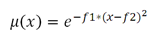
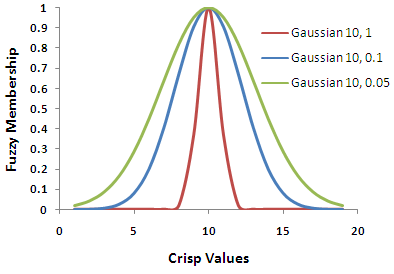
The inputs to the equation are \(f1\), the spread, and \(f2\), the midpoint. Increasing the spread causes the fuzzy membership curve to become steeper.
This function is useful if the membership is near a specific value.
The input values can be either integer or floating point positive values.
The FuzzyGaussian function is similar to the FuzzyNear function but has a more narrow spread.
Syntax
FuzzyGaussian(midpoint, spread)
| Name | Explanation | Data type |
|---|---|---|
|
midpoint |
The value with a fuzzy membership of 1. The default is the midpoint of the range of values of the input raster. |
Double |
|
spread |
Defines the spread of the function. The spread generally ranges from 0.01 to 1, with the larger the value results in a steeper distribution around the midpoint. The default value is 0.1. |
Double |
Properties
| Name | Explanation | Data type |
|---|---|---|
|
midpoint (Read and Write) |
The value defining the midpoint for the membership function. |
Double |
|
spread (Read and Write) |
Defines the spread of the membership function. The larger the value results in a steeper distribution from the midpoint. |
Double |
Code sample
Demonstrates how to create a FuzzyGaussian class and use it in the FuzzyMembership tool within the Python window.
import arcpy
from arcpy.sa import *
from arcpy import env
env.workspace = "c:/sapyexamples/data"
outFzyMember = FuzzyMembership("as_std", FuzzyGaussian(12, 0.1))
outFzyMember.save("c:/sapyexamples/fzymemb")
Performs a FuzzyMembership using the FuzzyGaussian class.
# Name: FuzzyGaussian_Ex_02.py
# Description: Scales input raster data into values ranging from zero to one
#     indicating the strength of a membership in a set.
# Requirements: Spatial Analyst extension

# Import system modules
import arcpy
from arcpy import env
from arcpy.sa import *

# Set environment settings
env.workspace = "C:/sapyexamples/data"

# Set local variables
inRaster = "as_std"

# Create the FuzzyGaussian algorithm object
midpoint = 10
spread = 0.2
myFuzzyAlgorithm = FuzzyGaussian(midpoint, spread)

# Run FuzzyMembership
outFuzzyMember = FuzzyMembership(inRaster, myFuzzyAlgorithm)

# Save the output
outFuzzyMember.save("c:/sapyexamples/fzygauss")