ACos function
 Available with Image Analyst license.
Available with Spatial Analyst license.
Overview
Calculates the inverse cosine of the pixels in a raster.
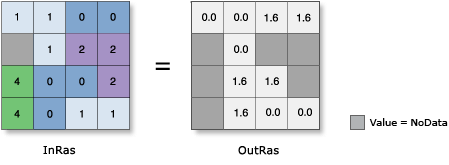
Notes
In mathematics, all trigonometric functions have a defined range of valid input values, called the domain. The output values from each function also have a defined range. For this tool, the domain and range are as follows:
Domain: -1 ≤ [in_value] ≤ 1
Range: 0 ≤ [out_value] ≤ pi
Note that any input value that is outside this domain will receive NoData on the output raster.
The input values to this tool are in radians. If degrees are desired, the resulting raster must be multiplied by the radians-to-degrees conversion factor of 180/\(\pi\), or approximately 57.296.
The output raster is always a floating-point type, regardless of the input value type.
The output values from this tool are interpreted as unitless.
If the input is a multiband raster, the output will be a multiband raster. The function will perform the operation on each band in the input.
If the input is a multidimensional raster, all slices from all variables will be processed, and the output will be a multidimensional raster.
For further assistance, a procedure to follow, and some examples of converting output from radians to degrees, are available.
Parameters
|
Parameter name |
Description |
|---|---|
|
Raster |
The input for which to calculate the inverse cosine values. |
|
Extent Type |
Choose which extent should be used in the output raster:
|
|
Cellsize Type |
Choose which cell size to use in the output raster. If all the input cell sizes are the same, all the options will yield the same results.
|