Arithmetic function
Overview
The Arithmetic function performs an arithmetic operation between two rasters, or a raster and a scalar operation, and vice versa.
Notes
The following table illustrates the Extent Type options:
|
Input rasters |
Extent if First |
Extent if Last |
Extent if Intersection |
Extent if Union |
|---|---|---|---|---|
|
|
|
|
|
|


The Operation options are as follows:
Plus—Outputs the sum of all the corresponding pixel values for each raster.
\(output \space = \space Raster1 \space + \space Raster2\)
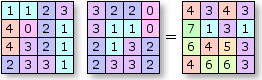
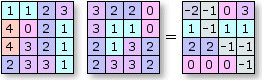
Minus—Outputs the difference between the corresponding pixel values for each raster. This can be used to calculate change detection.
\(output \space = \space Raster1 \space - \space Raster2\)
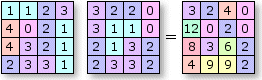
Multiply—Outputs the product of the corresponding pixel values for each raster. This can be used to perform some cost functions.
\(output \space = \space Raster1 \space × \space Raster2\)
Divide—Outputs the divisible result between the corresponding pixel values for each raster.
\(output \space = \space Raster1 \space ÷ \space Raster2\)
Power—Outputs the product of the corresponding pixel values raised to the power of the input raster or scalar.
$output \space = \space Raster1 ^ $
Modulus—Outputs the pixel value for the modulus of 2 rasters. For example, 17 % 5 = 2.
Parameters
|
Parameter |
Description |
|---|---|
|
Raster |
The first input raster dataset. |
|
Raster2 |
The second input raster dataset. |
|
Operation |
The arithmetic operation to be performed between the two input rasters. The options are as follows:
|
|
Cellsize Type |
Cellsize Type defines how the pixel cell size of the output will be computed when the input rasters have different pixel cell sizes. The options are as follows:
|
|
Extent Type |
Extent Type defines how the extent of the output will be computed when the input rasters have different extents. The options are as follows:
|