Rasterize Attributes function
Overview
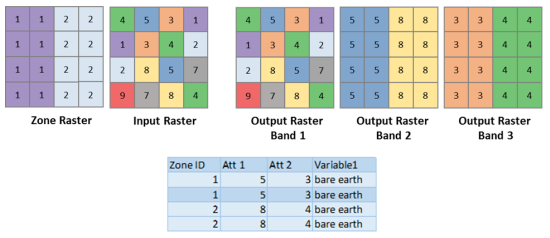
The Rasterize Attributes function enriches a raster by adding bands derived from values of specified attributes, from an external table, or from a feature service.
You can optionally specify a zone raster and the associated zone ID attribute to enable regional lookups.
Notes
If a multiband raster is used as an input, only the first band and the rasterized attributes will be retained.
Parameters
|
Parameter name |
Description |
|---|---|
|
Value Raster (Required) |
The input raster. The input should be a single-band raster. If a multiband raster is used, only the first band will be used. |
|
Zone Raster |
An optional single-band raster where each pixel contains the zone ID associated with the location. The zone ID is used for looking up rows in the zonal attributes table for zone-specific ingestion. Leave this parameter unspecified if you only want to import the attribute. |
|
Zonal Attributes Table |
The zonal attributes specified as a path to a local feature class, the path to a table, the URL to a feature service layer, or a JSON string. In JSON, it is described as a collection of mapping from zone IDs to an array of integers. |
|
Zone Field |
The field name containing the zone ID values. |
|
Attribute Field Names |
A list of fields in the Zonal Attributes Table, where each field is separated by a comma. Values in each field will be represented by a band in the output raster. |
|
Background Value |
The initial pixel value of the output bands in a raster, before being remapped. If a pixel does not fall within a zone, it will remain as the background value. |
|
Where Clause |
An optional additional query applied on the Zonal Attributes Table. If you were using the table above as an example, the query would be |