Release locks with the Release Locks tool
 Available with the Linear Referencing license.
Use the Release Locks tool to release any locks with a releasable status value of Yes.
Tip:
You can also release locks through the LRS Locks table.
The following table describes the releasable status values:
| Releasable status | Reason |
|---|---|
| Yes | The lock is owned by the user who is signed in (in any named version), and the route or event has not been edited. |
| On Post | The lock is owned by the user who is signed in (in any named version), and the route or event has been edited. |
| No | The lock is owned by another user. |
Release locks
To release locks using the Release Locks tool, complete the following steps:
Start ArcGIS Pro and open a project with a linear referencing system (LRS) Network from a conflict prevention-enabled LRS.
Select one or more routes using a feature selection tool.
On the Linear Referencing tab, in the Conflict Prevention group, click Release Locks
 .
Note:
This tool is enabled when the following occur:
Conflict prevention is enabled.
At least one route is selected.
If the route selection contains a combination of routes whose releasable status values are Yes, No, or On Post, or if the selected route has no locks, clicking Release Locks
releases only those routes whose releasable status value is Yes.
The locks are released.
Impact of the user and version on releasable status
The releasable status reported in the LRS Locks table depends on the signed-in user and the named version being edited.
The following is an example of the LRS Locks table with user 22 signed in using Version2:
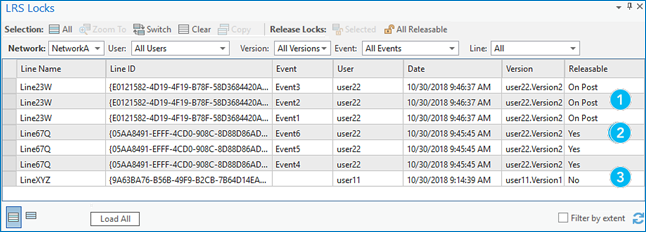
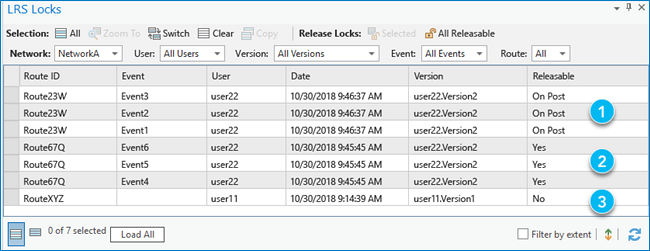
The numbers in the previous image correspond to the numbers in the following table:
| Number | Description |
|---|---|
| 1 | The locks were acquired by user 22 using Version2, and their edits were saved, resulting in a releasable status value of On Post. |
| 2 | The locks were acquired by user 22 using Version2, and they didn't save any edits, resulting in a releasable status value of Yes. |
| 3 | The locks were acquired by user 11 using Version1, and the signed-in user (user 22) didn't acquire the locks, resulting in a releasable status value of No. |
The following is an example of the LRS Locks table with user 11 signed in using Version1:
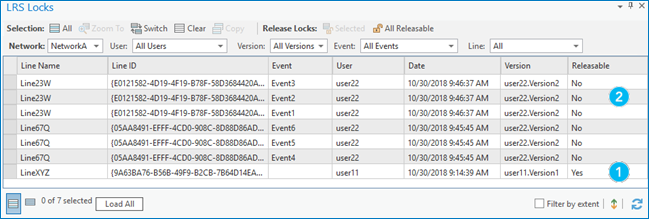
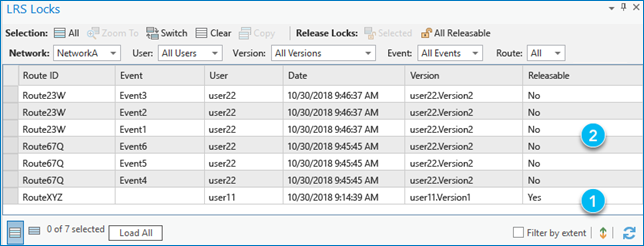
The numbers in the previous image correspond to the numbers in the following table:
| Number | Description |
|---|---|
| 1 | The lock was acquired by user 11 using Version1, and they didn't save any edits, resulting in a releasable status value of Yes. |
| 2 | The locks were acquired by user 22 using Version2, and the signed-in user (user 11) didn't acquire the locks, resulting in a releasable status value of No. |