IJobsManager Interface
In This Topic
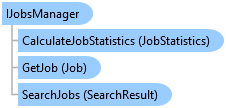
Provides access to the jobs within Workflow Manager.
Object Model
Syntax
Example
Get the job Id associated with the active map view
{
  // Get the job Id associated with the active map view
  var jobManager = WorkflowClientModule.JobsManager;
  jobId = jobManager.GetJobId();

  // Use the jobId to identify the job associated with the active map view
}
Get the job Id associated with a map
{
  // Get the job Id associated with a map
  var jobManager = WorkflowClientModule.JobsManager;
  jobId = jobManager.GetJobId(mapUri);

  // Use the jobId to identify the job associated with the map
}
Get a job
{
  // Note: QueuedTask is required to call Workflow Manager API methods
  // GetJob returns an existing job
  try
  {
    var jobManager = WorkflowClientModule.JobsManager;
    var job = jobManager.GetJob(jobId);
    // Do something with the job
  }
  catch (NotConnectedException)
  {
    // Not connected to Workflow Manager server, do some error handling
  }
  catch (Exception)
  {
    // Some other exception occurred, do some error handling
  }
  // Use the job object
}
Search for jobs using a detailed query
{
  var search = new SearchQuery()
  {
    // Search for all open high priority jobs assigned to users
    Q = "closed=0 AND assignedType='User' AND priority='High'",
    Fields = ["jobId", "jobName", "assignedTo", "dueDate"],
    // Sort by job assignment in ascending order and due date in descending order
    SortFields =
    [
      new SortField() { FieldName = "assignedTo", SortOrder = SortOrder.Asc },
      new SortField() { FieldName = "dueDate", SortOrder = SortOrder.Desc }
    ]
  };
  var jobManager = WorkflowClientModule.JobsManager;
  var searchResults = jobManager.SearchJobs(search);
  var fields = searchResults.Fields;
  var results = searchResults.Results;
}
Search for jobs using a detailed query with an arcade expression
{
  var search = new SearchQuery()
  {
    // Search for jobs assigned to the current user using the arcade expression '$currentUser'
    Q = "\"assignedType='User' AND closed=0 AND assignedTo='\" + $currentUser + \"' \"",
    Fields = ["jobId", "jobName", "assignedTo", "dueDate"],
    // Sort by job name in ascending order
    SortFields = [new SortField() { FieldName = "jobName", SortOrder = SortOrder.Asc }]
  };
  var jobManager = WorkflowClientModule.JobsManager;
  var searchResults = jobManager.SearchJobs(search);
  var fields = searchResults.Fields;
  var results = searchResults.Results;
}
Search for jobs using a simple string
{
  var search = new SearchQuery() { Search = "My Search String" };
  var jobManager = WorkflowClientModule.JobsManager;
  var searchResults = jobManager.SearchJobs(search);
  var fields = searchResults.Fields;
  var results = searchResults.Results;

  // Use the fields and results collections
}
Get statistics for jobs
{
  var query = new JobStatisticsQuery()
  {
    // Search for open jobs assigned to users
    Q = "\"assignedType='User' AND closed=0 \""
  };
  var jobManager = WorkflowClientModule.JobsManager;
  var results = jobManager.CalculateJobStatistics(query);
  var totalJobs = results.Total;
}
Run steps on a job
{
  var jobManager = WorkflowClientModule.JobsManager;
  jobManager.RunSteps(jobId);
}
Run specific steps on a job
{
  var jobManager = WorkflowClientModule.JobsManager;
  // Specify specific current steps in a job to run
  var stepIds = new List<string> { "step12345", "step67890" };
  jobManager.RunSteps(jobId, stepIds);
}
Stop running steps on a job
{
  var jobManager = WorkflowClientModule.JobsManager;
  // Get the job Id associated with the active map view
  jobId = jobManager.GetJobId();
  // Stop the current steps in the job with the given id.
  jobManager.StopSteps(jobId);
}
Stop specific running steps on a job
{
  var jobManager = WorkflowClientModule.JobsManager;
  // Get the job Id associated with the active map view
  jobId = jobManager.GetJobId();
  // Specify specific running steps in a job to stop
  List<string> stepIds = ["step12345", "step67890"];
  jobManager.StopSteps(jobId, stepIds);
}
Finish steps on a job
{
  var jobManager = WorkflowClientModule.JobsManager;
  // Finish the current steps in the job with the given id.
  jobManager.FinishSteps(jobId);
}
Finish specific steps on a job
{
  var jobManager = WorkflowClientModule.JobsManager;
  List<string> stepIds = ["step12345", "step67890"];
  jobManager.FinishSteps(jobId, stepIds);
}
Requirements
Target Platforms: Windows 11 Home, Pro, Enterprise (64 bit)
ArcGIS Pro version: 3.1 or higher.
See Also