ArcGIS Pro 3.7 API Reference Guide
ArcGIS.Desktop.Mapping Namespace / SymbolFactory Class / ConstructMarker Method / ConstructMarker(Int32,String,String,Int32) Method
The index of the character from the font.
The font family name of the character marker to construct.
The font style name (Regular, Bold, Italic, etc.) of the character marker to construct.
The size of the marker to construct.
Example

In This Topic
    ConstructMarker(Int32,String,String,Int32) Method
    In This Topic
    Constructs a character marker.
    Syntax
    Public Overloads Function ConstructMarker( _
       ByVal characterIndex As Integer, _
       ByVal fontFamily As String, _
       ByVal fontStyle As String, _
       ByVal size As Integer _
    ) As CIMMarker

    Parameters

    characterIndex
    The index of the character from the font.
    fontFamily
    The font family name of the character marker to construct.
    fontStyle
    The font style name (Regular, Bold, Italic, etc.) of the character marker to construct.
    size
    The size of the marker to construct.

    Return Value

    Example
    Modify a point symbol created from a character marker
    {
        //create marker from the Font, char index,size,color
        //Note: Needs QueuedTask to run
        var cimMarker = SymbolFactory.Instance.ConstructMarker(125, "Wingdings 3", "Regular", 6, ColorFactory.Instance.BlueRGB) as CIMCharacterMarker;
        var polygonMarker = cimMarker.Symbol;
        //modifying the polygon's outline and fill
        //This is the outline
        polygonMarker.SymbolLayers[0] = SymbolFactory.Instance.ConstructStroke(ColorFactory.Instance.GreenRGB, 2, SimpleLineStyle.Solid);
        //This is the fill
        polygonMarker.SymbolLayers[1] = SymbolFactory.Instance.ConstructSolidFill(ColorFactory.Instance.BlueRGB);
        //create a symbol from the marker 
        //Note this overload of ConstructPointSymbol does not need to be run within QueuedTask.Run.
        var pointSymbol = SymbolFactory.Instance.ConstructPointSymbol(cimMarker);
    }
    Markers placed at a 45 degree angle
    /// <summary>
    /// Create a line symbol with the markers placed at a 45 degree angle. <br/>  
    /// ![LineSymbolAngleMarker](https://ArcGIS.github.io/arcgis-pro-sdk/images/Symbology/line-marker-angle.png)
    /// </summary>
    {
      //Create a line symbol with the markers placed at a 45 degree angle.
      //Create a marker from the "|" character.  This is the marker that will be used to render the line layer.
      //Note: Run withing QueuedTask
      var lineMarker = SymbolFactory.Instance.ConstructMarker(124, "Agency FB", "Regular", 12);
    
      //Default line symbol which will be modified 
      CIMLineSymbol lineSymbolWithMarkersAtAngle = SymbolFactory.Instance.ConstructLineSymbol(ColorFactory.Instance.BlackRGB, 2, SimpleLineStyle.Solid);
    
      //Modifying the marker to align with line
      //First define "markerplacement"
      CIMMarkerPlacementAlongLineSameSize markerPlacement = new CIMMarkerPlacementAlongLineSameSize()
      {
        AngleToLine = true,
        PlacementTemplate = new double[] { 5 }
      };
      //assign the markerplacement to the marker
      lineMarker.MarkerPlacement = markerPlacement;
      //angle the marker if needed
      lineMarker.Rotation = 45;
    
      //assign the marker as a layer to the line symbol
      lineSymbolWithMarkersAtAngle.SymbolLayers[0] = lineMarker;
    }
    Dash line with two markers - Method II
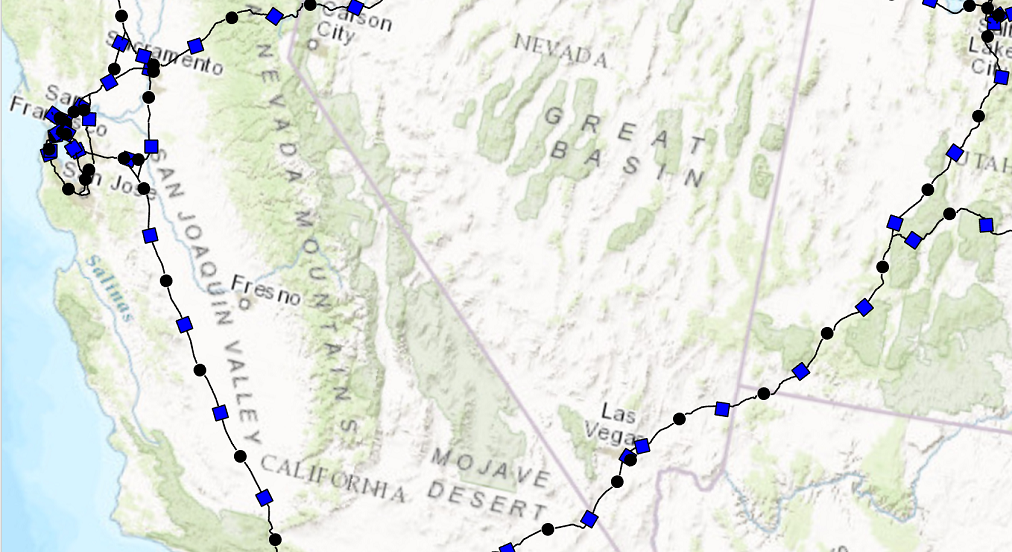
    /// <summary>
    /// Create a line symbol with a dash and two markers. <br/>
    /// In this pattern of creating this symbol, a [CIMVectorMarker](https://pro.arcgis.com/en/pro-app/sdk/api-reference/#topic6176.html) object is created as a new [CIMSymbolLayer](https://pro.arcgis.com/en/pro-app/sdk/api-reference/#topic5503.html).
    /// The circle and square markers created by [ContructMarker](https://pro.arcgis.com/en/pro-app/sdk/api-reference/#topic12350.html) method is then assigned to the [MarkerGraphics](https://pro.arcgis.com/en/pro-app/sdk/api-reference/#topic6188.html) property of the CIMVectorMarker. 
    /// When using this method, the CIMVectorMarker's [Frame](https://pro.arcgis.com/en/pro-app/sdk/api-reference/#topic6187.html) property needs to be set to the [CIMMarker](https://pro.arcgis.com/en/pro-app/sdk/api-reference/#topic3264.html) object's Frame. 
    /// Similarly, the CIMVectorMarker's [Size](https://pro.arcgis.com/en/pro-app/sdk/api-reference/#topic3284.html) property needs to be set to the CIMMarker object's size.
    /// This line symbol comprises three symbol layers listed below: 
    /// 1. A solid stroke that has dashes.
    /// 1. A circle marker.
    /// 1. A square marker.
    /// ![LineSymbolTwoMarkers](https://ArcGIS.github.io/arcgis-pro-sdk/images/Symbology/line-dash-two-markers.png)
    /// </summary>
    {
      // Create a line symbol with a dash and two markers.
      //default line symbol that will get modified.
      //Note: Run withing QueuedTask
      CIMLineSymbol dash2MarkersLine = new CIMLineSymbol();
      //circle marker to be used in our line symbol as a layer
      var circleMarker = SymbolFactory.Instance.ConstructMarker(ColorFactory.Instance.BlackRGB, 5, SimpleMarkerStyle.Circle) as CIMVectorMarker;
      //circle marker to be used in our line symbol as a layer
      var squareMarker = SymbolFactory.Instance.ConstructMarker(ColorFactory.Instance.BlueRGB, 5, SimpleMarkerStyle.Square) as CIMVectorMarker;
      //Create the array of layers that make the new line symbol
      CIMSymbolLayer[] mySymbolLyrs =
          {
                  new CIMSolidStroke() //dash line
                  {
                      Color = ColorFactory.Instance.BlackRGB,
                      Enable = true,
                      ColorLocked = true,
                      CapStyle = LineCapStyle.Round,
                      JoinStyle = LineJoinStyle.Round,
                      LineStyle3D = Simple3DLineStyle.Strip,
                      MiterLimit = 10,
                      Width = 1,
                      CloseCaps3D = false,
                      Effects = new CIMGeometricEffect[]
                      {
                          new CIMGeometricEffectDashes()
                          {
                              CustomEndingOffset = 0,
                              DashTemplate = new double[] {20, 10, 20, 10},
                              LineDashEnding = LineDashEnding.HalfPattern,
                              OffsetAlongLine = 0,
                              ControlPointEnding = LineDashEnding.NoConstraint
                          },
                          new CIMGeometricEffectOffset()
                          {
                              Method = GeometricEffectOffsetMethod.Bevelled,
                              Offset = 0,
                              Option = GeometricEffectOffsetOption.Fast
                          }
                      }
                  },
                  new CIMVectorMarker() //circle marker
                  {
                      MarkerGraphics = circleMarker.MarkerGraphics,
                      Frame = circleMarker.Frame, //need to match the CIMVector marker's frame to the circleMarker's frame.
                      Size = circleMarker.Size,    //need to match the CIMVector marker's size to the circleMarker's size.                    
                     MarkerPlacement = new CIMMarkerPlacementAlongLineSameSize()
                     {
                         AngleToLine = true,
                         Offset = 0,
                         Endings = PlacementEndings.Custom,
                         OffsetAlongLine = 15,
                         PlacementTemplate = new double[] {60},
                     }
    
                  },
                  new CIMVectorMarker() //square marker
                  {
                     MarkerGraphics = squareMarker.MarkerGraphics,
                     Frame = squareMarker.Frame, //need to match the CIMVector marker's frame to the squareMarker frame.
                     Size = squareMarker.Size, //need to match the CIMVector marker's size to the squareMarker size.
                     MarkerPlacement = new CIMMarkerPlacementAlongLineSameSize()
                     {
                         AngleToLine = true,
                         Endings = PlacementEndings.Custom,
                         OffsetAlongLine = 45,
                         PlacementTemplate = new double[] {60},
                     }
                  }
        };
      dash2MarkersLine.SymbolLayers = mySymbolLyrs;
    }
    Point Symbol from a font
    /// <summary>
    /// Create a point symbol from a character in a font file
    /// ![PointSymbolFont](https://ArcGIS.github.io/arcgis-pro-sdk/images/Symbology/point-marker.png)
    /// </summary>
    {
      //creating the marker from the Font selected
      //Note: Run withing QueuedTask
      var cimMarker = SymbolFactory.Instance.ConstructMarker(47, "Wingdings 3", "Regular", 12);
      CIMPointSymbol fontPointSymbol = SymbolFactory.Instance.ConstructPointSymbol(cimMarker);
      //To apply the symbol to a point feature layer
      //var renderer = pointLayer.GetRenderer() as CIMSimpleRenderer;
      //renderer.Symbol = fontPointSymbol.MakeSymbolReference();
      //pointLayer.SetRenderer(renderer);
    }
    Requirements

    Target Platforms: Windows 11 Home, Pro, Enterprise (64 bit)

    ArcGIS Pro version: 3.0 or higher.
    See Also