ArcGISPortalManager Class
In This Topic
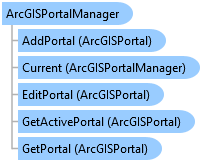
Manages the collection of portals currently defined for Pro. Portals can be added to and
removed from the ArcGISPortalManager. The list of portals is shown on the Portals backstage
tab.
Object Model
Syntax
Remarks
ArcGISPortalManager is a singleton. It is accessed via its Current property.
Out of the box you will always have a portal entry defined for arcgis.com (ArcGIS Online). This portal entry cannot be deleted.
Out of the box you will always have a portal entry defined for arcgis.com (ArcGIS Online). This portal entry cannot be deleted.
Example
Workflow to open an ArcGIS Pro project
{
  projectPath = @"https://<userName>.<domain>.com/portal/sharing/rest/content/items/1a434faebbe7424d9982f57d00223baa";
  string docVer = string.Empty;

  // A portal project path looks like this:
  //@"https://<ServerName>.<Domain>.com/portal/sharing/rest/content/items/1a434faebbe7424d9982f57d00223baa";
  //A local project path looks like this:
  //@"C:\Users\<UserName>\Documents\ArcGIS\Projects\MyProject\MyProject.aprx";

  //Check if the project can be opened
  if (Project.CanOpen(projectPath, out docVer))
  {
    //Open the project
    Project.OpenAsync(projectPath);
  }
  else //The project cannot be opened
  {
    //One possible reason: If the project is a portal project, the active portal must match the portal of the project
    //Check if this is a portal project
    bool isPortalProject = Uri.TryCreate(projectPath, UriKind.Absolute, out Uri uriResult)
         && (uriResult.Scheme == Uri.UriSchemeHttp || uriResult.Scheme == Uri.UriSchemeHttps);

    if (isPortalProject)
    {
      //Parse the project path to get the portal
      var uri = new Uri(projectPath);
      var portalUrlOfProjectToOpen = $"{uri.Scheme}://{uri.Host}/portal/";

      //Get the current active portal
      var activePortal = ArcGISPortalManager.Current.GetActivePortal();
      //Compare to see if the active Portal is the same as the portal of the project
      bool isSamePortal = activePortal != null && activePortal.PortalUri.ToString() == portalUrlOfProjectToOpen;
      if (!isSamePortal) //not the same.
      {
        //Set new active portal to be the portal of the project
        //Find the portal to sign in with using its Uri...
        var projectPortal = ArcGISPortalManager.Current.GetPortal(new Uri(portalUrlOfProjectToOpen, UriKind.Absolute));
        // Note: Needs QueuedTask to run
        {
          if (!projectPortal.IsSignedOn())
          {
            //Calling "SignIn" will trigger the OAuth popup if your credentials are
            //not cached (eg from a previous sign in in the session)
            if (projectPortal.SignIn().success)
            {
              //Set this portal as my active portal
              ArcGISPortalManager.Current.SetActivePortal(projectPortal);
              return;
            }
          }
          //Set this portal as my active portal
          ArcGISPortalManager.Current.SetActivePortal(projectPortal);
        }
        //Now try opening the project again
        if (Project.CanOpen(projectPath, out docVer))
        {
          Project.OpenAsync(projectPath);
        }
        else
        {
          System.Diagnostics.Debug.WriteLine("The project cannot be opened.");
        }
      }
      else //The portals are the same. So the problem could be something else - permissions, portal is down?
      {
        System.Diagnostics.Debug.WriteLine("The project cannot be opened.");
      }
    }
    else //Project is on disk and cannot be opened.
    {
      System.Diagnostics.Debug.WriteLine("The project cannot be opened.");
    }
  }
}
Retrieve a project item from a portal and open it
{
  var projectPortal = ArcGISPortalManager.Current.GetPortal(new Uri(@"https://<serverName>.<domain>.com/portal/", UriKind.Absolute));
  string owner = string.Empty;
  // Note: Needs QueuedTask to run
  {
    //Get the signed on user name
    owner = projectPortal.GetSignOnUsername();
  }
  //Get the user content from the portal
  PortalUserContent userContent = projectPortal.GetUserContentAsync(owner).Result;
  //Get the first portal project item
  var firstPortalProject = userContent.PortalItems.FirstOrDefault(pi => pi.PortalItemType == PortalItemType.ProProject);
  var portalProjectUri = firstPortalProject.ItemUri.ToString();
  //Check if project can be opened
  string docVer = string.Empty;
  if (Project.CanOpen(portalProjectUri, out docVer))
  {
    Project.OpenAsync(portalProjectUri);
  }
  //Note: If Project.CanOpen returns false, the project cannot be opened. One reason could be
  // the active portal is not the same as the portal of the project. Refer to the snippet: [Workflow to open an ArcGIS Pro project](ProSnippets-sharing#workflow-to-open-an-arcgis-pro-project)
}
ArcGISPortalManager: Get the Current Active Portal
{
  var active_portal = ArcGISPortalManager.Current.GetActivePortal();
  string uri = active_portal.PortalUri.ToString();
}
ArcGISPortalManager: Get a list of all your Portals
{
  var portals = ArcGISPortalManager.Current.GetPortals();
  //Make a list of all the Uris
  var portalUris = portals.Select(p => p.PortalUri.ToString()).ToList();
}
ArcGISPortalManager: Add a portal to the list of portals
{
  var portalUri = new Uri("http://myportal.esri.com/portal/", UriKind.Absolute);
  ArcGISPortalManager.Current.AddPortal(portalUri);
}
ArcGISPortalManager: Get a portal and Sign In, Set it Active
{
  //Find the portal to sign in with using its Uri...
  var uri = new Uri("http://myportal.esri.com/portal/", UriKind.Absolute);
  var aPortal = ArcGISPortalManager.Current.GetPortal(uri);
  if (!aPortal.IsSignedOn())
  {
    //Calling "SignIn" will trigger the OAuth popup if your credentials are
    //not cached (eg from a previous sign in in the session)
    if (portal.SignIn().success)
    {
      //Set this portal as my active portal
      ArcGISPortalManager.Current.SetActivePortal(portal);
    }
  }
}
Inheritance Hierarchy
System.Object
ArcGIS.Desktop.Core.ArcGISPortalManager
Requirements
Target Platforms: Windows 11 Home, Pro, Enterprise (64 bit)
ArcGIS Pro version: 3.0 or higher.
See Also