Parameters
- geometry
- The geometry to create a convex hull of.
Return Value
A polygon that represents the convex hull of the input geometry. If the input geometry is empty, then an empty polygon is returned.
| Exception | Description |
|---|---|
| System.ArgumentNullException | Geometry is null. |
| System.NotImplementedException | The method is not implemented for GeometryBag. |
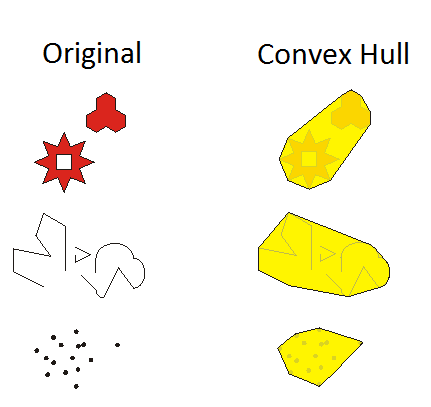
{
    //
    // convex hull around a point - returns a point
    //

    MapPoint pt = MapPointBuilderEx.CreateMapPoint(2.0, 2.0);
    Geometry hull = GeometryEngine.Instance.ConvexHull(pt);
    MapPoint hullPt = hull as MapPoint;
    // nullPt.X = 2
    // hullPt.Y = 2


    List<MapPoint> list =
    [
      MapPointBuilderEx.CreateMapPoint(1.0, 1.0),
  MapPointBuilderEx.CreateMapPoint(1.0, 2.0),
  MapPointBuilderEx.CreateMapPoint(2.0, 2.0),
  MapPointBuilderEx.CreateMapPoint(2.0, 1.0),
];

    //
    // convex hull around a multipoint - returns a polygon
    //

    // build a multiPoint
    Multipoint multiPoint = MultipointBuilderEx.CreateMultipoint(list);

    hull = GeometryEngine.Instance.ConvexHull(multiPoint);
    Polygon hullPoly = hull as Polygon;
    // hullPoly.Area = 1
    // hullPoly.PointCount = 5

    //
    // convex hull around a line - returns a polyline or polygon
    //

    List<MapPoint> polylineList = [MapPointBuilderEx.CreateMapPoint(1.0, 1.0), MapPointBuilderEx.CreateMapPoint(2.0, 2.0)];

    // 2 point straight line
    polyline = PolylineBuilderEx.CreatePolyline(polylineList);
    hull = GeometryEngine.Instance.ConvexHull(polyline);
    Polyline hullPolyline = hull as Polyline;
    // hullPolyline.Length = Math.Sqrt(2)
    // hullPolyline.PointCount = 2

    // 3 point angular line
    polylineList.Add(MapPointBuilderEx.CreateMapPoint(2.0, 1.0));
    polyline = PolylineBuilderEx.CreatePolyline(polylineList);
    hull = GeometryEngine.Instance.ConvexHull(polyline);
    hullPoly = hull as Polygon;
    // hullPoly.Length = 2 + Math.Sqrt(2)
    // hullPoly.Area = 0.5
    // hullPoly.PointCount = 4

    //
    // convex hull around a polygon - returns a polygon
    //

    // simple polygon
    Polygon poly = PolygonBuilderEx.CreatePolygon(list);
    hull = GeometryEngine.Instance.ConvexHull(poly);
    hullPoly = hull as Polygon;

    // hullPoly.Length = 4.0
    // hullPoly.Area = 1.0
    // hullPoly.PointCount = 5

    // polygon with concave angles
    List<MapPoint> funkyList =
    [
      MapPointBuilderEx.CreateMapPoint(1.0, 1.0),
  MapPointBuilderEx.CreateMapPoint(1.5, 1.5),
  MapPointBuilderEx.CreateMapPoint(1.0, 2.0),
  MapPointBuilderEx.CreateMapPoint(2.0, 2.0),
  MapPointBuilderEx.CreateMapPoint(1.5, 1.5),
  MapPointBuilderEx.CreateMapPoint(2.0, 1.0),
  MapPointBuilderEx.CreateMapPoint(1.0, 1.0),
];

    Polygon funkyPoly = PolygonBuilderEx.CreatePolygon(funkyList);
    hull = GeometryEngine.Instance.ConvexHull(funkyPoly);
    hullPoly = hull as Polygon;
    // hullPoly.Length = 4.0
    // hullPoly.Area = 1.0
    // hullPoly.PointCount = 5
    // hullPoly.Points[0] = 1.0, 1.0
    // hullPoly.Points[1] = 1.0, 2.0
    // hullPoly.Points[2] = 2.0, 2.0
    // hullPoly.Points[3] = 2.0, 1.0
    // hullPoly.Points[4] = 1.0, 1.0
  }
Target Platforms: Windows 11 Home, Pro, Enterprise (64 bit)