Parameters
- geometry1
- The base geometry.
- geometry2
- The comparison geometry.
Return Value
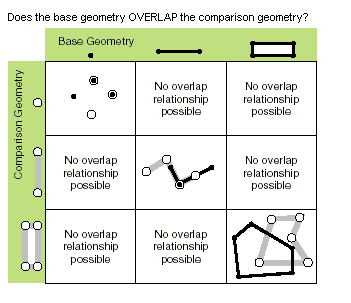
True if if geometry1 and geometry2 overlap.
| Exception | Description |
|---|---|
| System.ArgumentNullException | Either geometry1 or geometry2 or both are null. |
| System.NotImplementedException | The method is not implemented for GeometryBag. |
| System.InvalidOperationException | Incompatible spatial references between the input geometries. |
{
  MapPoint pt1 = MapPointBuilderEx.CreateMapPoint(1.5, 1.5);
  MapPoint pt2 = MapPointBuilderEx.CreateMapPoint(1.25, 1.75);
  MapPoint pt3 = MapPointBuilderEx.CreateMapPoint(3, 1.5);
  MapPoint pt4 = MapPointBuilderEx.CreateMapPoint(1.5, 2);

  //
  // point and point overlap
  //
  bool overlaps = GeometryEngine.Instance.Overlaps(pt1, pt2);        // overlaps = false
  overlaps = GeometryEngine.Instance.Overlaps(pt1, pt1);             // overlaps = false
                                                                     // Two geometries overlap if the region of their intersection is of the same dimension as the geometries involved and
                                                                     // is not equivalent to either of the geometries.

  List<MapPoint> pts = [pt1, pt2, pt3];

  List<MapPoint> pts2 = [pt2, pt3, pt4];

  //
  // pt and line overlap
  //
  polyline = PolylineBuilderEx.CreatePolyline(pts);
  bool isSimple = GeometryEngine.Instance.IsSimpleAsFeature(polyline);         // isSimple = true
  overlaps = GeometryEngine.Instance.Overlaps(polyline, pt1);                  // overlaps = false

  //
  // line and line
  //
  Polyline polyline2 = PolylineBuilderEx.CreatePolyline(pts2);
  isSimple = GeometryEngine.Instance.IsSimpleAsFeature(polyline2);             // isSimple = true
  overlaps = GeometryEngine.Instance.Overlaps(polyline, polyline2);            // overlaps = true
}
Target Platforms: Windows 11 Home, Pro, Enterprise (64 bit)