ArcGIS Pro 3.7 API Reference Guide
ArcGIS.Core.Geometry Namespace / IGeometryEngine Interface / ReverseOrientation Method
The polygon or polyline whose orientation will be reversed.
Example

In This Topic
    ReverseOrientation Method (IGeometryEngine)
    In This Topic
    Reverse the orientation of the geometry.
    Syntax
    Function ReverseOrientation( _
       ByVal multipart As Multipart _
    ) As Multipart
    Multipart ReverseOrientation( 
       Multipart multipart
    )

    Parameters

    multipart
    The polygon or polyline whose orientation will be reversed.

    Return Value

    A geometry whose directionality has been reversed. If the input multipart is empty, then it is returned unchanged.
    Exceptions
    ExceptionDescription
    Multipart is null.
    Remarks
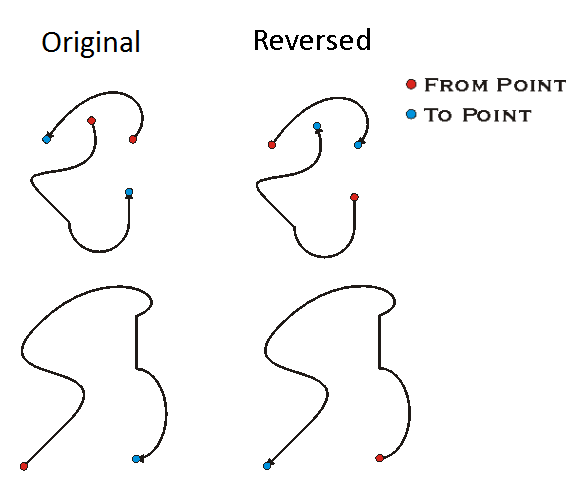
    ReverseOrientation changes the direction of the curve without changing the spatial position of the curve. The From Point and To Point of each Segment are interchanged.
    Caution should be taken in using ReverseOrientation on Polygons. Since ReverseOrientation changes the direction of each Ring within the Polygon, all Exterior Rings become Interior Rings and vice versa.

    GeometryEngine Reverse Orientation

    Example
    Reverse the order of points in a Polygon
    {
      List<Coordinate2D> list2D =
      [
        new Coordinate2D(1.0, 1.0),
      new Coordinate2D(1.0, 2.0),
      new Coordinate2D(2.0, 2.0),
      new Coordinate2D(2.0, 1.0),
    ];
    
      polygon = PolygonBuilderEx.CreatePolygon(list2D);
    
      Geometry g = GeometryEngine.Instance.ReverseOrientation(polygon);
      Polygon gPolygon = g as Polygon;
    
      // gPolygon.Points[0] = 1.0, 1.0
      // gPolygon.Points[1] = 2.0, 1.0
      // gPolygon.Points[2] = 2.0, 2.0
      // gPolygon.Points[3] = 1.0, 2.0
      // gPolygon.Points[4] = 1.0, 1.0
      // gPolygon.Area = -1 * polygon.Area
    }
    Requirements

    Target Platforms: Windows 11 Home, Pro, Enterprise (64 bit)

    ArcGIS Pro version: 3.0 or higher.
    See Also