Parameters
- geometry1
- The base geometry.
- geometry2
- The comparison geometry.
Return Value
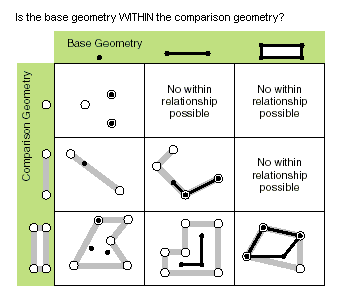
True if geometry1 is within geometry2.
| Exception | Description |
|---|---|
| System.ArgumentNullException | Either geometry1 or geometry2 or both are null. |
| System.NotImplementedException | The method is not implemented for GeometryBag. |
| System.InvalidOperationException | Incompatible spatial references between the input geometries. |
If the geometry2 is empty, then geometry1 is not within geometry2.
If geometry1 is empty and geometry2 is not empty, then geometry1 is within geometry2.
Within is the opposite of Contains. That is, geometry1 is within geometry2 if and only if geometry2 contains geometry1.
{
    // build a polygon
    List<MapPoint> pts =
    [
      MapPointBuilderEx.CreateMapPoint(1.0, 1.0),
  MapPointBuilderEx.CreateMapPoint(1.0, 2.0),
  MapPointBuilderEx.CreateMapPoint(2.0, 2.0),
  MapPointBuilderEx.CreateMapPoint(2.0, 1.0),
];

    Polygon poly = PolygonBuilderEx.CreatePolygon(pts);

    // an inner point
    MapPoint innerPt = MapPointBuilderEx.CreateMapPoint(1.5, 1.5);
    bool within = GeometryEngine.Instance.Within(innerPt, poly);   // within = true

    // point on a boundary
    within = GeometryEngine.Instance.Within(pts[0], poly);     // within = false

    // an interior line
    MapPoint innerPt2 = MapPointBuilderEx.CreateMapPoint(1.25, 1.75);
    List<MapPoint> innerLinePts = [innerPt, innerPt2];

    polyline = PolylineBuilderEx.CreatePolyline(innerLinePts);
    within = GeometryEngine.Instance.Within(polyline, poly);   // within = true

    // a line that crosses the boundary
    MapPoint outerPt = MapPointBuilderEx.CreateMapPoint(3, 1.5);
    List<MapPoint> crossingLinePts = [innerPt, outerPt];

    polyline = PolylineBuilderEx.CreatePolyline(crossingLinePts);
    within = GeometryEngine.Instance.Within(polyline, poly);     // within = false

    // polygon in polygon
    Envelope env = EnvelopeBuilderEx.CreateEnvelope(innerPt, innerPt2);
    within = GeometryEngine.Instance.Within(env, poly);      // within = true
  }
Target Platforms: Windows 11 Home, Pro, Enterprise (64 bit)