ReportFactory Class
In This Topic
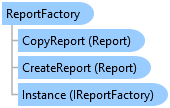
Provides methods to create new report project items.
Object Model
Syntax
Public Class ReportFactory
   Implements IReportFactory
public class ReportFactory : IReportFactory
Remarks
Creating a new report generates a new report project item that appears in the Reports folder in the Contents pane.
A new report project item is not automatically opened in a report view pane.
Example
Create report
{
  //Note: Call within QueuedTask.Run()
  //The fields in the datasource used for the report
  //This uses a US Cities dataset
  var listFields = new List<CIMReportField> {
          //Grouping should be the first field
          new CIMReportField{Name = "STATE_NAME", FieldOrder = 0, Group = true, SortInfo = FieldSortInfo.Desc}, //Group cities using STATES
          new CIMReportField{Name = "CITY_NAME", FieldOrder = 1},
          new CIMReportField{Name = "POP1990", FieldOrder = 2, },
      };
  //Definition query to use for the data source
  var defQuery = "STATE_NAME LIKE 'C%'";
  //Define the Datasource
  var reportDataSource = new ReportDataSource(featureLayer, defQuery, listFields);
  //The CIMPage defintion - page size, units, etc
  var cimReportPage = new CIMPage
  {
    Height = 11,
    StretchElements = false,
    Width = 6.5,
    ShowRulers = true,
    ShowGuides = true,
    Margin = new CIMMargin { Bottom = 1, Left = 1, Right = 1, Top = 1 },
    Units = LinearUnit.Inches
  };

  //Report template
  var reportTemplates = await ReportTemplateManager.GetTemplatesAsync();
  var reportTemplate = reportTemplates.Where(r => r.Name == "Attribute List with Grouping").First();

  //Report Styling
  var reportStyles = await ReportStylingManager.GetStylingsAsync();
  var reportStyle = reportStyles.Where(s => s == "Cool Tones").First();

  //Field Statistics
  var fieldStatisticsList = new List<ReportFieldStatistic> {
          new ReportFieldStatistic{ Field = "POP1990", Statistic = FieldStatisticsFlag.Sum}
          //Note: NoStatistics option for FieldStatisticsFlag is not supported.
      };
  var newReport = ReportFactory.Instance.CreateReport("USAReport", reportDataSource, cimReportPage, fieldStatisticsList, reportTemplate, reportStyle);
}
Inheritance Hierarchy
System.Object
ArcGIS.Desktop.Reports.ReportFactory
Requirements
Target Platforms: Windows 11 Home, Pro, Enterprise (64 bit)
ArcGIS Pro version: 3.0 or higher.
See Also