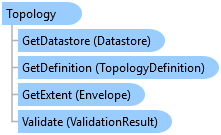
Topology Class
In This Topic
Represents a topology dataset.
Object Model
Syntax
Public NotInheritable Class Topology
   Inherits ArcGIS.Core.Data.Dataset
   Implements System.IDisposable
public sealed class Topology : ArcGIS.Core.Data.Dataset, System.IDisposable
Example
Open topology and process definition
{
  static void OpenTopologyAndProcessDefinition()
  {
    // Open a geodatabase topology from a file geodatabase and process the topology definition.
    using (Geodatabase geodatabase = new Geodatabase(new FileGeodatabaseConnectionPath(new Uri(@"C:\TestData\GrandTeton.gdb"))))
    using (ArcGIS.Core.Data.Topology.Topology topology = geodatabase.OpenDataset<ArcGIS.Core.Data.Topology.Topology>("Backcountry_Topology"))
    {
      ProcessDefinition(geodatabase, topology);
    }

    // Open a feature service topology and process the topology definition.
    const string TOPOLOGY_LAYER_ID = "0";

    using (Geodatabase geodatabase = new Geodatabase(new ServiceConnectionProperties(new Uri("https://sdkexamples.esri.com/server/rest/services/GrandTeton/FeatureServer"))))
    using (ArcGIS.Core.Data.Topology.Topology topology = geodatabase.OpenDataset<ArcGIS.Core.Data.Topology.Topology>(TOPOLOGY_LAYER_ID))
    {
      ProcessDefinition(geodatabase, topology);
    }

    static void ProcessDefinition(Geodatabase geodatabase, ArcGIS.Core.Data.Topology.Topology topology)
    {
      // Similar to the rest of the Definition objects in the Core.Data API, there are two ways to open a dataset's
      // definition -- via the Topology dataset itself or via the Geodatabase.
      using (TopologyDefinition definitionViaTopology = topology.GetDefinition())
      {
        OutputDefinition(geodatabase, definitionViaTopology);
      }

      using (TopologyDefinition definitionViaGeodatabase = geodatabase.GetDefinition<TopologyDefinition>("Backcountry_Topology"))
      {
        OutputDefinition(geodatabase, definitionViaGeodatabase);
      }
    }

    static void OutputDefinition(Geodatabase geodatabase, TopologyDefinition topologyDefinition)
    {
      Console.WriteLine($"Topology cluster tolerance => {topologyDefinition.GetClusterTolerance()}");
      Console.WriteLine($"Topology Z cluster tolerance => {topologyDefinition.GetZClusterTolerance()}");

      IReadOnlyList<string> featureClassNames = topologyDefinition.GetFeatureClassNames();
      Console.WriteLine($"There are {featureClassNames.Count} feature classes that are participating in the topology:");

      foreach (string name in featureClassNames)
      {
        // Open each feature class that participates in the topology.
        using (FeatureClass featureClass = geodatabase.OpenDataset<FeatureClass>(name))
        using (FeatureClassDefinition featureClassDefinition = featureClass.GetDefinition())
        {
          Console.WriteLine($"\t{featureClass.GetName()} ({featureClassDefinition.GetShapeType()})");
        }
      }
    }
  }
}
Inheritance Hierarchy
System.Object
ArcGIS.Core.CoreObjectsBase
ArcGIS.Core.Data.Dataset
ArcGIS.Core.Data.Topology.Topology
Requirements
Target Platforms: Windows 11 Home, Pro, Enterprise (64 bit)
ArcGIS Pro version: 3.0 or higher.
See Also