IReportPane Interface
In This Topic
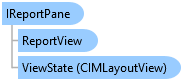
Represents a pane which contains a report view.
Object Model
Syntax
Example
Activate an already open report view
{
  //Note: Needs QueuedTask to run
  Report reportToActivate = Project.Current.GetItems<ReportProjectItem>().FirstOrDefault().GetReport();
  var reportPane = FrameworkApplication.Panes.FindReportPanes(report).Last();
  if (reportPane == null)
    return;
  //Activate the pane
  (reportPane as ArcGIS.Desktop.Framework.Contracts.Pane).Activate();
  //Get the "ReportView" associated with the Report Pane.
  ReportView reportViewFromPane = reportPane.ReportView;
}
Requirements
Target Platforms: Windows 11 Home, Pro, Enterprise (64 bit)
ArcGIS Pro version: 3.0 or higher.
See Also