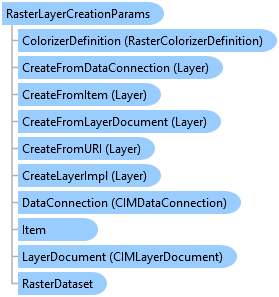
RasterLayerCreationParams Class
In This Topic
Represents an object to initialize and create a raster layer with pre-defined properties such as colorizer, visibility etc.
Object Model
Syntax
Public Class RasterLayerCreationParams
   Inherits LayerCreationParams
public class RasterLayerCreationParams : LayerCreationParams
Example
Create a raster layer with a new colorizer definition
{
    // Create a new stretch colorizer definition using default constructor.
    StretchColorizerDefinition stretchColorizerDef = new StretchColorizerDefinition();
    // Create a raster layer creation parameters object with the raster file path.
    var rasterLayerCreationParams = new RasterLayerCreationParams(new Uri("rasterPath"))
    {
        ColorizerDefinition = stretchColorizerDef,
        Name = "rasterLayerName",
        MapMemberIndex = 0
    };

    // Create a raster layer using the colorizer definition created above.
    // Note: You can create a raster layer from a url, project item, or data connection.
    //Note: Run within a QueuedTask
    RasterLayer rasterLayerfromURL =
  LayerFactory.Instance.CreateLayer<RasterLayer>(rasterLayerCreationParams, map);

}
Create a mosaic layer with a new colorizer definition
// Create a new colorizer definition using default constructor.
{
    StretchColorizerDefinition stretchColorizerDef = new StretchColorizerDefinition();
    var rasterLayerCreationParams = new RasterLayerCreationParams(new Uri("url"))
    {
        Name = "layerRasterName",
        ColorizerDefinition = stretchColorizerDef,
        MapMemberIndex = 0

    };
    // Create a mosaic layer using the colorizer definition created above.
    // Note: You can create a mosaic layer from a url, project item, or data connection.
    //Note: Run within a QueuedTask
    MosaicLayer newMosaicLayer = LayerFactory.Instance.CreateLayer<MosaicLayer>(rasterLayerCreationParams, map);
}
Create an image service layer with a new colorizer definition
{
    // Create a new colorizer definition using default constructor.
    StretchColorizerDefinition stretchColorizerDef = new StretchColorizerDefinition();
    var rasterLayerCreationParams = new RasterLayerCreationParams(new Uri(url))
    {
        Name = "RasterLayer",
        ColorizerDefinition = stretchColorizerDef,
        MapMemberIndex = 0
    };
    // Create an image service layer using the colorizer definition created above.
    //Note: Run within a QueuedTask
    ImageServiceLayer imageServiceLayerWithColorizer =
  LayerFactory.Instance.CreateLayer<ImageServiceLayer>(rasterLayerCreationParams, map);
}
Inheritance Hierarchy
System.Object
ArcGIS.Desktop.Mapping.BaseCreationParams
ArcGIS.Desktop.Mapping.MapMemberCreationParams
ArcGIS.Desktop.Mapping.LayerCreationParams
ArcGIS.Desktop.Mapping.RasterLayerCreationParams
Requirements
Target Platforms: Windows 11 Home, Pro, Enterprise (64 bit)
ArcGIS Pro version: 3.0 or higher.
See Also