ArcGIS Pro 3.7 API Reference Guide
ArcGIS.Core.Geometry Namespace / GeometryEngine Class / Buffer Method / Buffer(Geometry,Double) Method
Specifies the input geometry.
The distance (in the unit of the geometry's spatial reference) to buffer the geometry.
Example

In This Topic
    Buffer(Geometry,Double) Method
    In This Topic
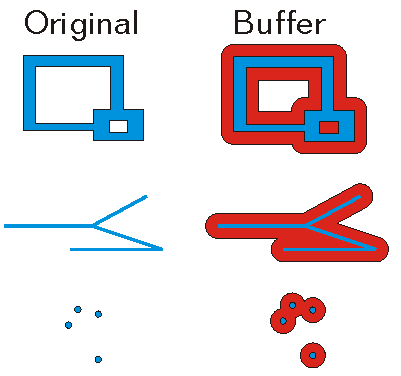
    Creates a buffer polygon at the specified distance around the given geometry.
    Syntax
    Public Overloads Function Buffer( _
       ByVal geometry As Geometry, _
       ByVal distance As Double _
    ) As Geometry

    Parameters

    geometry
    Specifies the input geometry.
    distance
    The distance (in the unit of the geometry's spatial reference) to buffer the geometry.

    Return Value

    The polygon that represents the buffered area. If the input geometry is empty, then an empty polygon is returned.
    Exceptions
    ExceptionDescription
    Geometry is null.
    The method is not implemented for GeometryBag.
    The buffer distance must be a valid floating point number.
    Remarks
    If the buffer distance is zero and the input geometry is a polygon or an envelope, then a polygon created from the input geometry is returned.

    If the distance is less than or equal to zero and the input geometry is not a polygon or an envelope, then an empty polygon is returned.

    GeometryEngine Buffer

    Example
    Zoom to a specified point
    {
      double x = -122.45;
      double y = 37.75;
      double buffer_size = 0.1;
      //Create a point
      var pt = MapPointBuilderEx.CreateMapPoint(x, y,
                     SpatialReferenceBuilder.CreateSpatialReference(4326));
      //Buffer it - for purpose of zoom
      var poly = GeometryEngine.Instance.Buffer(pt, buffer_size);
    
      //do we need to project the buffer polygon?
      if (!MapView.Active.Map.SpatialReference.IsEqual(poly.SpatialReference))
      {
        //project the polygon
        poly = GeometryEngine.Instance.Project(poly, MapView.Active.Map.SpatialReference);
      }
    
      // Must run on MCT.
      QueuedTask.Run(() =>
      {
        //Zoom - add in a delay for animation effect
        MapView.Active.ZoomTo(poly, new TimeSpan(0, 0, 0, 3));
      });
    }
    Buffer a MapPoint
    {
      // buffer a point
      MapPoint pt = MapPointBuilderEx.CreateMapPoint(1.0, 1.0, SpatialReferences.WGS84);
      Geometry ptBuffer = GeometryEngine.Instance.Buffer(pt, 5.0);
      Polygon buffer = ptBuffer as Polygon;
    }
    Buffer a Circular Arc
    {
      // create the circular arc
      MapPoint fromPt = MapPointBuilderEx.CreateMapPoint(2, 1);
      MapPoint toPt = MapPointBuilderEx.CreateMapPoint(1, 2);
      Coordinate2D interiorPt = new(1 + Math.Sqrt(2) / 2, 1 + Math.Sqrt(2) / 2);
    
      EllipticArcSegment circularArc = EllipticArcBuilderEx.CreateCircularArc(fromPt, toPt, interiorPt);
    
      // buffer the arc
      polyline = PolylineBuilderEx.CreatePolyline(circularArc);
      Geometry lineBuffer = GeometryEngine.Instance.Buffer(polyline, 10);
    }
    Requirements

    Target Platforms: Windows 11 Home, Pro, Enterprise (64 bit)

    ArcGIS Pro version: 3.0 or higher.
    See Also