Classify LAS Overlap (3D Analyst Tools)
Summary
Classifies LAS points from overlapping scans of aerial lidar surveys.
Illustration
Usage
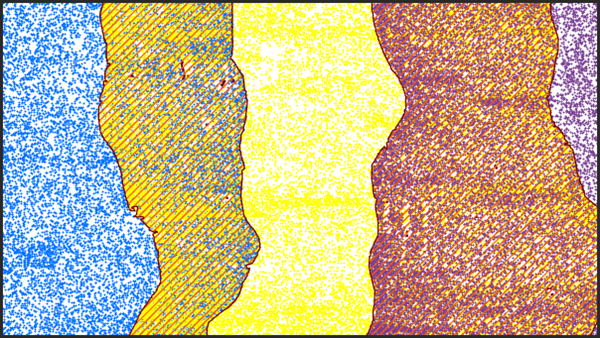
Achieving a regular distribution of points often improves the performance of downstream tools. Data derived from points with irregular distribution may yield an undesirable margin of error. When aerial lidar surveys have LAS points from overlapping flight lines, the LAS data will usually have a higher density of points in the area of overlap. The scan angle of points from the different flight lines may also vary widely. Typically, points with larger scan angles will have a larger margin of error than points whose scan angles are closer to nadir. Classifying overlap points allows the LAS data to be filtered in a way that produces a consistent point density. The overlap designation allows the points to be filtered and excluded from visualization and downstream analysis operations.
The point source ID attribute of a LAS point identifies the flight line from which the point was collected. This attribute is used to establish the presence of overlap points. The LAS data is evaluated in a given sampling distance. When points with different point source IDs are found within the area being evaluated, the scan angle is used to establish which point source ID represents the nonoverlapping points. The point source ID of the point with the scan angle that is closest to 0, or nadir, will be retained as nonoverlap points. The points associated with the remaining point source IDs will be marked as overlap.
The sample size used to evaluate the LAS points should be approximately two to three times the size of the nominal point spacing of the LAS data. Using a larger sampling distance introduces the possibility of misclassifying points, and using smaller sampling sizes may not capture enough points to properly identify the overlap points.
This tool works on tiled
.lasor.zlasfiles that combine point records from multiple flight lines. Each file is processed independently, which means overlapping points will not be detected if each flight line is stored in a separate file. Use the Tile LAS tool to merge such files.Overlap points in LAS version 1.4 files with point record formats 6 through 8 will be assigned the overlap classification flag. This allows the points to retain their original classification value. Overlap points in all other supported
.lasfiles will be assigned a class code value of 12. If the class code value of 12 is being used by the input.lasfiles to represent something other than overlapping scans, you can use the Change LAS Class Codes tool to reassign those points to another value before running this tool.
Parameters
| Label | Explanation | Data type |
|---|---|---|
|
Input LAS Dataset |
The tiled LAS dataset that will be processed. |
LAS Dataset Layer |
|
Sample Distance |
The distance of either dimension of the square area that will be used to evaluate the LAS data. If Unknown is specified as the linear unit, the unit will be defined by the spatial reference of the input |
Linear Unit |
|
Processing Extent (Optional) |
The extent of the data that will be evaluated.
When coordinates are manually provided, the coordinates must be numeric values and in the active map's coordinate system. The map may use different display units than the provided coordinates. Use a negative value sign for south and west coordinates. |
Extent |
|
Process entire LAS files that intersect extent (Optional) |
Specifies how the processing extent will be applied.
|
Boolean |
|
Compute statistics (Optional) |
Specifies whether statistics will be computed for the
|
Boolean |
|
Update pyramid (Optional) |
Specifies whether the LAS dataset pyramid will be updated after the class codes are modified.
|
Boolean |
 —The extent will be based on the active map or scene.
 —The extent will be based on a rectangle drawn on the map or scene.
 —The extent will be based on an active map layer. Choose an available layer or use the Extent of data in all layers option. Each map layer has the following options:
 —The extent of all features.
 —The extent of the selected features.
 —The extent of visible features.
 —The extent will be based on a dataset.
 —The extent will be the intersecting extent of all inputs.
 —The extent will be the combined extent of all inputs.
 —The extent can be copied to and from the clipboard.
 —Copies the extent and coordinate system to the clipboard.
 —The extent will be reset to the default value.
Derived output
| Label | Explanation | Data type |
|---|---|---|
|
Output LAS Dataset |
The LAS dataset to be modified. |
LAS Dataset Layer |
Environments
Licensing information
- Basic: Requires 3D Analyst
- Standard: Requires 3D Analyst
- Advanced: Requires 3D Analyst