Inside 3D (3D Analyst Tools)
Summary
Determines if 3D features from an input feature class are contained inside a closed multipatch, and writes an output table recording the features that are partially or fully inside the multipatch.
Illustration
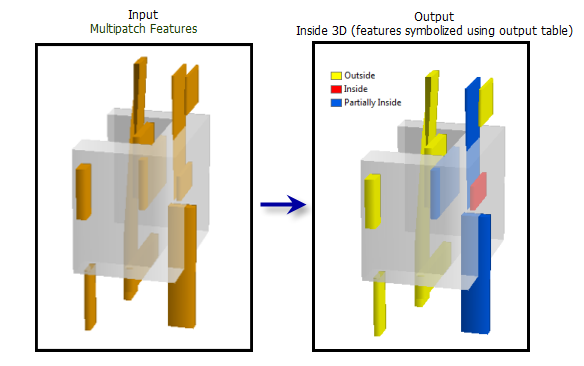
Usage
All input features must have Z information stored as part of their geometry. If field based height measurements are present in a 2D feature class, the Feature To 3D By Attribute tool can be used to create a 3D feature class.
Closed multipatch geometry is required for this analysis. The Is Closed 3D tool can be used to determine if a multipatch feature class contains closed features, and the Enclose Multipatch tool can be used to eliminate gaps in multipatch features.
If the Complex Output Table option is selected, a record is created for each multipatch that a given input feature intersects. A feature may fall within multiple closed multipatch features and have multiple entries in the output table.
The following fields are present in the output table:
Target_ID—The unique ID of the input feature.Status—Indicates if the feature identified by the Target_ID field is inside or partially inside a multipatch.Contain_ID—Identifies the unique ID of the multipatch that intersects the input features are inside or partially inside. Only included if the Complex Output Table option is selected
Parameters
| Label | Explanation | Data type |
|---|---|---|
|
Input Features |
The input multipatch or 3D point, line, or polygon feature class. |
Feature Layer |
|
Input Multipatch Features |
The closed multipatch features that will be used as the containers for the input features. |
Feature Layer |
|
Output Table |
The output table providing a list of 3D features in the Input Features parameter value that are inside or partially inside the Input Multipatch Features parameter value which are closed. The output table contains an |
Table |
|
Complex Output Table (Optional) |
Specifies whether the output table will identify the relationship between the Input Features and the Input Multipatch Features parameter values through the creation of a
|
Boolean |
Environments
Current Workspace, Output CONFIG Keyword, Auto Commit, Extent
Licensing information
- Basic: Requires 3D Analyst
- Standard: Requires 3D Analyst
- Advanced: Requires 3D Analyst