Lookup (3D Analyst Tools)
Summary
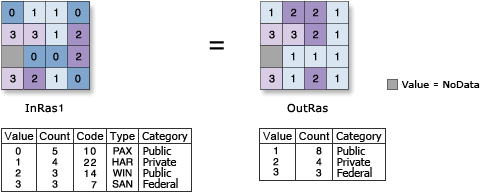
Creates a raster by looking up values in another field in the table of the input raster.
Illustration
Usage
Both numeric (integer or floating point) or string field types are supported. If the field is integer or string, the output will be an integer raster; otherwise, the output raster will be a floating-point raster.
If the lookup field is of integer type, the values of that field will be written to the output raster attribute table as Value. Other items in the input raster attribute table will not be transferred to the output raster attribute table.
For example, an attribute table of input raster with numeric field
Attr1Value Count Attr1 1 294 1 2 345 8 3 654 3Output attribute table from Lookup on
Attr1fieldValue Count 1 294 3 654 8 345If the lookup field is a string type, the lookup field will appear in the output raster attribute table, and the value field will be the same numeric type as for input raster. Any other items in the input raster's attribute table will not be transferred to the output raster's attribute table.
For example, consider the attribute table of an input raster with string field
Text1Value Count Attr1 Text1 1 294 1 A 2 6218 8 B 3 28 3 4 3603 9 3The attribute table of the output raster from running Lookup on the
Text1field would beValue Count Text1 1 294 A 2 6218 B 3 28 4 3603 3
Parameters
| Label | Explanation | Data type |
|---|---|---|
|
Input raster |
The input raster that contains a field from which to create a new raster. |
Raster Layer |
|
Lookup field |
Field containing the desired values for the new raster. It can be a numeric or string type. |
Field |
|
Output raster |
The output raster whose values are determined by the specified field of the input raster. |
Raster Dataset |
Environments
Auto Commit, Cell Size, Cell Size Projection Method, Compression, Current Workspace, Extent, Geographic Transformations, Mask, Output CONFIG Keyword, Output Coordinate System, Scratch Workspace, Snap Raster, Tile Size
Licensing information
- Basic: Requires 3D Analyst or Spatial Analyst
- Standard: Requires 3D Analyst or Spatial Analyst
- Advanced: Requires 3D Analyst or Spatial Analyst