Surface Slope (3D Analyst Tools)
Summary
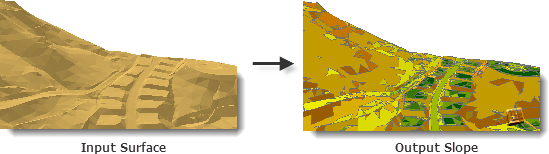
Creates polygon features that represent ranges of slope values for triangulated surfaces.
Illustration
Usage
The surface normal of each triangle, which is given by the vector cross-product of two triangle edges, is used to determine slope in percent or degrees. Percent slope describes the surface normal's ratio of change in height to change in horizontal distance, whereas degree slope is the angle of inclination between the surface normal and a horizontal plane.
Each resulting polygon represents a range of slope values based on the classification breaks used when executing the tool. The default classification breaks divide slope measurements into nine groups and are indicated below:
SLOPE CODE
PERCENT
DEGREE RANGE
1
0.00 — 1.00
0.00 — 0.57
2
1.00 — 2.15
0.57 — 1.43
3
2.15 — 4.64
1.43 — 2.66
4
4.64 — 10.0
2.66 — 5.71
5
10.00 — 21.50
5.71 — 12.13
6
21.50 — 46.40
12.13 — 24.89
7
46.40 — 100.0
24.89 — 45.00
8
100.0 — 1000.0
45.00 — 84.29
9
1000.0 <
84.29 — 90.0
Slope classifications may be customized by specifying a table with up to two fields of numeric values in the Class Breaks Table parameter. The first column identifies the break points of the slope classification. If a second column is provided, its values will be used to associate a code that gets attributed for each polygon feature. If the table below was used, all slope values from 0 to 10 will be represented by a code of 1, 10 to 25 by a code of 2, and so on. The class break units of the table are set in the Slope Units (
units) parameter.CLASS_BREAK
CODE
10.0
1
25.0
2
40.0
3
70.0
4
Note:
The table can be in any supported format (
.dbf,.txt, or geodatabase table). The name of the fields are irrelevant, as the first will always be used for the class breaks and the second for the aspect codes.
Parameters
| Label | Explanation | Data type |
|---|---|---|
|
Input Surface |
The TIN, terrain, or LAS dataset whose slope measurements will be written to the output polygon feature. |
LAS Dataset Layer; Terrain Layer; TIN Layer |
|
Output Feature Class |
The feature class that will be produced. |
Feature Class |
|
Slope Units (Optional) |
The units of measure to be used in calculating slope.
|
String |
|
Class Breaks Table (Optional) |
A table containing classification breaks that will be used to group the output features. The first column of this table will indicate the break point, whereas the second will provide the classification code. |
Table |
|
Slope Field (Optional) |
The field containing slope values. |
String |
|
Z Factor (Optional) |
The factor by which z-values will be multiplied. This is typically used to convert z linear units to match x,y linear units. The default is 1, which leaves elevation values unchanged. This parameter is not available if the spatial reference of the input surface has a z-datum with a specified linear unit. |
Double |
|
Pyramid Level Resolution (Optional) |
The z-tolerance or window-size resolution of the terrain pyramid level that will be used. The default is 0, or full resolution. |
Double |
Environments
Current Workspace, Scratch Workspace, Extent, Output Coordinate System, Geographic Transformations, XY Resolution, XY Tolerance, Output XY Domain, Output CONFIG Keyword, Auto Commit, Minimize memory use during analysis on terrains
Licensing information
- Basic: Requires 3D Analyst
- Standard: Requires 3D Analyst
- Advanced: Requires 3D Analyst