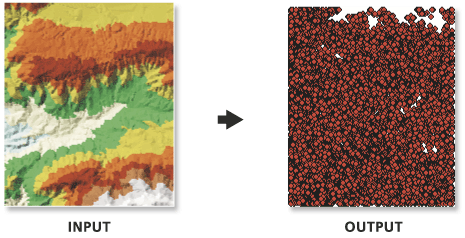
arcpy.3d.TinNode(in_tin, out_feature_class, {spot_field}, {tag_field})
|
Name
|
Explanation
|
Data type
|
|
in_tin
|
The TIN dataset that will be processed.
|
TIN Layer
|
|
out_feature_class
|
The feature class that will be produced.
|
Feature Class
|
|
spot_field
(Optional)
|
The name of the elevation attribute field of the output feature class. If a name is given, the feature class will be 2D; otherwise, it will be 3D. No name is provided by default, which results in the creation of 3D point features.
|
String
|
|
tag_field
(Optional)
|
The name of the field storing the tag attribute in the output feature class. By default, no tag value field is created.
|
String
|
Code sample
TinNode example 1 (Python window)
The following sample demonstrates the use of this tool in the Python window:
arcpy.env.workspace = 'C:/data'
arcpy.ddd.TinNode('tin', 'elevation_node.shp', spot_field='Elevation')
TinNode example 2 (stand-alone script)
The following sample demonstrates the use of this tool in a stand-alone Python script:
"""****************************************************************************
Name: Create Terrain from TIN
Description: This script demonstrates how to create a terrain dataset using
             features extracted from a TIN. It is particularly useful in
             situations where the source data used in the TIN is not available,
             and the amount of data stored in the TIN proves to be too large
             for the TIN. The terrain's scalability will allow improved
             display performance and faster analysis. The script is designed
             to work as a script tool with 5 input arguments.
****************************************************************************"""
# Import system modules
import arcpy

# Set local variables
tin = arcpy.GetParameterAsText(0) # TIN used to create terrain
gdbLocation = arcpy.GetParameterAsText(1) # Folder that will store terran GDB
gdbName = arcpy.GetParameterAsText(2) # Name of terrain GDB
fdName = arcpy.GetParameterAsText(3) # Name of feature dataset
terrainName = arcpy.GetParameterAsText(4) # Name of terrain

try:
    # Create the file gdb that will store the feature dataset
    arcpy.management.CreateFileGDB(gdbLocation, gdbName)
    gdb = '{0}/{1}'.format(gdbLocation, gdbName)
    # Obtain spatial reference from TIN
    SR = arcpy.Describe(tin).spatialReference
    # Create the feature dataset that will store the terrain
    arcpy.management.CreateFeatureDataset(gdb, fdName, SR)
    fd = '{0}/{1}'.format(gdb, fdName)
    # Export TIN elements to feature classes for terrain
    arcpy.AddMessage("Exporting TIN footprint to define terrain boundary...")
    boundary = "{0}/boundary".format(fd)
    # Run TinDomain
    arcpy.ddd.TinDomain(tin, tinDomain, 'POLYGON')
    arcpy.AddMessage("Exporting TIN breaklines...")
    breaklines = "{0}/breaklines".format(fd)
    # Run TinLine
    arcpy.ddd.TinLine(tin, breaklines, "Code")
    arcpy.AddMessage("Exporting TIN nodes...")
    masspoints = "{0}/masspoints".format(fd)
    # Run TinNode
    arcpy.ddd.TinNode(sourceTIN, TIN_nodes)
    arcpy.AddMessage("Creating terrain dataset...")
    terrain = "terrain_from_tin"
    # Run CreateTerrain
    arcpy.ddd.CreateTerrain(fd, terrainName, 10, 50000, "",
                            "WINDOWSIZE", "ZMEAN", "NONE", 1)
    arcpy.AddMessage("Adding terrain pyramid levels...")
    terrain = "{0}/{1}".format(fd, terrainName)
    pyramids = ["20 5000", "25 10000", "35 25000", "50 50000"]
    # Run AddTerrainPyramidLevel
    arcpy.ddd.AddTerrainPyramidLevel(terrain, "", pyramids)
    arcpy.AddMessage("Adding features to terrain...")
    inFeatures = "{0} Shape softclip 1 0 10 true false boundary_embed <None> "\
             "false; {1} Shape masspoints 1 0 50 true false points_embed "\
             "<None> false; {2} Shape softline 1 0 25 false false lines_embed "\
             "<None> false".format(boundary, masspoints, breaklines)
    # Run AddFeatureClassToTerrain
    arcpy.ddd.AddFeatureClassToTerrain(terrain, inFeatures)
    arcpy.AddMessage("Building terrain...")
    # Run BuildTerrain
    arcpy.ddd.BuildTerrain(terrain, "NO_UPDATE_EXTENT")
    arcpy.GetMessages()

except arcpy.ExecuteError:
    print(arcpy.GetMessages())
except Exception as err:
    print(err)