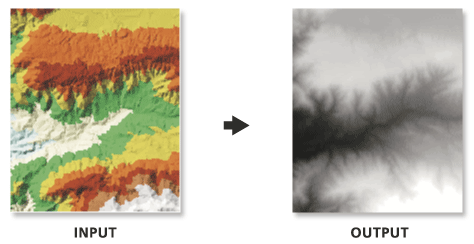
Because interpolation of the input TIN surface occurs at regular intervals, some loss of information in the output raster should be expected. How well the raster represents the TIN is dependent on the resolution of the raster and the degree and interval of TIN surface variation. Generally, as the resolution is increased, the output raster more closely represents the TIN surface. Because the raster is a cell structure, it cannot maintain the hard and soft breakline edges that may be present in the TIN.
When exporting a large raster, you can specify the Output Data Type parameter value as an integer to save disk space if the accuracy requirements of the z-values can be represented by integer data.
The location and name of the output raster. When storing a raster dataset in a geodatabase or in a folder such as an Esri Grid, do not add a file extension to the name of the raster dataset. A file extension can be provided to define the raster's format when storing it in a folder, such as .tif to generate a GeoTIFF or .img to generate an ERDAS IMAGINE format file.
If the raster is stored as a .tif file or in a geodatabase, the raster compression type and quality can be specified using geoprocessing environment settings.
Raster Dataset
Output Data Type
(Optional)
Specifies the type of numeric values that will be stored in the output raster.
Floating Point—The output raster will use 32-bit floating point, which supports values ranging from -3.402823466e+38 to 3.402823466e+38. This is the default.
Integer—The output raster will use an appropriate integer bit depth. This option will round z-values to the nearest whole number and write an integer to each raster cell value.
String
Method
(Optional)
The interpolation method used to create the raster.
Linear—Calculates cell values by applying linear interpolation to the TIN triangles. This is the default.
Natural Neighbors—Calculates cell values by using natural neighbors interpolation of TIN triangles
String
Sampling Distance
(Optional)
The sampling method and distance used to define the cell size of the output raster.
Observations—Defines the number of cells that divide the longest side of the output raster. This method is used by default with the value of 250.
Cell Size—Defines the cell size of the output raster.
String
Z Factor
(Optional)
The factor by which z-values will be multiplied. This is typically used to convert z linear units to match x,y linear units. The default is 1, which leaves elevation values unchanged. This parameter is not available if the spatial reference of the input surface has a z-datum with a specified linear unit.
Double
Sampling Value
The value that corresponds with the Sampling Distance for specifying the output raster's cell size.
The location and name of the output raster. When storing a raster dataset in a geodatabase or in a folder such as an Esri Grid, do not add a file extension to the name of the raster dataset. A file extension can be provided to define the raster's format when storing it in a folder, such as .tif to generate a GeoTIFF or .img to generate an ERDAS IMAGINE format file.
If the raster is stored as a .tif file or in a geodatabase, the raster compression type and quality can be specified using geoprocessing environment settings.
Raster Dataset
data_type
(Optional)
Specifies the type of numeric values that will be stored in the output raster.
FLOAT—The output raster will use 32-bit floating point, which supports values ranging from -3.402823466e+38 to 3.402823466e+38. This is the default.
INT—The output raster will use an appropriate integer bit depth. This option will round z-values to the nearest whole number and write an integer to each raster cell value.
String
method
(Optional)
The interpolation method used to create the raster.
LINEAR—Calculates cell values by applying linear interpolation to the TIN triangles. This is the default.
NATURAL_NEIGHBORS—Calculates cell values by using natural neighbors interpolation of TIN triangles
String
sample_distance[sampling_method distance,...]
(Optional)
The sampling method and distance used to define the cell size of the output raster.
OBSERVATIONS—Defines the number of cells that divide the longest side of the output raster. This method is used by default with the value of 250.
CELLSIZE—Defines the cell size of the output raster.
String
z_factor
(Optional)
The factor by which z-values will be multiplied. This is typically used to convert z linear units to match x,y linear units. The default is 1, which leaves elevation values unchanged. This parameter is not available if the spatial reference of the input surface has a z-datum with a specified linear unit.
Double
sample_value
The value that corresponds with the Sampling Distance for specifying the output raster's cell size.
Double
Code sample
TinRaster example 1 (Python window)
The following sample demonstrates the use of this tool in the Python window:
The following sample demonstrates the use of this tool in a stand-alone Python script:
'''******************************************************************
Name: TinRaster Example
Description: This script demonstrates how to use the
             TinRaster tool to create rasters from
             each TIN in the target workspace.
******************************************************************'''
# Import system modules
import arcpy

# Set environment setting
arcpy.env.workspace = "C:/data"

# Set Local Variables
dataType = "INT"
method = "NATURAL_NEIGHBORS"
sampling = "CELLSIZE 10"
zfactor = "1"

# Create list of TINs
TINList = arcpy.ListDatasets("*", "Tin")

# Verify the presence of TINs in the list
if TINList:
    # Iterate through the list of TINs
    for dataset in TINList:
        # Define the name of the output file
        outRaster = "{0}_natural.img".format(dataset)
        # Run TinRaster
        arcpy.ddd.TinRaster(dataset, outRaster, dataType,
                            method, sampling, zfactor)
    print("Finished.")
else:
    print("There are no TIN(s) in {0}.".format(env.workspace))