Enrich Layer (Analysis Tools)
Summary
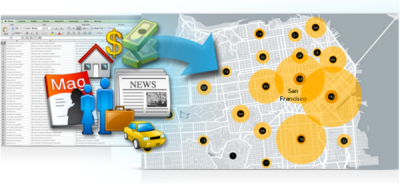
Enriches your data by adding demographic and landscape facts about the people and places that surround or are inside your data locations. The output is a duplicate of your input with new attribute fields added to the table. This tool requires an ArcGIS Online organizational account and consumes credits.
Legacy:
This is a deprecated tool. This functionality has been replaced by the Enrich tool.
Illustration
Usage
License:
To use the Enrich Layer tool, you must be logged in to an ArcGIS Online organization account. Each time the tool runs successfully, service credits are debited from your subscription based on the service used and the results returned from the service. Refer to the ArcGIS Online credit estimator for an estimate of the service credits consumed by this tool.
When the input features are points or lines, you must specify a Define areas to enrich option (
buffer_typeoption in Python) to make straight-line buffer, driving time, or walking-time areas around the features to enrich. The output feature class will be the same geometry as the input but will represent the enriched characteristics of the area specified. For example, if your input is points, the output will also be points, but an enriched output field such asMedian household incomewill represent an area around those points, not a value at the specific point.When using Enrich Layer from the tool dialog box, the Country, Data Collection, and Variables parameters must be entered sequentially. You must select a country to see data collections, and you must select a data collection to see variables.
You can select variables from multiple data collections by first selecting a set of variables from one collection; then select a different data collection and select another set of variables from the new collection.
You can run this tool with only a data collection specified and no variables selected to get all variables in the collection.
This tool creates a new output feature class, which is a copy of the input with additional attributes added. The existing feature geometries and attribute fields and values will not be changed.
Parameters
| Label | Explanation | Data type |
|---|---|---|
|
Input Features |
The features to enrich with new data. |
Feature Layer |
|
Output Feature Class |
The output feature class, which is a copy of the input features with new attribute fields added. |
Feature Class |
|
Country |
The country whose data collections and variables are used to enrich the input. You can use the Global country code to obtain enriched data from anywhere in the world. Global can also be used when you have input features that are in more than one country. |
String |
|
Data Collection |
The collection of data used to enrich the input. You can specify a data collection without selecting any variables to enrich your data with all variables included in that collection. The Global country code only includes one data collection, KeyGlobalFacts. |
String |
|
Variables (Optional) |
The specific variables used to enrich the input. Variables can be from one or multiple data collections. |
String |
|
Define areas to enrich (Optional) |
If the input features are points, you must define an area around them to enrich from one of the following seven types. If the input features are lines, Straight line (Euclidean distance) is the only valid option.
|
String |
|
Distance or time (Optional) |
The value that determines the straight-line distance or drive time around the input features for areas to enrich. The unit of the distance or time should be supplied in the Unit parameter. |
Double |
|
Unit (Optional) |
Specifies the unit for Distance or time parameter value.
|
String |
Derived output
| Label | Explanation | Data type |
|---|---|---|
|
Temporary data used for tool execution |
The temporary data used for tool execution. |
String |
Environments
Extent, Output Coordinate System, Current Workspace, Scratch Workspace, Output has Z values, Default Output Z Value, Geographic Transformations, Output XY Domain, Output Z Domain, XY Resolution, XY Tolerance, Z Resolution, Z Tolerance
Licensing information
- Basic: Yes
- Standard: Yes
- Advanced: Yes