Add Aviation Line Bypass (Aviation Tools)
Summary
Adjusts route polyline features that overlap point features.
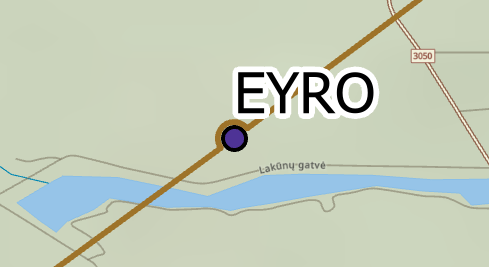
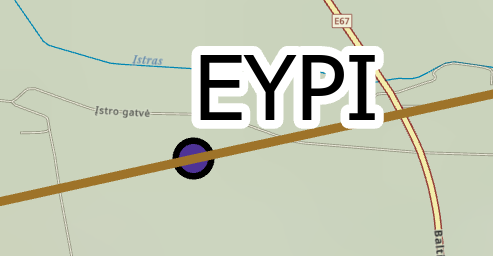
In some cases, an Air Traffic Service (ATS) route may pass through a point such as a navigational aid (navaid) or designated point that is not designated as part of its airway structure. For those cases, the ATS route's line symbol can be depicted as a bypass around the point to more clearly show that the ATS route does not include the point.
When an ATS route bypasses a navaid or designated point, the route representing the line is curved slightly where the point intersects the route. This does not indicate that the flight path has changed, only that the point is not considered part of the ATS route. The following images show the difference between an ATS route that includes a designated point and a route that bypasses a designated point on a navigational chart:
Usage
This tool processes selected polyline features on a map. If no polyline feature is selected, the tool will process all polyline features in the feature class.
Input polyline and point features must be included in the same map that you designate for the Input Map parameter. Input polyline and point features are passed by reference from the input map, not a geodatabase workspace.
The Input Map parameter must have a set reference scale.
If you do not provide features for the Bypass Features parameter, the tool will revert all lines with bypass symbology to straight lines.
Only selected features in the Target Line Features parameter value will be processed by this tool.
The Radius Scale Factor parameter is only valid if the Radius Option parameter value is Dynamic Radius.
The Radius parameter is only valid if the Radius Option parameter value is Constant Radius.
If you do not provide a value for the Tolerance parameter, all features with overlapping symbology will be processed.
Parameters
| Label | Explanation | Data type |
|---|---|---|
|
Input Map |
The input map with a set reference scale. |
Map |
|
Target Line Features |
The polyline features representing ATS routes. |
String |
|
Bypass Features (Optional) |
The point features that the Target Line Features parameter value will bypass. |
String |
|
Tolerance (Optional) |
The maximum distance between the center point of a bypass feature and a route. If no linear unit is specified or is set to Unknown, it will be the same as the input map's spatial reference. |
Linear Unit |
|
Radius Option (Optional) |
Specifies the type of bypass radius that will be used.
|
String |
|
Radius Scale Factor (Optional) |
The amount a bypass with a dynamic radius will be scaled. This parameter is only valid if the Radius Option parameter value is Dynamic Radius. |
Double |
|
Radius (Optional) |
The radius of a bypass with a constant radius. This parameter is only valid if the Radius Option parameter value is Constant Radius. If no linear unit is specified or is set to Unknown, it will be the same as the input map's spatial reference. |
Linear Unit |
|
Merge Option (Optional) |
Specifies whether consecutive bypass lines will be merged.
|
String |
Derived output
| Label | Explanation | Data type |
|---|---|---|
|
Updated Line Features |
The polyline feature class containing bypass lines. |
Feature Layer |
Environments
This tool does not use any geoprocessing environments.
Licensing information
- Basic: No
- Standard: Requires ArcGIS Aviation Charting
- Advanced: Requires ArcGIS Aviation Charting