Overlay Layers (GeoAnalytics Server Tools)
Summary
Overlays the geometries from multiple layers into a single layer. Overlay can be used to combine, erase, modify, or update spatial features.
Legacy:
The ArcGIS GeoAnalytics Server extension is being deprecated in ArcGIS Enterprise. The final release of GeoAnalytics Server was included with ArcGIS Enterprise 11.3. This geoprocessing tool is available through ArcGIS Enterprise 11.3 and earlier versions.
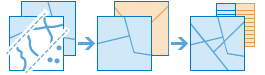
Overlay is used to answer one of the most basic questions of geography, What is on top of what? The following are examples:
What parcels are within the 100-year floodplain? (Within is another way of saying on top of.)
What land use is on top of what soil type?
What mines are within abandoned military bases?
Illustration
Usage
This geoprocessing tool is available with ArcGIS Enterprise 10.6.1 or later.
Use examples include the following:
The department of environmental quality wants to monitor the impact of grazing livestock on the state's water quality. Biologists with the department need to determine where the land deemed to be grazing allotments intersect certain watersheds. Overlay Layers can be used to find intersecting areas.
A development company wants to build a golf resort in one of three centrally located counties in their state. Before they can begin planning, they need to determine whether there is enough privately owned land within those counties that they may be able to purchase for the resort. Overlay Layers can be used to remove the publically owned lands from the selected counties.
With ArcGIS Enterprise 10.6.1, the input layer and overlay layer must have matching geometry types. At ArcGIS Enterprise 10.7, additional relationships are supported.
The following table outlines the Intersect and Erase overlay operations with different geometry types available at ArcGIS Enterprise 10.6.1:
Input layer (green) and overlay layer (yellow)
Intersect results
Erase results
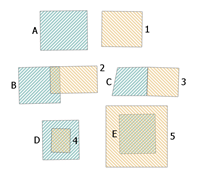
Polygon input layer (green) and overlay layer (yellow).
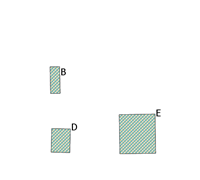
Intersecting polygons of the input and overlay layers. B is the intersection of B and 2. D is the intersection of D and 4. E is the intersection of E and 5.
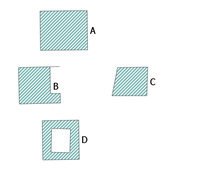
Polygons that are the result of the Erase operation. E has been completely erased, and a portion of B and D have been erased. A and C have not been erased.
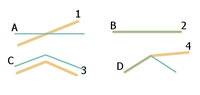
Line input layer (green) and overlay layer (yellow).
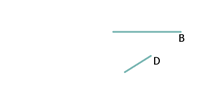
Lines that are the result of the Intersect operation. B is the intersection of B and 2. D is the intersection of D and 4.
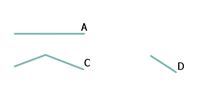
Lines that are the result of the Erase operation. The feature B has been completely erased and a segment of D has been erased. A and C have not been erased.
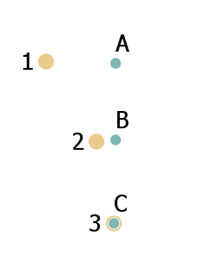
Point input layer (green) and overlay layer (yellow).
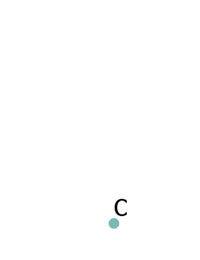
A point that is the result of the Intersect operation. C is the intersection of C and 3.
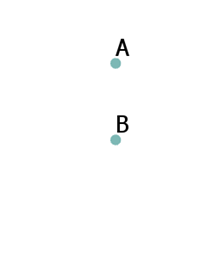
Points that are the result of the Erase operation. The feature C has been erased. A and B are the result of the operation.
With ArcGIS Enterprise 10.6.1, if both layers are polygons, analysis can be accelerated by unchecking the Include Overlapping Input Layers parameter (
include_overlaps=NOT_OVERLAPPINGin Python). Only uncheck this input if both of the following conditions are true:The input layer features do not overlap other input layer features.
The overlay layer features do not overlap other overlay layer features.
You can also uncheck this parameter if you don't want a unique result returned for each self-intersecting overlap. For example, census boundaries would not have any self-overlapping features, and if they were overlaid to another disjoint polygon layer, you could uncheck this parameter. This parameter is not used at ArcGIS Enterprise 10.7 or later.
At ArcGIS Enterprise 10.7 or later, the supported overlay methods and input geometries are described in the following table:
Input and overlay geometry types
Intersect
Erase
Union (available at 10.7)
Identity (available at 10.7)
Symmetric Difference (available at 10.7)
Point and point

Available at 10.6.1 and later.
Available at 10.6.1 and later.
Available at 10.7 and later.
Available at 10.7 and later.
Point and polyline
Available at 10.7 and later.
Point and polygon
Available at 10.7 and later.
Available at 10.7 and later.
Polyline and point
Available at 10.7 and later.
Polyline and polyline
Available at 10.6.1 and later.
Available at 10.6.1 and later.
Available at 10.7 and later.
Available at 10.7 and later.
Polyline and polygon
Available at 10.7 and later.
Available at 10.7 and later.
Polygon and point
Available at 10.7 and later.
Polygon and polyline
Available at 10.7 and later.
Polygon and polygon
Available at 10.6.1 and later.
Available at 10.6.1 and later.
Available at 10.7 and later.
Available at 10.7 and later.
Available at 10.7 and later.
Overlay method
Description
Intersect

The features or portions of features in the overlay that overlap the input features are preserved. The input and feature geometry must be the same.
This is the default.
Erase

The features or portions of features in the input layer that do not overlap the features in the overlay layer are written to the output.
Union

The result will contain a geometric union of the input layer and overlay layer. All features and their attributes will be written to the layer.
Identity

The result will contain features or portions of features of the input features and overlay features. Features or portions of features that overlap in both input layer and overlay layer will be written to the output layer.
Symmetric Difference

The result will contain features or portions of features of the input layer and the overlay layer that do not overlap.
Parameters
| Label | Explanation | Data type |
|---|---|---|
|
Input Layer |
The point, line, or polygon features that will be overlaid with the overlay layer. |
Feature Set |
|
Overlay Layer |
The features that will be overlaid with the input layer features. |
Feature Set |
|
Output Name |
The name of the output feature service. |
String |
|
Overlay Type |
Specifies the type of overlay to be performed.
|
String |
|
Include Overlapping Input Layers (Optional) |
Specifies whether one or both of the input layers have overlapping features. This parameter is only supported for ArcGIS Enterprise 10.6.1.
|
Boolean |
|
Data Store (Optional) |
Specifies the ArcGIS Data Store where the output will be stored. All results stored in a spatiotemporal big data store will be stored in WGS84. Results stored in a relational data store will maintain their coordinate system.
|
String |
Derived output
| Label | Explanation | Data type |
|---|---|---|
|
Output Feature Layer |
The overlay of multiple layers into a single layer. |
Feature Set |
Environments
Output Coordinate System, Extent, Current Workspace
Special cases
- Output Coordinate System
-
The coordinate system that will be used for analysis. Analysis will be completed in the input coordinate system unless specified by this parameter. For GeoAnalytics Tools, final results will be stored in the spatiotemporal data store in WGS84.
Licensing information
- Basic: Requires ArcGIS GeoAnalytics Server
Available with ArcGIS Enterprise 10.6.1 - Standard: Requires ArcGIS GeoAnalytics Server
Available with ArcGIS Enterprise 10.6.1 - Advanced: Requires ArcGIS GeoAnalytics Server
Available with ArcGIS Enterprise 10.6.1