How Feature Outline Masks and Intersecting Layers Masks work
Masking is a process that creates polygons of a specified shape and size around symbolized features and text. Masking polygons can then be used to remove portions of underlying features to improve map clarity. A common use for masking is to mask features around annotation to ensure the text remains readable. The Feature Outline Masks and Intersecting Layers Masks tools have a variety of mask kinds to choose from.
Kinds of masks
The exact shape of the masked polygons is dictated by the Mask Kind parameter (method parameter in Python).
| Mask Kind parameter value | Example |
|---|---|
| Box — A polygon representing the extent of the symbolized feature. | 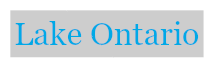 |
| Convex hull — The convex hull of the symbolized geometry of the feature. This is the default. | 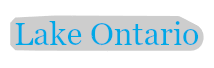 |
| Exact simplified — A generalized polygon representing the exact shape of the symbolized feature. Polygons created with this method have a significantly smaller number of vertices compared to polygons created with the Exact method. |  |
| Exact — A polygon representing the exact shape of the symbolized feature. |  |