Batch Update Fields (Data Management Tools)
Summary
Transforms fields in a table or feature class based on schema defined in the definition table and creates a new table or feature class.
You can do the following using this tool:
Add new fields.
Update existing fields.
Reorder fields.
Change field types.
Change field properties.
Assign or update field aliases.
Calculate field values based on existing fields using Python.
Remove fields.
Usage
The input table can be a feature class or a table. The tool outputs a new feature class or table with the updated schema.
The schema changes for the output table are defined by the Output Schema Definition Table parameter.
The following is an example of a definition table:
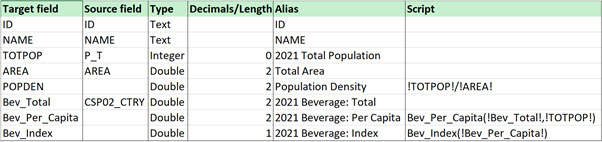
If the Output Schema Definition Table parameter value includes the following field names, as in the example above, the corresponding parameter values will be populated automatically:
Target fieldSource fieldTypeDecimals/LengthAliasScript
Note:
ScriptorSource fieldmust be populated.The tool calculates new fields using existing fields by providing a script field in the definition table.
An example value in the
Scriptfield of the definition table is!TOTPOP!/!AREA!, which calculates thePopulation Densityfield. Field names must be enclosed in exclamation points.If the input table contains a join, you can create a script in the output schema definition table to use in calculating new fields. It will include the calculated field in the output table, but the joined table's fields will be excluded.

The tool can create additional fields that are dependent on other field calculations. For example, the
Bev_Indexfield is calculated using theBev_Per_Capitafield, which is also calculated when the tool is run.Use the Script File parameter for multiline Python calculations. To use a script file, create a file with Python functions, and reference the functions in the definition table.
The following is an example of script code for a target field named
Bev_Per_Capita:A field named
Scriptin the Output Schema Definition Table parameter value with a value ofBev_Per_Capita(!Bev_Total!, !TOTPOP!)A Script File parameter value with the following function:
def Bev_Per_Capita(Bev_Total, TOTPOP):
    return Bev_Total / TOTPOP
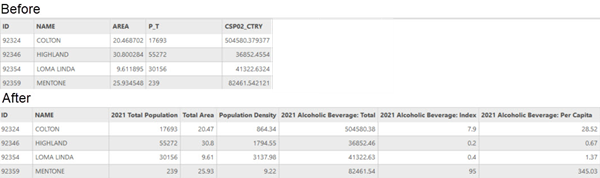
The following is an example showing the attribute table before and after running the tool:
Parameters
| Label | Explanation | Data type |
|---|---|---|
|
Input Table |
The input table or feature class. |
Table View |
|
Output Table |
The output table or feature class containing the updated fields. |
Table |
|
Output Schema Definition Table |
A table containing the field definitions and calculations that will be used to create the output. |
Table View |
|
Script File (Optional) |
A Python file that stores multiline Python functions to perform calculations for the Output Table parameter fields. |
File |
|
Output Field Name (Optional) |
The field name from the definition table that contains the target field names for the output table. |
Field |
|
Source Field Name (Optional) |
The field name from the definition table that contains the source field names from the input table. |
Field |
|
Output Field Type (Optional) |
The field in the Output Schema Definition Table parameter value that defines the data types for the output table. The field is expected to be of Text type. The field in the The following values are supported:
|
Field |
|
Output Field Decimals or Length (Optional) |
The field name from the definition table that defines the number of decimals or the length of the field for the output fields. |
Field |
|
Output Field Alias (Optional) |
The field name from the definition table that defines the alias names for the fields of the output table. |
Field |
|
Output Field Script (Optional) |
The field name from the definition table that defines the calculations for the output fields. |
Field |
Environments
Licensing information
- Basic: Yes
- Standard: Yes
- Advanced: Yes