Field Statistics To Table (Data Management Tools)
Summary
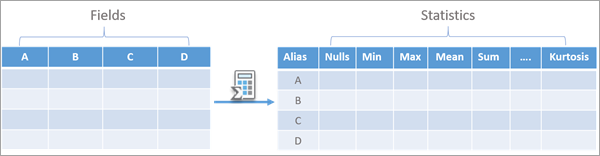
Creates a table of descriptive statistics for one or more input fields in a table or feature class.
Illustration
Usage
The tool accepts a feature class or stand-alone table as input.
For the Input Fields parameter, multiple fields can be specified for which statistics can be calculated. The parameter accepts numeric (Short, Long, Big Integer, Float, and Double types), Text, and Date (Date, Date Only, Time Only and Timestamp Offset) type fields.
The order of the fields specified by the Input Fields parameter will be the order of the rows in the output table.
The Group By Field parameter is used to calculate input field statistics separately for each unique value in the specified field. The statistics for each of the input fields will be calculated and reported once per unique value in the group by field.
The Output Tables parameter has four options for the Field Types column:
All—All of the input fields and output statistics, regardless of the field type, will be exported to a single output table.
Numeric—Only the Numeric type input fields (Short, Long, Big Integer, Float, and Double) will be exported, and only the statistics applicable to Numeric field types will be exported to the output table.
Text—Only the Text type input fields will be exported, and only the statistics applicable to the Text field type will be exported to the output table.
Date—Only the Date type input fields (Date, Date Only, Time Only, Timestamp Offset) will be exported, and only the statistics applicable to the Date field type will be exported to the output table.
For each output table, the name of the table is specified in the Output Name column of the Output Tables parameter, and the table will be saved in the workspace specified by the Output Location parameter.
The output statistics and their field names can be configured using the Output Statistics parameter. If no value is provided for this parameter, all of the applicable output statistics will be included in the output tables. The following table lists the available statistics and the corresponding output field type for each option of the Field Types column of the Output Tables parameter:
Output statistic
All
Numeric
Text
Date
Field Name
Text
Text
Text
Text
Alias
Text
Text
Text
Text
Field type
Text
Text
Text
Text
Nulls
Long
Long
Long
Long
Minimum
Text
Double
-
Date
Maximum
Text
Double
-
Date
Mean
Text
Double
-
Date
Standard deviation
Double
Double
-
-
Median
Text
Double
-
Date
Count
Long
Long
Long
Long
Number of unique values
Long
Long
Long
Long
Mode
Text
Double
Text
Date
Least common
Text
Double
Text
Date
Outliers
Long
Long
-
-
Sum
Double
Double
-
-
Range
Text
Double
-
Text
Interquartile range
Double
Double
-
-
First quartile
Text
Double
-
Date
Third quartile
Text
Double
-
Date
Coefficient of variation
Double
Double
-
-
Skewness
Double
Double
-
-
Kurtosis
Double
Double
-
-
The available statistics are the same as those available in the Data Engineering view. For details on how each statistic is calculated, see Interact with statistics.
If you choose All for the Field Types column of the Output Tables parameter, all the field types will be exported in a single table. This can help you visualize all the input fields and their statistics at once. This provides advantages for certain applications; for example, it might be preferred when using the statistics in a layout or a report. However, there are caveats to exporting different field types as a single table. Some statistic options that are common across field types, including Mode, Least Common, Minimum, and Maximum, will be stored as text fields in the output table. This can cause problems, for example, when sorting these values in the statistics columns or chaining the output statistics in a model. There will also be empty cells in the table, as certain statistics do not apply to text or date fields.
If you choose Numeric, Text, or Date for the Field Types column of the Output Tables parameter, each field type will be exported in a separate table, and the output tables will only include the statistics applicable to that field type. Some statistics that apply to multiple field types will be stored in the format matching the input field type. For example, in the Numeric table, the Minimum field will be of type Double, and it will be of type Date in the Date table. It is recommended that you have different output tables. For example, to save the statistics as the same type as the input fields, sort the statistics in the output table or use their values in a model.
The Mode and Least Common options for the Statistic column of the Output Statistics parameter can correspond to multiple values in an input field in the case of a tie. In such cases, multiple values will be reported as <Null> for Numeric, Text, and Date output tables. For the All option, the output cell will contain the text Multiple Values.
Parameters
| Label | Explanation | Data type |
|---|---|---|
|
Input Table |
The input table containing the fields that will be used to create the statistics table. |
Table View |
|
Input Fields |
The fields containing the values that will be used to calculate the statistics. |
Field |
|
Output Location |
The location where the output tables will be created. The location can be a geodatabase, folder, or feature dataset. |
Workspace |
|
Output Tables |
The output tables containing the statistics. The Field Types column specifies the field types that will be included in each output table, and the name of each output table is provided in the Output Name column. For example, you can create a single table with summaries of all field types, or you can create separate tables for summaries of Numeric, Text, and Date field types. Value table columns:
|
Value Table |
|
Group By Field (Optional) |
The field that will be used to group rows into categories. If a group by field is provided, each field of the input will appear as a row in the output table once per unique value in the group by field. |
Field |
|
Output Statistics (Optional) |
Specifies the statistics that will be summarized and the names of the output fields containing the statistics. The statistic is provided in the Statistic column, and the name of the output field is provided in the Output Field Name column. If no values are provided, all applicable statistics will be calculated for all input fields. Only statistics applicable to the input fields will be available. Value table columns:
|
Value Table |
Derived output
| Label | Explanation | Data type |
|---|---|---|
|
Output Table for Numeric Fields |
The output tables for Numeric data types. The table will be saved in the workspace specified in the Output Location parameter. |
Table |
|
Output Table for Text Fields |
The output tables for Text data types. The table will be saved in the workspace specified in the Output Location parameter. |
Table |
|
Output Table for Date Fields |
The output tables for Date data types. The table will be saved in the workspace specified in the Output Location parameter. |
Table |
|
Output Table for All Fields |
The output tables for all data types. The table will be saved in the workspace specified in the Output Location parameter. |
Table |
Environments
This tool does not use any geoprocessing environments.
Licensing information
- Basic: Yes
- Standard: Yes
- Advanced: Yes