Generate Tessellation (Data Management Tools)
Summary
Generates a tessellated grid of regular polygon features to cover a given extent. The tessellation can be of triangles, squares, diamonds, hexagons, H3 hexagons, or transverse hexagons.
Illustration
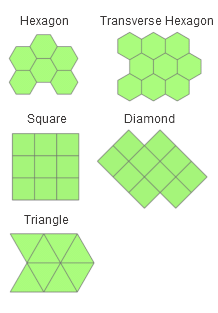
Usage
To ensure that the entire input extent is covered by the tessellated grid, the output features purposely extend beyond the input extent. This occurs because the edges of the tessellated grid will not always be straight lines, and gaps would be present if the grid was limited by the input extent.
For Shape Type parameter options other than H3 hexagon, the output features are created using Euclidean calculations. For best results the Extent parameter value should be in a coordinate system that minimizes distance or area distortion. Extents should be in an appropriate projected coordinate system. Extents with a geographic coordinate system or projected coordinate systems that are not appropriate for distance measurements should be projected first.
When the Shape Type parameter value is H3 hexagon, the
GRID_IDfield values will be a unique hierarchical index for each cell.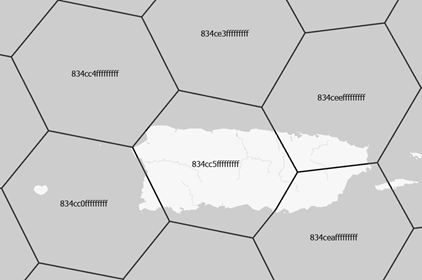
For all other Shape Type parameter values, the
GRID_IDfield will be a unique ID for each feature. The format for the IDs is A-1, A-2, B-1, B-2, and so on. This allows for the selection of rows and columns by query using the Select Layer By Attribute tool. For example, select all features in column A withGRID_ID like 'A-%', or select all features in row 1 withGRID_ID like '%-1'.The spatial reference of the output is determined by the following:
The Spatial Reference parameter value, if specified
If the Spatial Reference parameter is not specified, the Output Coordinate System environment value will be used, if set
If neither of these are set, the spatial reference of the Extent parameter value will be used
The Extent parameter's value consists of coordinates defining a rectangle as well as a spatial reference. When the extent is set from an existing object, such as the active map's extent, or when using
arcpy.Describe(dataset).extentin Python, the object's spatial reference is typically included.If the Extent parameter value has an undefined spatial reference, the coordinates are assumed to be in the spatial reference of the output.
If the Extent parameter value has a spatial reference that is different than the Output Feature Class parameter value's spatial reference, the features will be generated in the Extent parameter value's spatial reference, and will be projected to the spatial reference of the output. This does not apply when the Shape Type parameter value is H3 hexagon.
To generate a grid that excludes tessellation features that do not intersect features in another dataset, use the Select Layer By Location tool to select output polygons that contain the source features, and use the Copy Features tool to make a permanent copy of the selected output features to a new feature class.
The tool generates shapes based on a specified area. To determine the area of a shape based on the length of a side, use one of the following formulas to calculate the value of the Size parameter:
Shape
Formula
Example
Hexagon or Transverse hexagon
\(A = \frac{3\sqrt{3}}{2}\mathsf{s}^2\)
To generate hexagons with a side length of 100 meters, specify the Size parameter value of 25980.76211353316 square meters (100 raised to the power of 2 multiplied by 3 multiplied by the square root of 3 divided by 2).
Square
\(A = \mathsf{s}^2\)
To generate squares with a side length of 100 meters, specify the Size parameter value of 10,000 square meters (100 raised to the power of 2).
Diamond
\(A = \mathsf{s}^2\)
To generate diamonds with a side length of 100 meters, specify the Size parameter value of 10,000 square meters (100 raised to the power of 2).
Triangle
\(A = \frac{\sqrt{3}}{4}\mathsf{s}^2\)
To generate triangles with a side length of 100 meters, specify the Size parameter value of 4330.127018922193 square meters (100 raised to the power of 2 multiplied by the square root of 3 divided by 4).
The Shape Type parameter's H3 hexagon option ignores the Size parameter. The area of the hexagon will be based on the H3 Resolution parameter value.
Parameters
| Label | Explanation | Data type |
|---|---|---|
|
Output Feature Class |
The path and name of the output feature class containing the tessellated grid. |
Feature Class |
|
Extent |
The extent that the tessellation will cover. This can be the currently visible area, the extent of a dataset, or manually entered values.
When coordinates are manually provided, the coordinates must be numeric values and in the active map's coordinate system. The map may use different display units than the provided coordinates. Use a negative value sign for south and west coordinates. |
Extent |
|
Shape Type (Optional) |
Specifies the shape that will be generated.
|
String |
|
Size (Optional) |
The area of each individual shape that comprises the tessellation. |
Areal Unit |
|
Spatial Reference (Optional) |
The spatial reference that will be assigned to the output feature class. |
Spatial Reference |
|
H3 Resolution (Optional) |
Specifies the H3 resolution of the hexagons. With each increasing resolution value, the area of the polygons will be one seventh the size.
This parameter is active when the Shape Type parameter is set to H3 hexagon. |
Long |
 —The extent will be based on the active map or scene.
 —The extent will be based on a rectangle drawn on the map or scene.
 —The extent will be based on an active map layer. Choose an available layer or use the Extent of data in all layers option. Each map layer has the following options:
 —The extent of all features.
 —The extent of the selected features.
 —The extent of visible features.
 —The extent will be based on a dataset.
 —The extent can be copied to and from the clipboard.
 —Copies the extent and coordinate system to the clipboard.
 —The extent will be reset to the default value.
Environments
Output XY Domain, Output Coordinate System, Current Workspace, Geographic Transformations, Scratch Workspace, XY Resolution, XY Tolerance, Extent
Licensing information
- Basic: Yes
- Standard: Yes
- Advanced: Yes