Import Mosaic Dataset Geometry (Data Management Tools)
Summary
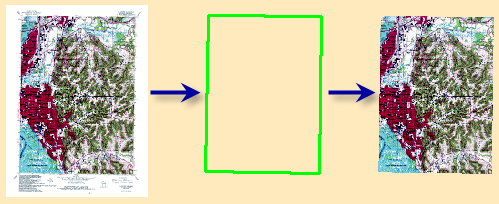
Modifies the geometry for the footprints, boundary, or seamlines in a mosaic dataset to match those in a feature class.
Illustration
Usage
This tool matches the feature in the mosaic dataset with the feature in the feature class based on a common attribute field.
The footprint is not always used to clip the image in the mosaic dataset. You can change the Always Clip The Image To Its Footprint property in the Mosaic Dataset Properties dialog box on the Defaults tab.
If the Input Feature Class has more than 1,000 records, you should add an index on the Input Join Field by running the Add Attribute Index tool. If your mosaic dataset is very large and the join field is not indexed, the tool will take much longer to complete.
Parameters
| Label | Explanation | Data type |
|---|---|---|
|
Mosaic Dataset |
The mosaic dataset whose geometries you want to edit. |
Mosaic Layer |
|
Target Feature Class |
The geometry that you want to change.
|
String |
|
Target Join Field |
The field in the mosaic dataset to use as a basis for the join. |
Field |
|
Input Feature Class |
The feature class with the new geometry. |
Feature Layer |
|
Input Join Field |
The field in the Input Feature Class to use as a basis for the join. If the Input Feature Class has more than 1,000 records, add an index on this field by running the Add_Attribute_Index tool. If your mosaic dataset is very large and the join field is not indexed, the tool will take much longer to complete. |
Field |
Derived output
| Label | Explanation | Data type |
|---|---|---|
|
Updated Mosaic Dataset |
The updated mosaic dataset. |
Mosaic Layer |
Environments
This tool does not use any geoprocessing environments.
Licensing information
- Basic: No
- Standard: Yes
- Advanced: Yes