Align Features (Editing Tools)
Summary
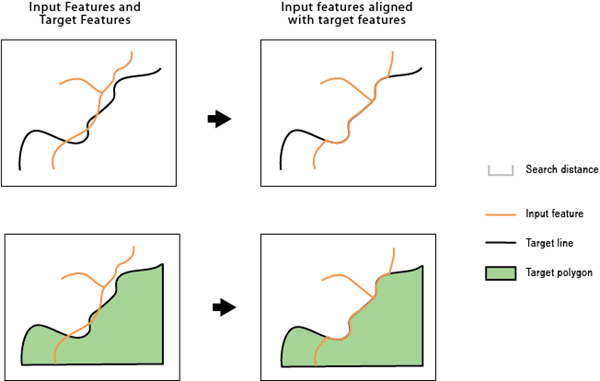
Identifies inconsistent portions of the input features compared to target features within a search distance and aligns them with the target features.
Illustration
Usage
Caution:
This tool modifies the input data. See Tools that modify or update the input data for more information and strategies to avoid undesired data changes.
Note:
All inputs must be in the same coordinate system.
The input features and target features can be line or polygon features. For example, you may have a county boundary as a line or a polygon, but a portion of it differs from the river centerline that is the border between it and the neighboring county. This tool can be used to align that portion of the county boundary with the river centerline so they are coincident.
An input feature or a portion of it becomes an alignment candidate when it is within the specified Search Distance value to the target feature. The candidate shape must be similar to the target shape. For example, an input road feature and a target road feature running in parallel are more similar than the two features crossing each other in a 90 degree angle.
If specified, the Match Fields parameter determines whether the alignment candidates are more likely the correct matching features to their targets. For example, if two input features are found within the search distance to a target feature and they both are similar in shape to the target, the one with a matching field value will be a stronger candidate.
The alignment preserves existing topological relationships among the input features. For example, if a line, with its endpoints connected with other lines, is moved due to the alignment, the endpoints of all the connecting lines are moved so that the lines remain connected.
The
AF_CONFfield is added to the modified input. This field stores a value greater than 0 up to a maximum of 100, indicating the confidence level of the alignment for each feature. A value of 100 means no ambiguity in the candidate for the alignment. The value will decrease due to multiple potential candidates found, greater differences in shape, or unmatched attributes when the Match Fields parameter is specified. A value of -1 is given to unmodified features. Due to the possible complexity of the input and target features, unexpected alignment may occur. Postinspection may be necessary, especially for features with relatively lowAF_CONFvalues.
Parameters
| Label | Explanation | Data type |
|---|---|---|
|
Input Features |
The input line or polygon features that will be adjusted. |
Feature Layer |
|
Target Features |
The input lines or polygons to which the input features will be aligned. |
Feature Layer |
|
Search Distance |
The distance that will be used to search for match candidates. A distance must be specified and it must be greater than zero. You can choose a preferred unit. The default is the feature unit. |
Linear Unit |
|
Match Fields (Optional) |
The fields from the input and target features. If provided, each pair of fields will be checked for match candidates to help determine the right match. Value table columns:
|
Value Table |
Derived output
| Label | Explanation | Data type |
|---|---|---|
|
Output Features |
The updated input features. |
Feature Layer |
Environments
Licensing information
- Basic: No
- Standard: No
- Advanced: Yes