Rubbersheet Features (Editing Tools)
Summary
Modifies input features by spatially adjusting them through rubbersheeting, using the specified rubbersheet links, so they are better aligned with the intended target features.
Illustration
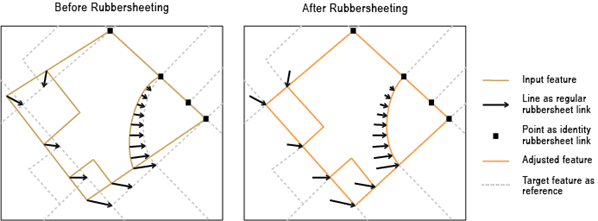
Usage
Caution:
This tool modifies the input data. See Tools that modify or update the input data for more information and strategies to avoid undesired data changes.
This tool is intended to be used after the Generate Rubbersheet Links tool. Rubbersheeting makes spatial adjustments to align the input feature locations with more accurate target feature locations based on the specified rubbersheet links. The input link features represent the regular links; the input point features represent identity links that hold source positions unmoved during the rubbersheeting process. Both input link features and identity link features must have
SRC_FIDandTGT_FIDfields.Note:
All inputs must be in the same coordinate system.
The Method parameter determines the interpolation method used to create the temporary TINs in rubbersheeting.
Linear—This method creates a quick TIN surface but does not really take into account the neighborhood. It is slightly faster and produces good results when you have many rubbersheet links spread uniformly over the data you are adjusting.
Natural neighbor—This method is slower but is more accurate when you don't have many rubbersheet links and they are scattered across the dataset. Using the linear method in this case will be less accurate.
Parameters
| Label | Explanation | Data type |
|---|---|---|
|
Input Features |
The input features that will be adjusted. They can be points, lines, polygons, or annotations. |
Feature Layer |
|
Input Link Features |
The input line features representing regular links for rubbersheeting. |
Feature Layer |
|
Input Point Features As Identity Links (Optional) |
The input point features representing identity links for rubbersheeting. |
Feature Layer |
|
Method (Optional) |
Specifies the rubbersheeting method that will be used to adjust features.
|
String |
Derived output
| Label | Explanation | Data type |
|---|---|---|
|
Modified Input Features |
The updated input features. |
Feature Layer |
Environments
Licensing information
- Basic: No
- Standard: No
- Advanced: Yes