Dissolve Boundaries (Standard Feature Analysis Tools)
Summary
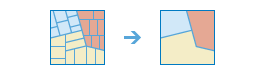
Finds polygons that overlap or share a common boundary and merges them together to form a single polygon.
You can control which boundaries are merged by specifying a field. For example, if you have a layer of counties and each county has a State_Name field, you can dissolve boundaries using the State_Name field. Adjacent counties will be merged together if they have the same value for State_Name. The end result is a layer of state boundaries.
Illustration
Usage
There are two methods for dissolving boundaries: overlapping or adjacent areas and field value.
This tool has the option to calculate statistics on numerical fields for areas that are being dissolved together. The statistics include sum, average, minimum, maximum, and standard deviation. Each time a field and statistic is entered, a new row will be added to the tool pane so more than one statistic can be calculated at once.
Parameters
| Label | Explanation | Data type |
|---|---|---|
|
Input Layer |
The layer containing polygon features that will be dissolved or combined. |
Feature Set |
|
Output Name |
The name of the output layer that will be created on your portal. |
String |
|
Dissolve Fields (Optional) |
One or more fields from the input layer that control which polygons will be merged. If you don't provide a value, polygons that share a common border (that is, they are adjacent) or polygon areas that overlap will be dissolved into one polygon. If you do provide a value, polygons that share a common border and contain the same value in one or more fields will be dissolved. For example, if you have a layer of counties and each county has a |
Field |
|
Summary Fields (Optional) |
A list of field names and statistical summary type that will be calculated for all points within each polygon. The count of points within each polygon is always returned. Value table columns:
|
Value Table |
Derived output
| Label | Explanation | Data type |
|---|---|---|
|
Output |
The output polygon layer with dissolved boundaries. |
Feature Set |
Environments
Licensing information
- Basic: Requires your account in ArcGIS Enterprise to have the Perform Analysis privilege
- Standard: Requires your account in ArcGIS Enterprise to have the Perform Analysis privilege
- Advanced: Requires your account in ArcGIS Enterprise to have the Perform Analysis privilege