Overlay Layers (Standard Feature Analysis Tools)
Summary
Overlays the geometries from multiple layers into one single layer. Overlay can be used to combine, erase, modify, or update spatial features. Overlay is more than a merging of geometries; all the attributes of the features in the overlay are included in the output.
Overlay is used to answer one of the most basic questions of geography: "What is on top of what?". The following are examples:
What parcels are within the 100-year floodplain? (Within is just another way of saying on top of.)
What roads are within what countries?
What land use is on top of what soil type?
What wells are within abandoned military bases?
Illustration
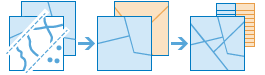
Usage
Example uses of this tool include the following:
The department of environmental quality wants to monitor the impact of grazing livestock on the state's water quality. Biologists with the department need to determine where the land deemed to be grazing allotments intersects with certain watersheds. This tool can be used to find intersecting areas.
A development company wants to build a golf resort in one of three centrally located counties in their state. Before they can begin planning, they need to determine whether there is enough privately owned land within those counties that they may be able to purchase for the resort. This tool can be used to remove the publically owned lands from the selected counties.
This tool requires two inputs: an input layer and an overlay layer. The availability of overlay method options depends on whether the input and overlay layers are points, lines, or areas. The following table describes the method options:
Overlay method
Input layer
Overlay layer
Description
Intersect

Points, lines, or areas
Points, lines, or areas
The features or portions of features in the input that are overlapped with the overlay features will be kept.
The type of output can be specified as Points, Lines, or Areas when intersecting line or area features. The dimension of the output geometry type must be the same or less than both the input and overlay dimensions in which Points=0 dimensions, Lines=1 dimension, and Areas=2 dimensions.
This is the default.
Union

Areas
Areas
The input and overlay areas will be combined.
Erase

Areas
Points, lines, or areas
The features or portions of features in the input areas that are overlapped with the overlay features will be removed.
Parameters
| Label | Explanation | Data type |
|---|---|---|
|
Input Layer |
The point, line, or polygon features that will be overlaid with the overlay layer. |
Feature Set |
|
Overlay Layer |
The features that will be overlaid with the input layer features. |
Feature Set |
|
Output Name |
The name of the output layer that will be created on your portal. |
String |
|
Overlay Type (Optional) |
The type of overlay that will be performed.
|
String |
|
Output Type (Optional) |
The type of intersection that will be returned. This parameter is only valid when the overlay type is intersect.
|
String |
|
Snap To Input (Optional) |
Specifies whether feature vertices from the input layer can snap their vertices.
|
Boolean |
|
Tolerance (Optional) |
A double value of the minimum distance separating all feature coordinates as well as the distance a coordinate can move in the x or y direction (or both). The units of tolerance are the same as the units of the input layer's coordinate system. |
Double |
Derived output
| Label | Explanation | Data type |
|---|---|---|
|
Output |
The features that are the result of the overlay. The type of feature (point, line, or polygon) depends on the input parameter settings. |
Feature Set |
Environments
Licensing information
- Basic: Requires your account in ArcGIS Enterprise to have the Perform Analysis privilege
- Standard: Requires your account in ArcGIS Enterprise to have the Perform Analysis privilege
- Advanced: Requires your account in ArcGIS Enterprise to have the Perform Analysis privilege