Neighborhood Selection (Geostatistical Analyst Tools)
Summary
Creates a layer of points based on a user-defined neighborhood.
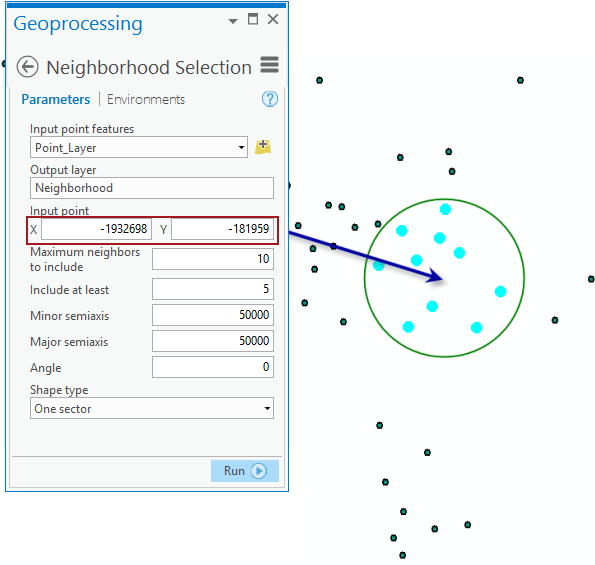
For example, you can create a selection of points in a circular neighborhood around a location defined by the input point.
Illustration
Usage
- This tool can be used in conjunction with tools in the Interpolation toolset when different searching neighborhoods are examined.
Parameters
| Label | Explanation | Data type |
|---|---|---|
|
Input point features |
The points that will be used to create a neighborhood selection. |
Feature Layer |
|
Output layer |
An output layer with the neighborhood selection. |
Feature Layer |
|
Input point |
The neighborhood center's x,y-coordinate. |
Point |
|
Maximum neighbors to include |
The number of points that will be used in each sector. If a sector has the required number of points, all points in that sector will be used. |
Long |
|
Include at least |
The minimum number of points that will be used in each sector. If the minimum number of required points are not available in any given sector, the nearest available point outside the sector will be selected. |
Long |
|
Minor semiaxis |
The size of the minor semiaxis of the search neighborhood. |
Double |
|
Major semiaxis |
The size of the major semiaxis of the search neighborhood. |
Double |
|
Angle |
The angle of rotation of the neighborhood axis. |
Double |
|
Shape type (Optional) |
Species the geometry of the neighborhood.
|
String |
Environments
Licensing information
- Basic: Requires Geostatistical Analyst
- Standard: Requires Geostatistical Analyst
- Advanced: Requires Geostatistical Analyst