Converting inputs from degrees to radians for Trigonometric tools
 Available with Image Analyst license.
Available with Spatial Analyst license.
To use degrees as inputs for trigonometric tools, the values need to be converted into radians. To do the conversion, multiply the input values by \(\pi\) / 180, or approximately 0.01745.
In Python, this conversion can be done directly in the expression, or you can define a variable to store the value once and reuse it as needed. Using the Cos tool as an example, the syntax could be in the following form:
>>> import math
>>> from arcpy.ia import *
>>> OutRas = Cos (InRas * math.pi / 180.0)
Or, you can use a variable for the conversion factor:
>>> import math
>>> deg2rad = math.pi / 180.0
>>> from arcpy.ia import *
>>> OutRas = Cos (InRas * deg2rad)
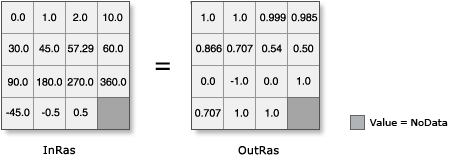
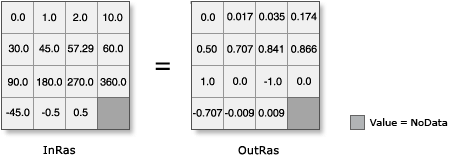
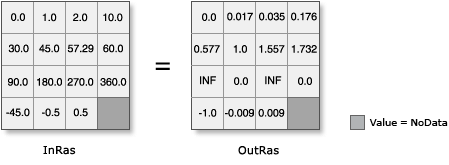
The following illustrations demonstrate converting inputs whose values are in degrees into radians before performing the particular operation.
Note:
The variable defined in the example above will be used in these examples.
Examples of converting trigonometric inputs to radians
|
Tool |
Illustration and Python syntax |
|
|
|
|
|
|
|
|