Calculate Density (Raster Analysis Tools)
Summary
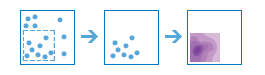
Creates a density map from point or line features by spreading known quantities of some phenomenon (represented as attributes of the points or lines) across the map. The result is a layer of areas classified from least dense to most dense.
A barrier can be used to alter the influence of a feature while calculating density.
Illustration
Usage
This raster analysis portal tool is available when you are signed in to an ArcGIS Enterprise portal that has ArcGIS Image Server configured for Raster Analysis. When the tool is run, ArcGIS Pro serves as a client and the processing occurs in the servers federated with ArcGIS Enterprise. The portal tool accepts layers from your portal as input and creates output in your portal.
The input feature layer can be a layer from the portal or a URI or URL to a feature service. While you can use local feature data and layers as input to this portal tool, best practice is to use layers from your portal as input.
Larger values of the radius parameter produce a density raster that is smoother. Smaller values produce a raster that changes more abruptly. If no value is provided, the tool will calculate one based on the number of points and their coordinates.
Only the points or portions of a line that fall within the neighborhood are considered when calculating density. If no points or line sections fall within the neighborhood of a particular cell, the density of that cell will be zero.
Parameters
| Label | Explanation | Data type |
|---|---|---|
|
Input Point or Line Features |
The input point or line features that will be used to calculate the density raster. |
Feature Set |
|
Output Name |
The name of the output raster service. The default name is based on the tool name and the input layer name. If the layer name already exists, you will be prompted to provide another name. |
String |
|
Count Field (Optional) |
A field indicating the number of incidents at each location. For example, if you are making a population density raster, and the input points are cities, it is appropriate to use the population of the city for the count field so cities with larger populations have more impact on the density calculations. |
Field |
|
Search Distance (Optional) |
The search distance and units for the distance. When calculating the density of a cell, all features within this distance will be used in the density calculation for that cell. The unit values are Kilometers, Meters, Statute Miles, International Feet, US Survey Miles, and US Survey Feet. The default units are meters. |
Linear Unit |
|
Output Area Units (Optional) |
Specifies the units that will be used for calculating area. Density is count divided by area, and this parameter sets the units of the area in the density calculation.
|
String |
|
Output Cell Size (Optional) |
The cell size and units for the output raster. The unit values are Kilometers, Meters, Statute Miles, International Feet, US Survey Miles, and US Survey Feet. |
Linear Unit |
|
Input Barrier Features (Optional) |
The dataset that defines the barriers. The barriers can be a feature layer of polyline or polygon features. |
Feature Set |
Derived output
| Label | Explanation | Data type |
|---|---|---|
|
Output Raster |
The output raster. |
Raster Layer |
Environments
Extent, Cell Size, Mask, Output Coordinate System, Pyramid, Snap Raster
Licensing information
- Basic: Requires ArcGIS Image Server
- Standard: Requires ArcGIS Image Server
- Advanced: Requires ArcGIS Image Server