Classify Objects Using Deep Learning (Raster Analysis Tools)
Summary
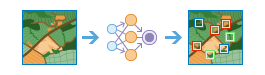
Runs a trained deep learning model on an input raster and an optional feature class to produce a feature class or table in which each input object or feature has an assigned class or category label.
Illustration
Usage
The raster analysis server Python environment must be configured with the proper deep learning framework Python API such as CNTK or something similar.
With this tool running, the raster analysis server calls a third-party deep learning Python API (such as CNTK) and uses the specified Python raster function to process each raster tile.
The input model of this tool will only take a deep learning package (
.dlpkfile) item from the portal.After the input model is selected or specified, the tool will obtain the model arguments information from the raster analysis server. The tool may fail to obtain such information if the input model is invalid or the raster analysis server isn't properly configured with the deep learning framework.
Parameters
| Label | Explanation | Data type |
|---|---|---|
|
Input Raster |
The input image to classify. The image can be an image service URL, a raster layer, an image service, a map server layer, or an internet tiled layer. |
Raster Layer; Image Service; Map Server; Map Server Layer; Internet Tiled Layer; String |
|
Input Model |
The deep learning model that will be used to classify objects in the input image. The input is the URL of a deep learning package ( |
File |
|
Output Name |
The name of the feature service containing the classified objects. |
String |
|
Input Features (Optional) |
The feature service that identifies the location of each object or feature to be classified and labeled. Each row in the input feature service represents a single object or feature. If no input feature service is specified, each input image will be classified as a single object. If the input image or images use a spatial reference, the output from the tool is a feature class in which the extent of each image is used as the bounding geometry for each labeled feature class. If the input image or images are not spatially referenced, the output from the tool is a table containing the image ID values and the class labels for each image. |
Feature Layer; Map Server Layer; String |
|
Model Arguments (Optional) |
The function model arguments to use for the classification. These are defined in the Python raster function class referenced by the input model. This is where you list additional deep learning parameters and arguments for experiments and refinement, such as a confidence threshold for adjusting the sensitivity. The names of the arguments are populated by the tool from the Python module on the Raster Analytics server. Value table columns:
|
Value Table |
|
Class Label Field (Optional) |
The name of the field that will contain the class or category label in the output feature class. If a field name is not specified, a new field named |
String |
|
Processing Mode (Optional) |
Specifies how all raster items in a mosaic dataset or an image service will be processed. This parameter is applied when the input raster is a mosaic dataset or an image service.
|
String |
Derived output
| Label | Explanation | Data type |
|---|---|---|
|
Output Objects |
The output feature set. |
Feature Set |
Environments
Cell Size, Extent, Parallel Processing Factor, Processor Type
Licensing information
- Basic: Requires ArcGIS Image Server
- Standard: Requires ArcGIS Image Server
- Advanced: Requires ArcGIS Image Server