Watershed (Raster Analysis Tools)
Summary
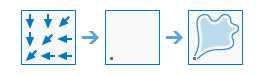
Determines the contributing area above a set of cells in a raster.
Illustration
Usage
This raster analysis portal tool is available when you are signed in to an ArcGIS Enterprise portal that has ArcGIS Image Server configured for Raster Analysis. When the tool is run, ArcGIS Pro serves as a client and the processing occurs in the servers federated with ArcGIS Enterprise. The portal tool accepts layers from your portal as input and creates output in your portal.
The input raster layer supports a layer from the portal, a URI or URL to an image service, or the output from the Make Image Server Layer tool. The input feature layer can be a layer from the portal or a URI or URL to a feature service. This tool does not support local raster data or layers. While you can use local feature data and layers as input to this portal tool, best practice is to use layers from your portal as input.
The value of each watershed will be taken from the value of the source in the input raster or feature pour point data. When the pour point is a raster dataset, the cell values will be used. When the pour point is a point feature dataset, the values will come from the specified field.
The Watershed tool only supports a D8 input flow direction raster. D8 flow directions can be created using the Flow Direction tool, run with default flow direction type
D8.When specifying the input pour point locations as feature data, the default field will be the first available valid field. If no valid field exists, the ObjectID field (for example,
OIDorFID) will be the default.
Parameters
| Label | Explanation | Data type |
|---|---|---|
|
Input Flow Direction Raster |
The input raster that shows the direction of flow out of each cell. |
Raster Layer; Image Service; String |
|
Input Pour Point Raster or Features |
The input pour point locations. |
Raster Layer; Feature Layer; Image Service; Feature Service; String |
|
Output Name |
The name of the output watershed raster service. The default name is based on the tool name and the input layer name. If the layer name already exists, you will be prompted to provide another name. |
String |
|
Pour Point Field (Optional) |
Field used to assign values to the pour point locations. |
String |
Derived output
| Label | Explanation | Data type |
|---|---|---|
|
Output Raster |
The output raster. |
Raster Layer |
Environments
Extent, Cell Size, Mask, Output Coordinate System, Pyramid, Snap Raster
Licensing information
- Basic: Requires ArcGIS Image Server
- Standard: Requires ArcGIS Image Server
- Advanced: Requires ArcGIS Image Server