Float (Spatial Analyst Tools)
Summary
Converts each cell value of a raster into a floating-point representation.
Illustration
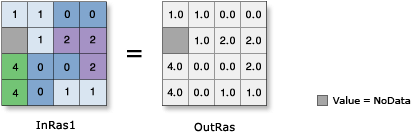
Usage
The input values can be positive or negative.
If you execute Float on an input that is already floating point, the output values will remain the same as the input values.
If the input is a multiband raster, the output will be a multiband raster. The tool will perform the operation on each band in the input.
If the input is multidimensional raster data, all slices from all variables will be processed. The output will be a multidimensional raster in CRF format.
See Analysis environments and Spatial Analyst for additional details on the geoprocessing environments that apply to this tool.
Parameters
| Label | Explanation | Data type |
|---|---|---|
|
Input raster or constant value |
The input raster to be converted to floating point. To use a number as an input for this parameter, the cell size and extent must first be set in the environment. |
Raster Layer; Constant |
Return value
| Label | Explanation | Data type |
|---|---|---|
|
Output raster |
The output raster. The cell values are the floating-point representation of the input values. |
Raster |
Environments
Auto Commit, Cell Size, Cell Size Projection Method, Current Workspace, Extent, Geographic Transformations, Mask, Output CONFIG Keyword, Output Coordinate System, Scratch Workspace, Snap Raster, Tile Size
Licensing information
- Basic: Requires Spatial Analyst or Image Analyst or 3D Analyst
- Standard: Requires Spatial Analyst or Image Analyst or 3D Analyst
- Advanced: Requires Spatial Analyst or Image Analyst or 3D Analyst