Focal Flow (Spatial Analyst Tools)
Summary
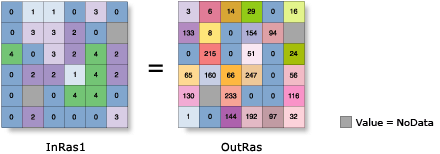
Determines the flow of the values in the input raster within each cell's immediate neighborhood.
Illustration
Usage
Focal Flow evaluates the eight immediate neighbors of a cell to determine the flow.
The resulting values from the tool measure flow into, not out of, a cell.
The output values are derived from the binary representation of the results of the analysis.
See Analysis environments and Spatial Analyst for additional details on the geoprocessing environments that apply to this tool.
Parameters
| Label | Explanation | Data type |
|---|---|---|
|
Input surface raster |
The input surface raster for which to calculate the focal flow. The eight immediate neighbors of each cell are evaluated to determine the flow. The input raster can be integer or floating-point. |
Raster Layer |
|
Threshold value (Optional) |
Defines a value that constitutes the threshold, which must be equaled or exceeded before flow can occur. The threshold value can be either an integer or floating-point value. If the difference between the value at a neighboring cell location and the value of the processing cell is less than or equal to the threshold value, the output will be 0 (or no flow). |
Double |
Return value
| Label | Explanation | Data type |
|---|---|---|
|
Output raster |
The output focal flow raster. The output raster is always of integer type. |
Raster |
Environments
Auto Commit, Cell Size, Cell Size Projection Method, Compression, Current Workspace, Extent, Geographic Transformations, Mask, Output CONFIG Keyword, Output Coordinate System, Scratch Workspace, Snap Raster, Tile Size
Licensing information
- Basic: Requires Spatial Analyst
- Standard: Requires Spatial Analyst
- Advanced: Requires Spatial Analyst