Pick (Spatial Analyst Tools)
Summary
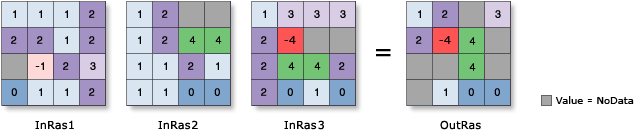
The value from a position raster is used to determine from which raster in a list of input rasters the output cell value will be obtained.
Illustration
Usage
The value of each cell of the Input position raster (
in_position_rasterin Python) determines which input will be used to obtain the output raster value. For example, if a cell in the Input position raster has a value of 1, the value from the first input in the raster list will be used for the output cell value. If the position input has a value of 2, the output value will come from the second input in the raster list, and so on.The order of the Input rasters or constant values (
in_rasters_or_constantsin Python) is relevant for this tool. If the order of rasters changes, the results will change.If a cell value on the Input position raster is zero or negative, the result will be NoData. If the position value is larger than the number of rasters in the list, the result will be NoData.
If the Input position raster is floating point, the values will be truncated to be integers before they are processed.
Any cell with a NoData value on the position raster will receive NoData on the output raster.
If any of the rasters in the input list is floating point, the output raster will be floating point. If they are all integer, the output raster will be integer.
If the Process as multiband parameter is unchecked (
process_as_multibandis set toSINGLE_BANDin Python), only the first band of a multiband Input position raster (in_position_rasterin Python) will be used. Each band from a multiband Input rasters or constant values (in_rasters_or_constantsin Python) will be processed separately as a single-band raster.If the Process as multiband parameter is checked (
process_as_multibandis set toMULTI_BANDin Python), each multiband raster input will be processed as a multiband raster.The number of bands in the output depends on the Input position raster. If the Input position raster is a single band, the number of bands on the output raster will be the same as the maximum number of bands of all multiband rasters from the Input rasters or constant values. If the Input position raster is a multiband, the output raster will have the same number of bands as the Input position raster.
If any of the Input rasters or constant values is a raster with a smaller number of bands than the output raster, the missing bands will be interpreted as a band filled with NoData. If the cell value of the Input position raster picks value one from the missing band, the output raster will receive NoData. If any of the Input rasters or constant values is a constant, it will be interpreted as a multiband raster, in which the cell values of all bands are the same as the constant and have the same number of bands as the output raster.
When the input raster has rectangular cells, it will be processed so that the output raster cells will be square with sides equal to the average of the rectangular length and width.
See Analysis environments and Spatial Analyst for additional details on the geoprocessing environments that apply to this tool.
Parameters
| Label | Explanation | Data type |
|---|---|---|
|
Input position raster |
The input raster defining the position of the raster to use for the output value. The input can be an integer or float raster. |
Raster Layer |
|
Input rasters or constant values |
The list of inputs from which the output value will be selected. The inputs can be integer or float rasters. A number can also be used as an input. |
Raster Layer; Constant |
|
Process as multiband (Optional) |
Specifies how the input multiband raster bands will be processed.
|
Boolean |
Return value
| Label | Explanation | Data type |
|---|---|---|
|
Output raster |
The output raster. |
Raster |
Environments
Auto Commit, Cell Size, Cell Size Projection Method, Compression, Current Workspace, Extent, Geographic Transformations, Mask, Output CONFIG Keyword, Output Coordinate System, Scratch Workspace, Snap Raster, Tile Size
Licensing information
- Basic: Requires Spatial Analyst or Image Analyst
- Standard: Requires Spatial Analyst or Image Analyst
- Advanced: Requires Spatial Analyst or Image Analyst