Raster to Weighted Points (Spatial Analyst Tools)
Summary
Generates representative, value-proportional points from continuous surfaces, preserving spatial patterns and total magnitudes.
Illustration
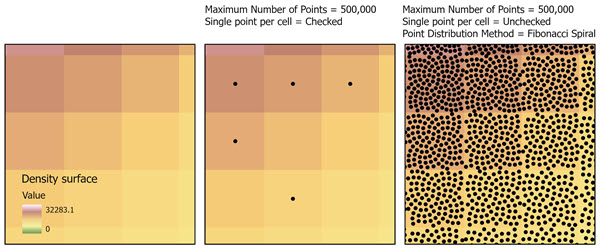
Usage
Several parameters are available that control the total number of output points and how those points will be distributed across the input surface. The Maximum Number of Points (
max_number_of_pointsin Python) parameter defines the maximum number of output points. The Limit One Point per Cell (single_point_per_cellin Python) parameter restricts allocation to at most one point per cell. The Point Distribution Method (point_distribution_methodin Python) parameter determines how multiple points are positioned within cells.The Maximum Number of Points parameter specifies the total number of points that will be generated from the entire raster. The number of points allocated to each cell is proportional to the cell values. Cells with larger values contribute more points and cells with smaller values contribute fewer points. This allows the output to preserve the spatial pattern and relative magnitude of the input surface.
Use the Limit one point per cell parameter to prevent more than one point from being assigned to the same cell. This is useful when a uniform spatial distribution is required. Using this parameter may result in lesser number of points than the maximum number of points specified.
When the parameter is unchecked (
single_point_per_cell= 'DO_NOT_LIMIT' in Python), multiple points maybe assigned to a single cell if the cell's value justifies additional representation.If checked (
single_point_per_cell= 'LIMIT' in Python), the output point will be placed at the center of the cell.The distribution pattern of output points is determined by the Point Distribution Method parameter. Placement can occur at the cell center, randomly within the cell, or in an even arrangement when multiple points are present. Random placement is useful for simulation workflows, uncertainty assessment, and generating anonymized representations of sensitive surfaces. Deterministic placement methods produce consistent point locations across repeated runs and are appropriate for reproducible spatial analysis.
The Circular method places multiple points in a radial configuration around the cell center. The largest distance from the cell center should be less than half of cell radius for accurate placement.
The Equal Area Voronoi method subdivides the cell into regions of equal area and places one point per region to maximize spatial separation.
The Random method places points randomly within the cell footprint.
The Fibonacci Lattice method distributes multiple points in an isotropic pattern suitable for uniform sampling.
The Fibonacci Spiral method arranges points along a deterministic spiral that produces even spacing.
If the Create multipoint output parameter is checked (
create_multipoint_output= `MULTIPART`` in Python), all points generated from a single cell are stored as a multipoint feature geometry. This option reduces the number of output records and is useful for compact geometry storage. The output multipoint features can be used in downstream workflows that treat each cell as a single logical unit.If the Normalization Method parameter value is set to None, no normalization will be applied and the original values from the input are used directly for point allocation. This is appropriate for surfaces where the magnitude of values already carries semantic meaning, such as kernel density estimates or physically measured environmental surfaces.
The available normalization methods are:
Min–Max—The values will be scaled linearly between 0 and 1, preserving relative differences.
Log—Large numeric ranges will be compressed to reduce the influence of extreme high values while enhancing distinctions among low values.
Sigmoid—A logistic transform will be applied to emphasize midrange differences and compress extremes.
Softmax—The raster will be converted into a probability distribution where each cell's normalized value reflects its relative magnitude compared to all other cells.
Sum-to-1—All values will be scaled so that their sum equals exactly 1, enabling probability-based sampling workflows.
Z-Score—The values will be standardized by subtracting the mean and dividing by the standard deviation.
None—The original raster values will be used without modification.
If the Normalize values before point generation parameter is checked (
normalize_before_point_generation= `NORMALIZE`` in Python), the raster values are transformed before allocation using the selected normalization method. Normalization adjusts the numeric scale and distribution of the raster while maintaining its spatial structure. This is useful when raster values span wide numeric ranges, contain extreme outliers, or exhibit skew that could otherwise dominate the allocation. When normalization is not applied, the raw raster values are used directly in the point allocation process.All transformation, normalization, allocation, and point distribution operations occur in memory.
Points are not created for NoData cells from the input surface.
The output feature class will include attributes for the original cell value, a normalized value (if a Normalization Method is used), and a distributed value when multiple points originate from the same cell.
See Analysis environments and Spatial Analyst for additional details on the geoprocessing environments that apply to this tool.
Parameters
| Label | Explanation | Data type |
|---|---|---|
|
Input Surface Raster |
The continuous raster for which proportional points will be generated. Each input cell value represents the relative magnitude or intensity to be converted into one or more points. |
Raster Layer |
|
Output Point Features |
The output feature class that will contain the generated points. |
Feature Layer |
|
Maximum Number of Points |
The maximum number of points to generate from the input raster. Use this parameter to limit the output density of a large raster. |
Double |
|
Limit one point per cell (Optional) |
Specifies whether only one point will be generated per raster cell.
|
Boolean |
|
Create multipoint output (Optional) |
Specifies whether points with the same value will be preserved in the output or be aggregated. An aggregated output reduces feature count and improves performance when generating large numbers of points.
|
Boolean |
|
Point Distribution Method (Optional) |
Defines how points will be spatially distributed within each raster cell. By default, a point is placed at the geometric center of each cell. This parameter is unavailable when the Limit one point per cell parameter is checked.
|
String |
|
Distance from Cell Center (Optional) |
The maximum distance, in map units, that points may be offset from the cell center when a non-center placement method is used. This parameter is only available if the Point Distribution Method parameter value is set to the Circular or Equal Area Voronoi options. The maximum value allowed is 0.45. If 0 is used, all the output points will placed in cell center. |
Double |
|
Normalization Method (Optional) |
Specifies how raster values will be scaled or transformed before proportional point generation. Scaling methods only change the values assigned to output points, while transformation methods also affect how many points are generated in each cell by changing the relative weighting of cell values.
|
String |
|
Normalize before point generation (Optional) |
Specifies whether the input surface raster will be transformed using the chosen normalization method before point allocation. This parameter is only available if the Normalization Method parameter value is set to the Min–Max, Log, Sigmoid, or Softmax option.
|
Boolean |
Environments
Current Workspace, Extent, Geographic Transformations, Random number generator, Output Coordinate System, Scratch Workspace
Licensing information
- Basic: Requires Spatial Analyst
- Standard: Requires Spatial Analyst
- Advanced: Requires Spatial Analyst